Large language models are stateless: each API call starts from scratch with no recollection of previous turns. To build conversational applications, you must explicitly manage chat history and decide how much context to include in every request. LangChain: Chains, Agents, and Retrieval provides several memory strategies, from simple buffer storage to intelligent summarization, along with a modern LCEL-native approach using RunnableWithMessageHistory.
1. The Memory Problem
When you send a message to an LLM API, the model has no built-in awareness of what was said before. If a user asks "What is Python?" and then follows up with "What are its main libraries?", the model has no idea what "its" refers to unless you include the previous exchange in the new request. Memory management is the art of deciding which previous messages to include, how to compress them, and where to store them between requests.
LangChain: Chains, Agents, and Retrieval offers two generations of memory tools. The legacy memory classes (such as ConversationBufferMemory) were designed for the old LLMChain API. The modern approach uses RunnableWithMessageHistory with LCEL chains. Both are covered here because legacy memory classes appear frequently in existing codebases and tutorials.
2. Legacy Memory Classes
ConversationBufferMemory
The simplest memory strategy stores every message in a growing list. ConversationBufferMemory keeps the complete conversation history and injects it into the prompt on every call. This works well for short conversations but will eventually exceed the model's context window.
This example demonstrates buffer memory with a legacy chain.
from langchain.chains import ConversationChain
from langchain_openai import ChatOpenAI
from langchain.memory import ConversationBufferMemory

model = ChatOpenAI(model="gpt-4o-mini", temperature=0)
memory = ConversationBufferMemory(return_messages=True)

conversation = ConversationChain(llm=model, memory=memory)

# First turn
response1 = conversation.invoke({"input": "My name is Alice."})
print(response1["response"])

# Second turn: the model remembers the name
response2 = conversation.invoke({"input": "What is my name?"})
print(response2["response"])  # "Your name is Alice."

# Inspect stored messages
print(memory.chat_memory.messages)
ConversationSummaryMemory
For long conversations, storing every message becomes impractical. ConversationSummaryMemory uses the LLM itself to maintain a running summary of the conversation. Each time new messages are added, the summary is updated to incorporate the new information while keeping the token count bounded.
The following example shows how summary memory compresses a multi-turn conversation.
from langchain.memory import ConversationSummaryMemory
from langchain_openai import ChatOpenAI

model = ChatOpenAI(model="gpt-4o-mini", temperature=0)
memory = ConversationSummaryMemory(llm=model, return_messages=True)

# Simulate adding conversation turns
memory.save_context(
    {"input": "I'm building a chatbot for customer support."},
    {"output": "That sounds like a great project! What domain will it cover?"}
)
memory.save_context(
    {"input": "It will handle billing questions for a SaaS product."},
    {"output": "Got it. You'll want to integrate with your billing API."}
)
memory.save_context(
    {"input": "We use Stripe for payments."},
    {"output": "Stripe has excellent APIs. I can help you set up the integration."}
)

# The memory stores a summary, not individual messages
print(memory.load_memory_variables({}))
# Output: a condensed summary mentioning the chatbot, billing, SaaS, and Stripe
Summary memory incurs an extra LLM call each time the summary is updated. For production systems, consider updating the summary only every N turns or when the buffer exceeds a token threshold rather than on every single turn.
ConversationTokenBufferMemory
A practical middle ground between full buffer and summary: ConversationTokenBufferMemory keeps recent messages up to a specified token limit. When the limit is exceeded, the oldest messages are dropped. This gives the model a sliding window of recent context without any summarization cost.
from langchain.memory import ConversationTokenBufferMemory
from langchain_openai import ChatOpenAI

model = ChatOpenAI(model="gpt-4o-mini")
memory = ConversationTokenBufferMemory(
    llm=model,
    max_token_limit=200,  # Keep only the most recent ~200 tokens
    return_messages=True
)

# Add several turns
for i in range(10):
    memory.save_context(
        {"input": f"Question {i}: Tell me about topic {i}."},
        {"output": f"Here is information about topic {i}. " * 5}
    )

# Only the most recent messages (within 200 tokens) are retained
messages = memory.load_memory_variables({})
print(f"Messages in memory: {len(messages['history'])}")
The memory classes shown above (ConversationBufferMemory, ConversationSummaryMemory, ConversationTokenBufferMemory) are part of LangChain: Chains, Agents, and Retrieval's legacy API. They work with ConversationChain and LLMChain. For new projects using LCEL, use RunnableWithMessageHistory instead (covered next).
3. Modern Memory with LCEL
The recommended approach for managing conversation history in LCEL chains is RunnableWithMessageHistory. This wrapper adds message history to any runnable by looking up (or creating) a history object keyed by a session ID. It is more flexible than legacy memory because it works with any LCEL chain and supports pluggable storage backends.
This example builds a conversational chain with LCEL and in-memory history storage.
from langchain_openai import ChatOpenAI
from langchain_core.prompts import ChatPromptTemplate, MessagesPlaceholder
from langchain_core.output_parsers import StrOutputParser
from langchain_core.runnables.history import RunnableWithMessageHistory
from langchain_community.chat_message_histories import ChatMessageHistory

# In-memory store: maps session_id to ChatMessageHistory
store = {}

def get_session_history(session_id: str) -> ChatMessageHistory:
    if session_id not in store:
        store[session_id] = ChatMessageHistory()
    return store[session_id]

# Build the chain with a MessagesPlaceholder for history
prompt = ChatPromptTemplate.from_messages([
    ("system", "You are a helpful assistant."),
    MessagesPlaceholder(variable_name="history"),
    ("human", "{input}")
])
model = ChatOpenAI(model="gpt-4o-mini", temperature=0)
chain = prompt | model | StrOutputParser()

# Wrap with message history
conversational_chain = RunnableWithMessageHistory(
    chain,
    get_session_history,
    input_messages_key="input",
    history_messages_key="history"
)

# Use session IDs to maintain separate conversations
config = {"configurable": {"session_id": "user-123"}}

response1 = conversational_chain.invoke(
    {"input": "My favorite language is Rust."},
    config=config
)
print(response1)

response2 = conversational_chain.invoke(
    {"input": "What is my favorite language?"},
    config=config
)
print(response2)  # "Your favorite language is Rust."
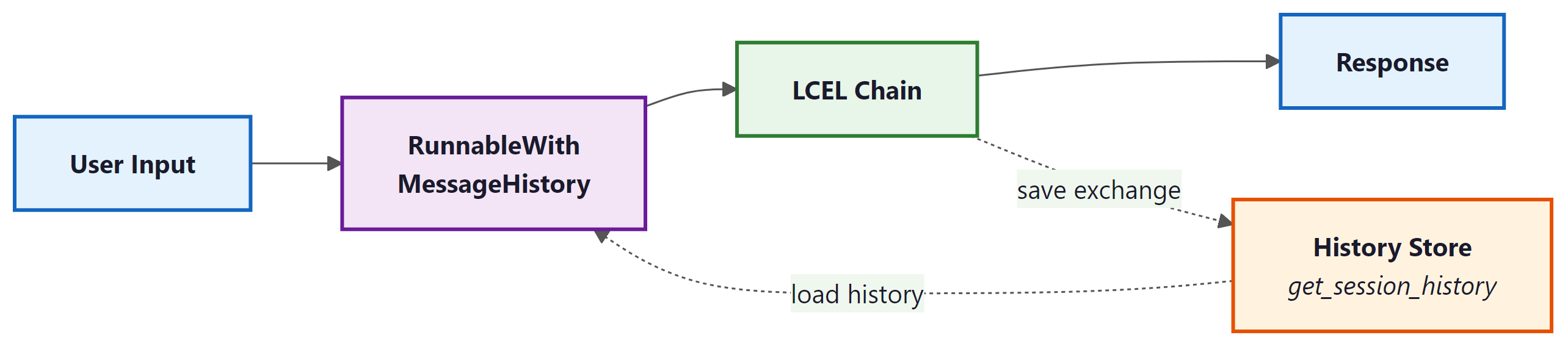
RunnableWithMessageHistory wrapper intercepts each invocation, loads prior messages from the history store, injects them into the prompt via MessagesPlaceholder, and saves the new exchange after the chain completes.4. Persistent Chat History Stores
The in-memory ChatMessageHistory is fine for development and testing, but production applications need durable storage. LangChain: Chains, Agents, and Retrieval's community package provides integrations for Redis, PostgreSQL, MongoDB, DynamoDB, and many other backends. Each integration implements the same BaseChatMessageHistory interface, so swapping backends requires changing only the get_session_history function.
This example shows how to use Redis as a persistent history store.
from langchain_community.chat_message_histories import RedisChatMessageHistory

def get_session_history(session_id: str):
    return RedisChatMessageHistory(
        session_id=session_id,
        url="redis://localhost:6379/0",
        ttl=3600  # Expire conversations after 1 hour
    )

# The rest of the chain setup is identical to the in-memory example.
# Just pass this function to RunnableWithMessageHistory.
5. Strategies for Long Conversations
As conversations grow, you must choose a strategy for keeping the prompt within the model's context window. The table below summarizes the main approaches and their trade-offs.
| Strategy | Mechanism | Pros | Cons |
|---|---|---|---|
| Full buffer | Keep all messages | Complete context, no information loss | Hits context limit on long conversations |
| Token buffer | Drop oldest messages beyond token limit | Predictable token usage, no extra LLM calls | Loses early context abruptly |
| Summary | LLM summarizes older messages | Retains key facts from entire conversation | Extra LLM calls, potential summary drift |
| Summary + buffer | Summary of old messages, full recent messages | Best of both: context and recency | Most complex to implement |
For LCEL-based chains, you can implement any of these strategies by customizing the function that loads and trims history before injection. The following example shows a simple token-trimming approach.
from langchain_core.messages import trim_messages

# Trim history to fit within a token budget before passing to the model
trimmer = trim_messages(
    max_tokens=1000,
    strategy="last",          # Keep the most recent messages
    token_counter=model,       # Use the model's tokenizer for accurate counts
    include_system=True,       # Always keep the system message
    allow_partial=False        # Don't cut messages in half
)

# Insert the trimmer into the chain
chain_with_trimming = (
    {"history": trimmer, "input": lambda x: x["input"]}
    | prompt
    | model
    | StrOutputParser()
)
For new LCEL-based projects, use RunnableWithMessageHistory with a pluggable history store and trim_messages for context window management. Legacy memory classes are still useful for understanding older codebases but should not be the foundation of new applications.