"You don't spec the whole building before picking up the hammer anymore. You describe the room, watch it appear, fix what's wrong, and describe the next room."
Deploy, Relentlessly Iterative AI Agent
AI coding assistants have changed the physics of software development. A new workflow has emerged where developers describe intent in natural language and let an AI generate code, then review, test, and steer iteratively. Andrej Karpathy coined the term "vibe coding" for this practice. Used carelessly, it produces fragile, untested code. Used responsibly, with evaluation gates, documented intent, and structured evidence, it becomes a powerful acceleration technique. This section defines the practice, introduces the observe-steer loop as its professional backbone, and delivers the Intent + Evidence Bundle (IEB): a version-controlled folder that keeps AI-assisted development auditable, reproducible, and safe.
Prerequisites
This section builds on prompt engineering fundamentals from Chapter 11 and the evaluation framework from Chapter 29. Familiarity with version control (Git) is assumed.

1. What Is Vibe Coding?
"Vibe coding" refers to a style of software development where the programmer describes what they want in natural language (or even by pointing at a screenshot) and an AI assistant generates the code. The programmer's role shifts from writing syntax to reviewing, steering, and constraining output. Think of it as pair programming where one partner is an LLM with encyclopedic knowledge of libraries and patterns but no understanding of your business context or quality requirements.
When Vibe Coding Saved a Hackathon (and Nearly Sank the Product)
Who: A two-person startup team at a 48-hour AI hackathon.
Situation: They needed a document Q&A prototype with a Streamlit frontend, RAG pipeline, and vector database integration.
Problem: Neither founder had built a RAG pipeline before, and the hackathon clock was ticking.
Dilemma: They could study the documentation for two days and build carefully, or let Claude Code scaffold the entire stack in hours and spend the remaining time evaluating quality.
Decision: They chose vibe coding with an explicit constraint: every generated function must have a test, and they would review all LLM integration points manually.
How: Using Claude Code, they scaffolded the Streamlit app, FAISS vector store, and OpenAI embedding pipeline in four hours. They spent the remaining 44 hours on evaluation, prompt tuning, and fixing three critical bugs the AI had introduced (including a silent chunking error that split sentences mid-word).
Result: They won second place. But when they later tried to extend the prototype into a product, they discovered that 30% of the generated code contained assumptions that were wrong for their production environment.
Lesson: Vibe coding compresses the time to a working prototype, but the time you save on writing code must be reinvested in reviewing, testing, and understanding what was generated.
The term first gained traction in early 2025 when Andrej Karpathy described his workflow of "just vibing" with an AI, accepting whatever code it produced, and iterating on the results. While his description was deliberately provocative, the underlying shift is real: AI coding assistants (GitHub Copilot, Cursor, Claude Code, Windsurf, and others) have made it possible to generate substantial codebases from natural language descriptions in minutes rather than days.
The critical distinction lies in how you handle the generated output. Two approaches exist along a spectrum:
| Dimension | Raw Vibe Coding | Responsible Vibe Coding |
|---|---|---|
| Intent capture | Verbal, ephemeral | Written in intent.md, version-controlled |
| Review discipline | "If it runs, ship it" | Review every generated function; flag uncertainty |
| Testing | Manual spot checks | AI generates tests, human verifies coverage |
| Constraints | None explicit | Documented non-negotiables (security, cost, latency) |
| Reproducibility | Low; depends on chat history | High; prompts versioned, eval suite pinned |
| Suitable for | Throwaway prototypes, personal scripts | Production code, team projects, regulated domains |
Responsible vibe coding is not anti-speed; it is anti-regret. The overhead of writing an intent document, creating a golden test set, and versioning your prompts adds perhaps 20 minutes to a session. The cost of debugging a production incident caused by untested AI-generated code, or discovering that your entire codebase depends on a prompt pattern that breaks after a model update, is measured in days or weeks. Speed without evidence is not velocity; it is gambling.
2. The Observe-Steer Loop
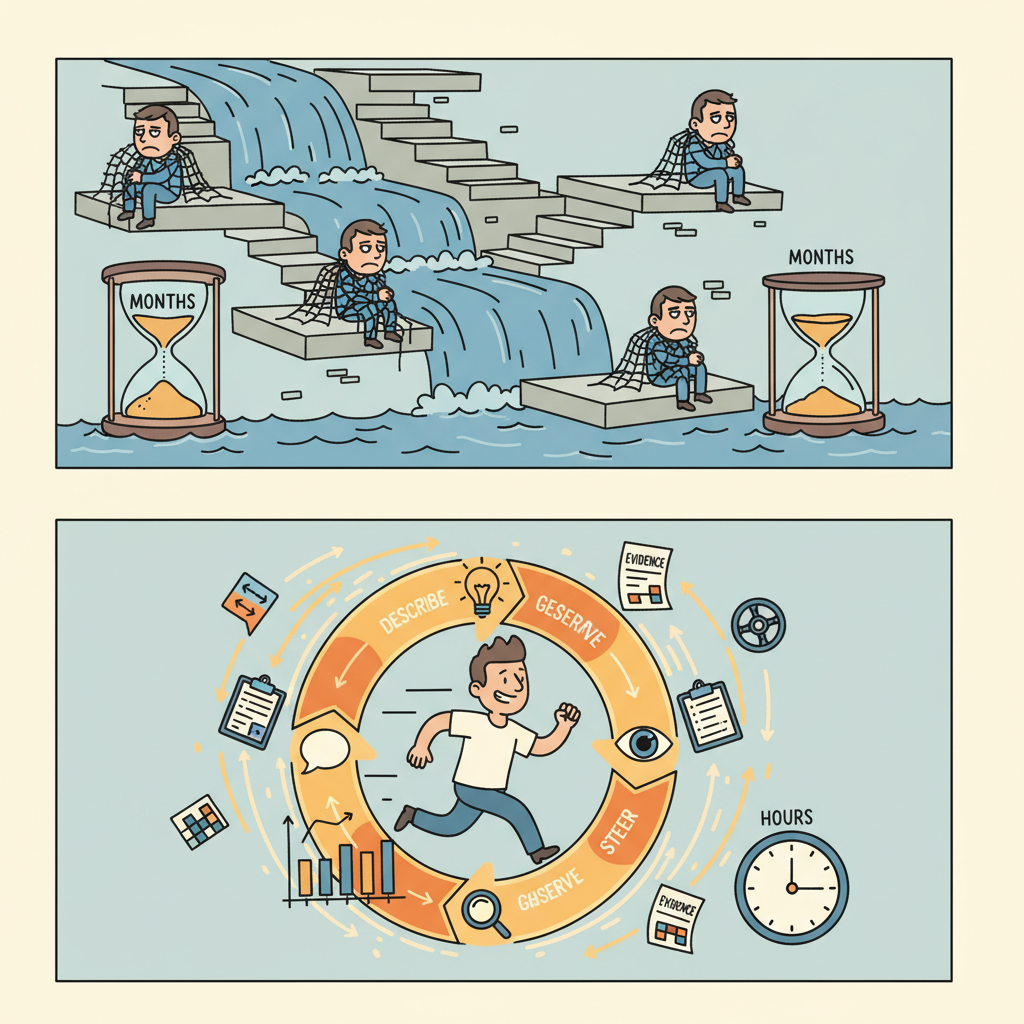
Traditional software development follows a plan-build-test cycle: write a specification, implement it, then verify. AI-assisted development replaces the heavy upfront specification with a tighter feedback loop that we call the observe-steer loop:
- Describe. State your intent in natural language. Be specific about constraints and non-negotiables, but do not over-specify implementation details.
- Generate. Let the AI produce code, configuration, or content.
- Observe. Run the output. Read it carefully. Check it against your evaluation criteria. Use the observability tools from Chapter 30 to inspect traces, latency, and costs.
- Evaluate. Does the output meet your quality gates? Run your evaluation suite (Chapter 29). Not just "does it look right?" but "does it pass the rubric?"
- Steer. Based on what you observed, refine your prompt, add constraints, request changes, or accept the result. Feed the observation back into the next iteration.
This loop runs in minutes, not days. A single coding session might execute 10 to 50 iterations. The key difference from ad-hoc prompting is that each iteration is grounded in observable evidence (test results, traces, metrics) rather than subjective impressions.
Who: A developer at an e-commerce company building a customer-support ticket classifier.
Situation: The first prompt produced a classifier that handled 8 of 10 test categories correctly, and the team was tempted to ship it.
Problem: The evaluation suite revealed the classifier confused "billing inquiry" with "refund request," two categories that require very different routing and handling in production.
Decision: Instead of debugging blindly, the developer steered the prompt by adding two few-shot examples for each confused category and specifying the distinguishing criteria explicitly.
Result: The next iteration scored 10/10. The developer committed the updated prompt version and the eval results. Total elapsed time: 12 minutes.
Lesson: Without an evaluation suite, the 8/10 version would have shipped and the confusion would have surfaced only through misdirected customer tickets in production.
3. Documentation as a Control Surface
In an observe-steer workflow, documentation is not an afterthought that you write once the code is "done." It is the primary control surface for the AI assistant. The documents you maintain directly shape what the AI generates, what constraints it respects, and how you verify its work.
Four types of documentation serve as active control surfaces:
- Intent documents. What the system must do, what it must never do, and who approved those decisions. These function like a requirements specification but are written in plain language that both humans and AI assistants can consume. When you paste your intent document into a coding session, the AI inherits your constraints.
- Prompt templates. Versioned prompts with placeholders, stored alongside the code they support. As discussed in Chapter 11, prompts are a form of source code and deserve the same version control discipline.
- Evaluation artifacts. Golden test sets, scoring rubrics, and regression baselines. These define "good enough" in machine-readable form, enabling automated quality gates.
- Risk and cost records. Threat models, token budgets, and routing strategies. These constrain architectural decisions and prevent cost surprises.
Modern AI coding tools (Claude Code, Cursor, Windsurf) can read project files as context. A well-structured intent.md at the root of your project becomes a persistent system prompt for every coding session. This means documentation has a dual audience: human teammates and AI assistants. Write accordingly: be explicit, use concrete examples, and state constraints as testable assertions rather than vague aspirations.
4. Lock-in Dynamics and Switching Costs
AI-assisted development changes the economics of switching between tools, providers, and architectures. Some switching costs decrease; others increase.
Costs that decrease:
- Refactoring cost. AI assistants can refactor entire codebases between frameworks, languages, or API providers in hours rather than weeks. Migrating from one LLM provider's SDK to another is now a task you can describe in a prompt, not a multi-sprint project.
- Boilerplate rewriting. Switching from REST to GraphQL, or from one database to another, becomes cheaper when an AI can generate the adapter layer.
Costs that increase (data gravity):
- Evaluation data. Your golden test sets, scoring rubrics, and regression baselines are tightly coupled to your current model and prompt design. Switching models means re-validating your entire evaluation suite.
- Fine-tuning investments. If you have fine-tuned a model on proprietary data, that investment is locked to one provider.
- Prompt libraries. Hundreds of carefully tuned prompts represent significant intellectual capital. While prompts are portable in theory, they often exploit model-specific behaviors that do not transfer cleanly.
- Trace and feedback data. Months of production traces, user feedback, and quality metrics are your most valuable asset for improvement. This data has gravity; it pulls your decisions toward the system that generated it.
The term "data gravity" was coined by Dave McCrory in 2010 to describe how data attracts applications, services, and more data to its location. In the AI product context, your evaluation data and production traces act as a gravitational center: the more evidence you accumulate about how your system performs, the harder it becomes to justify starting over with a different provider, even if the new provider offers better base capabilities. This is why the Intent + Evidence Bundle, introduced below, is designed to be provider-agnostic wherever possible.
5. The Intent + Evidence Bundle (IEB)
The deliverable for this section is the Intent + Evidence Bundle (IEB): a version-controlled folder that lives alongside your code and captures everything needed to understand, reproduce, and audit your AI product's behavior. The IEB is the professional answer to the question "How do I keep vibe coding under control?"
The IEB contains five components:
| File / Folder | Purpose | Updated When |
|---|---|---|
intent.md |
Non-negotiable requirements, approved scope, stakeholder sign-offs | Scope changes, new constraints, design reviews |
eval/ |
Golden test set (golden.jsonl), regression baselines, scoring rubrics |
New failure modes discovered, model changes, prompt updates |
prompts/ |
Versioned prompt templates with changelogs | Every prompt modification (treat like source code) |
risk.md |
Threat model: adversarial inputs, data leakage, bias vectors, failure scenarios | New risk identified, architecture changes, incident post-mortems |
cost.md |
Token budget, model routing strategy, cost-per-interaction targets | Pricing changes, traffic growth, model swaps |
The following script initializes an IEB folder structure with template files.
# Initialize an Intent + Evidence Bundle (IEB) folder structure
# Run once at project start to scaffold the IEB directory
import os
from pathlib import Path
from datetime import date

def init_ieb(project_root: str, project_name: str = "My AI Project") -> Path:
 """Create the IEB folder structure with starter templates.

 Args:
 project_root: Path to the project's root directory.
 project_name: Human-readable project name for template headers.

 Returns:
 Path to the created ieb/ directory.
 """
 ieb_root = Path(project_root) / "ieb"
 today = date.today().isoformat()

 # Define folder structure
 folders = ["eval", "prompts"]
 for folder in folders:
 (ieb_root / folder).mkdir(parents=True, exist_ok=True)

 # --- intent.md ---
 intent_content = f"""# Intent Document: {project_name}
**Created:** {today}
**Owner:** [Your Name]
**Status:** Draft

## What This System Must Do
- [ ] [Describe the core capability in one sentence]

## What This System Must Never Do
- [ ] [List safety and compliance non-negotiables]

## Approved Scope
- [ ] [Define boundaries: what is in scope, what is out]

## Stakeholder Approvals
| Name | Role | Date | Notes |
|------|------|------|-------|
| | | | |
"""
 (ieb_root / "intent.md").write_text(intent_content, encoding="utf-8")

 # --- risk.md ---
 risk_content = f"""# Risk Register: {project_name}
**Last reviewed:** {today}

## Threat Model
| Threat | Likelihood | Impact | Mitigation |
|--------|-----------|--------|------------|
| Adversarial prompt injection | Medium | High | Input validation, guardrails |
| Data leakage in responses | Low | Critical | Output filtering, PII detection |
| Model hallucination | High | Medium | Eval suite, confidence thresholds |

## Open Risks
- [ ] [List unmitigated risks here]
"""
 (ieb_root / "risk.md").write_text(risk_content, encoding="utf-8")

 # --- cost.md ---
 cost_content = f"""# Cost and Routing Strategy: {project_name}
**Last reviewed:** {today}

## Token Budget
| Scenario | Input tokens | Output tokens | Model | Cost/call |
|----------|-------------|---------------|-------|-----------|
| Typical query | ~500 | ~200 | gpt-4o-mini | ~$0.0003 |
| Complex query | ~2,000 | ~800 | gpt-4o | ~$0.01 |

## Routing Strategy
- Route simple queries to the smaller, cheaper model.
- Escalate to the larger model when confidence is below threshold.
- See Chapter 10 for API routing patterns.

## Monthly Budget Target
- Target: $[amount]/month at [volume] queries/day
"""
 (ieb_root / "cost.md").write_text(cost_content, encoding="utf-8")

 # --- eval/golden.jsonl (starter with one example) ---
 golden_example = (
 '{"input": "What is your refund policy?", '
 '"expected_intent": "refund_inquiry", '
 '"expected_contains": ["refund", "policy"], '
 '"notes": "Baseline test case"}\n'
 )
 (ieb_root / "eval" / "golden.jsonl").write_text(
 golden_example, encoding="utf-8"
 )

 # --- prompts/v001_system_prompt.txt ---
 prompt_template = f"""# System Prompt v001
# Created: {today}
# Changelog: Initial version

You are a helpful assistant for {project_name}.

## Instructions
- Answer user questions accurately and concisely.
- If you are unsure, say so explicitly.
- Never fabricate information.

## Constraints
- Do not discuss competitors.
- Do not reveal internal system details.
- Keep responses under 300 words unless the user requests more detail.
"""
 (ieb_root / "prompts" / "v001_system_prompt.txt").write_text(
 prompt_template, encoding="utf-8"
 )

 print(f"IEB initialized at: {ieb_root}")
 print(f" intent.md - Define your non-negotiables")
 print(f" risk.md - Document threats and mitigations")
 print(f" cost.md - Set token budgets and routing rules")
 print(f" eval/ - Add golden test cases to golden.jsonl")
 print(f" prompts/ - Version your prompt templates here")
 return ieb_root


# Example usage
if __name__ == "__main__":
init_ieb(".", project_name="Customer Support Bot")Who: A solo developer at a small SaaS company building a support chatbot with Claude Code.
Situation: Before writing any code, the developer ran init_ieb(".", project_name="Acme Support Bot") and filled in intent.md with three non-negotiables: (1) never fabricate order numbers, (2) respond in under 3 seconds at p95, (3) cost under $0.02 per turn. They seeded eval/golden.jsonl with 20 test cases.
Problem: During the third iteration, the eval suite caught a new failure mode: the bot confused "cancel order" with "cancel subscription," routing users to the wrong workflow.
Decision: The developer added the failure case to the golden set, steered the prompt to distinguish the two intents, re-evaluated, and committed all artifacts (code, prompt, eval results) to Git.
Result: Three months later, a new teammate joined the project and reconstructed the full decision history from the IEB, including why "cancel order" and "cancel subscription" had separate handling, without a single onboarding meeting.
Lesson: Externalizing intent, constraints, and evaluation data into version-controlled files turns ephemeral coding sessions into a durable, auditable project history.
6. Putting It Together: The Responsible Vibe Coding Workflow
The following workflow combines the observe-steer loop with the IEB into a repeatable development process:
- Initialize. Run
init_ieb(). Fill inintent.mdwith non-negotiables. Seedeval/golden.jsonlwith at least 10 test cases. - Describe. Open your AI coding assistant. Paste
intent.mdas context. Describe the feature you want to build. - Generate. Let the assistant produce code. Accept the output into your working directory.
- Observe. Run the code. Examine the output. Check traces using your observability stack (Chapter 30).
- Evaluate. Run the evaluation suite (Chapter 29) against your golden set. Record pass/fail rates.
- Steer. If evaluation fails, refine the prompt or constraints. If a new failure mode appears, add it to the golden set. If a risk becomes apparent, update
risk.md. - Commit. Commit all changes: code, prompts, eval results, and any IEB updates. Use meaningful commit messages that reference the steer that motivated the change.
- Repeat. Return to step 2 for the next feature or refinement.
Vibe coding sessions are inherently local and ephemeral. The AI assistant's context window includes your conversation history, which is not captured in Git. If you close the session and start a new one, the assistant loses all that context. The IEB solves this by externalizing the critical information (intent, constraints, eval data, prompts) into files that persist across sessions. Without the IEB, your project's institutional knowledge lives only in chat logs that are difficult to search, share, or reproduce.
- Vibe coding is real and useful, but it requires discipline. The raw form (generate and ship without review) is suitable only for throwaway prototypes. Responsible vibe coding adds intent documentation, evaluation gates, and version-controlled prompts.
- The observe-steer loop replaces heavy upfront specification. Instead of writing a 50-page requirements document, you describe intent, generate, observe the result, evaluate against a rubric, and steer. Each cycle takes minutes.
- Documentation is a control surface, not an afterthought. Your intent documents, prompt templates, and evaluation artifacts directly shape what AI assistants generate. Write them for a dual audience: human teammates and AI tools.
- Data gravity creates lock-in even when code is portable. AI-assisted refactoring reduces code-level switching costs, but your evaluation data, fine-tuning investments, and production traces create gravitational pull toward your current stack.
- The Intent + Evidence Bundle (IEB) keeps AI-assisted development auditable. Five components (intent, eval, prompts, risk, cost) ensure that every decision is documented, every quality gate is explicit, and every teammate (human or AI) can reconstruct the project's rationale.
What Comes Next
With the IEB in place and the observe-steer workflow established, Section 37.2: The Founder's Prototype Loop puts these ideas into practice with a complete vertical-slice prototype. You will build a working mini-product that combines structured output, prompt guardrails, a tiny evaluation harness, and basic tracing, all in a single coding session guided by the Prototype Playbook.
Show Answer
intent.md: captures non-negotiable requirements and stakeholder approvals. (2) eval/: holds golden test sets and regression baselines for automated quality gates. (3) prompts/: stores versioned prompt templates with changelogs, treating prompts as source code. (4) risk.md: documents the threat model including adversarial inputs, data leakage vectors, and bias risks. (5) cost.md: records token budgets, model routing strategies, and cost-per-interaction targets.Show Answer
Show Answer
Bibliography
Karpathy, A. (2025). "Vibe Coding." Personal blog post. karpathy.ai
Peng, S., Kalliamvakou, E., Cihon, P., et al. (2023). "The Impact of AI on Developer Productivity: Evidence from GitHub Copilot." arXiv:2302.06590
McCrory, D. (2010). "Data Gravity: In the Clouds." Dave McCrory's Blog. datagravity.org