"Every edge runtime is a wager on which hardware will dominate next. llama.cpp bets on everything; MLX on Apple; ExecuTorch on PyTorch; WebLLM on the browser. The portfolio strategy is to ship two of them."
Quant, Edge-Squeezing AI Agent
Six frameworks dominate on-device LLM deployment in 2026: llama.cpp (universal C/C++), Ollama (developer-friendly wrapper), MLX (Apple Silicon), ExecuTorch (PyTorch to mobile), WebLLM (in-browser via WebGPU), and Qualcomm AI Hub (Snapdragon NPU). Each makes a different bet about the dominant hardware substrate, and each comes with a quantization workflow (GGUF, MLX, .pte, Hexagon). This section is organized as a catalog of the runtimes, the situations they suit, and the iMatrix quantization workflow that underpins most of them.
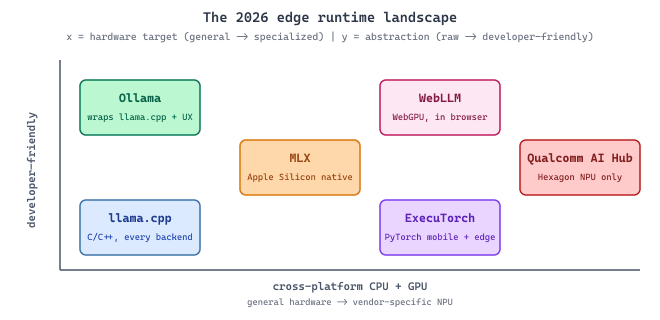
llama.cpp is to LLM inference what ffmpeg is to video: a single C/C++ binary that handles a sprawling matrix of input formats, hardware backends, and output configurations, written by a small set of contributors who do not care about your build system. Every other edge runtime (Ollama, LM Studio, LocalAI, Jan, Llamafile) is a wrapper around llama.cpp with a friendlier UX layer on top. When in doubt about whether a quantization works on a device, the llama.cpp issue tracker is the canonical answer.
Prerequisites
This section assumes the motivations and tiered-architecture pattern from Section 60.1 and inference fundamentals from Chapter 9.
60.2.1 llama.cpp: Universal C/C++ Inference
llama.cpp, created by Georgi Gerganov, is the foundational project for running LLMs on consumer hardware. Written in pure C/C++ with no Python dependencies, it compiles and runs on virtually any platform: Linux, macOS, Windows, Android, iOS, and even Raspberry Pi. The project introduced the GGUF (GPT-Generated Unified Format) quantization format, which has become the standard for distributing quantized models. llama.cpp supports dozens of model architectures (Llama, Mistral, Phi, Qwen, Gemma, and many others) and provides both a CLI interface and a built-in HTTP server compatible with the OpenAI API format.
# Build llama.cpp from source
git clone https://github.com/ggerganov/llama.cpp
cd llama.cpp
cmake -B build -DGGML_CUDA=ON # For NVIDIA GPUs; omit for CPU-only
cmake --build build --config Release -j $(nproc)
# Download a GGUF model (example: Llama 3.2 3B at Q4_K_M quantization)
# Models are available on Hugging Face in GGUF format
wget https://huggingface.co/bartowski/Llama-3.2-3B-Instruct-GGUF/resolve/main/Llama-3.2-3B-Instruct-Q4_K_M.gguf
# Run interactive chat
./build/bin/llama-cli \
-m Llama-3.2-3B-Instruct-Q4_K_M.gguf \
--chat-template llama3 \
-c 4096 \
-ngl 99 # Offload all layers to GPU
# Start an OpenAI-compatible API server
./build/bin/llama-server \
-m Llama-3.2-3B-Instruct-Q4_K_M.gguf \
--host 0.0.0.0 --port 8080 \
-c 4096 -ngl 99GGUF Quantization Levels
GGUF models come in various quantization levels that trade quality for memory and speed. The naming convention encodes the bit width and quantization method. Understanding these trade-offs is essential for choosing the right model variant for your hardware constraints.
| Quantization | Bits per Weight | Size (7B model) | Quality Impact | Best For |
|---|---|---|---|---|
| Q8_0 | 8.0 | ~7.2 GB | Near-lossless | Maximum quality, ample RAM |
| Q6_K | 6.6 | ~5.5 GB | Very small loss | High quality, moderate RAM |
| Q5_K_M | 5.7 | ~4.8 GB | Small loss | Good balance for most uses |
| Q4_K_M | 4.8 | ~4.1 GB | Moderate loss | Most popular; fits 8GB VRAM |
| Q3_K_M | 3.9 | ~3.3 GB | Noticeable loss | Tight memory constraints |
| Q2_K | 3.4 | ~2.8 GB | Significant loss | Extreme constraints only |
Quality degradation from quantization is not linear. Models typically maintain near-full quality down to Q5_K_M (5 to 6 bits), show modest degradation at Q4_K_M (4 to 5 bits), and then experience a steeper quality drop below 4 bits. The exact cliff depends on model architecture and size: larger models (70B+) tolerate aggressive quantization better than smaller models (3B) because they have more redundancy. Always benchmark your specific use case at multiple quantization levels rather than relying on general guidelines.
iMatrix: Importance-Matrix Quantization
Modern llama.cpp quantizers (Q4_K_M, Q3_K_M, Q2_K and friends) optionally consume an
importance matrix (iMatrix) computed from a small calibration corpus. The iMatrix
captures which weights contribute most to activation variance on representative inputs, and
the quantizer allocates higher precision to those weights. The result is that an iMatrix-aware
Q4_K_M quantization typically beats a naive Q4_K_M by 0.1 to 0.4 perplexity points on the
same model, at essentially no inference-time cost (the iMatrix is consumed during quantization
and discarded). See the original llama.cpp discussion at
github.com/ggerganov/llama.cpp/discussions/5006
for the full design notes. Most of the popular GGUF redistributors on Hugging Face (bartowski,
mradermacher) now publish iMatrix-quantized variants by default; if a GGUF file's name contains
iq or imatrix, it was built this way.
60.2.2 Ollama: Developer-Friendly Local Model Management
Ollama wraps llama.cpp (and other backends) in a user-friendly interface inspired by
Docker. Instead of downloading GGUF files manually and managing command-line flags, Ollama
provides a pull/run workflow that handles model downloads, GPU
detection, memory management, and API serving automatically. It supports macOS, Linux, and
Windows, and exposes an OpenAI-compatible API by default on port 11434.
# Install Ollama (macOS/Linux)
curl -fsSL https://ollama.com/install.sh | sh

# Pull and run a model
ollama pull llama3.2:3b
ollama run llama3.2:3b "Explain edge deployment in one paragraph."

# List available models
ollama list

# Run with a specific quantization
ollama pull llama3.2:3b-instruct-q5_K_M
ollama run llama3.2:3b-instruct-q5_K_Mpull/run commands mirror Docker semantics, and the quantization tag (q5_K_M) selects a specific quality/size tradeoff at download time.Custom Modelfiles
Ollama's Modelfile system allows you to create custom model configurations with specific system prompts, parameters, and templates. This is useful for packaging a fine-tuned or customized model as a reusable unit that team members can pull and run identically.
# Modelfile: a custom medical assistant configuration
FROM llama3.2:3b-instruct-q5_K_M

PARAMETER temperature 0.3
PARAMETER top_p 0.9
PARAMETER num_ctx 4096
PARAMETER stop "<|eot_id|>"

SYSTEM """You are a medical terminology assistant running on a hospital
workstation. You help clinicians look up drug interactions, medical
terminology, and clinical guidelines. You always include a disclaimer
that your outputs are for reference only and do not constitute medical
advice. All data stays on this device; no information is sent externally."""

TEMPLATE """{{ if .System }}<|start_header_id|>system<|end_header_id|>

{{ .System }}<|eot_id|>{{ end }}{{ if .Prompt }}<|start_header_id|>user<|end_header_id|>

{{ .Prompt }}<|eot_id|>{{ end }}<|start_header_id|>assistant<|end_header_id|>

{{ .Response }}<|eot_id|>"""PARAMETER directives set a low temperature (0.3) for factual consistency, and the SYSTEM block injects a domain-specific persona with a mandatory disclaimer.# Build and run the custom model
ollama create medical-assistant -f Modelfile
ollama run medical-assistant "What are the contraindications for metformin?"ollama create command packages the base model, parameters, and system prompt into a single named unit that any team member can launch with ollama run.Programmatic Access
This snippet shows how to query benchmark results programmatically through the API.
"""Using Ollama's API from Python (OpenAI-compatible endpoint)."""

from openai import OpenAI

# Ollama exposes an OpenAI-compatible API on localhost:11434
client = OpenAI(base_url="http://localhost:11434/v1", api_key="ollama")

response = client.chat.completions.create(
 model="llama3.2:3b",
 messages=[
 {"role": "system", "content": "You are a helpful assistant."},
 {"role": "user", "content": "What is quantization in LLMs?"},
 ],
 temperature=0.7,
 max_tokens=500,
)
print(response.choices[0].message.content)

# Streaming works identically to the OpenAI API
stream = client.chat.completions.create(
 model="llama3.2:3b",
 messages=[{"role": "user", "content": "Explain edge deployment."}],
 stream=True,
)
for chunk in stream:
 if chunk.choices[0].delta.content:
print(chunk.choices[0].delta.content, end="", flush=True)60.2.3 MLX: Optimized Inference on Apple Silicon
Apple's MLX framework is designed specifically for Apple Silicon (M1 through M4 chips),
exploiting the unified memory architecture that allows the CPU, GPU, and Neural Engine to
share the same memory without copying. For Mac users, MLX often delivers better performance
than llama.cpp because it uses Metal shaders optimized for Apple's GPU architecture. The
companion library mlx-lm provides a high-level interface for text generation
with Hugging Face model compatibility.
# Install MLX and mlx-lm
pip install mlx mlx-lm
# Run a model directly from Hugging Face
mlx_lm.generate \
--model mlx-community/Llama-3.2-3B-Instruct-4bit \
--prompt "Explain the benefits of on-device inference." \
--max-tokens 200
# Convert a Hugging Face model to MLX format with quantization
mlx_lm.convert \
--hf-path meta-llama/Llama-3.2-3B-Instruct \
--mlx-path ./llama-3.2-3b-mlx-4bit \
--quantize \
--q-bits 4 \
--q-group-size 64mlx-lm, runs a 4-bit MLX-converted Llama-3.2-3B end-to-end with one mlx_lm.generate call, and demonstrates mlx_lm.convert to roll your own 4-bit quantization from a Hugging Face checkpoint. The pipeline relies on Apple Silicon unified memory and assumes a Mac with an M-series GPU."""MLX text generation with streaming."""
from mlx_lm import load, generate
# Load a quantized model (downloads from HF if not cached)
model, tokenizer = load("mlx-community/Llama-3.2-3B-Instruct-4bit")
# Generate text
prompt = tokenizer.apply_chat_template(
[{"role": "user", "content": "What are the advantages of MLX?"}],
tokenize=False,
add_generation_prompt=True,
)
response = generate(
model,
tokenizer,
prompt=prompt,
max_tokens=300,
temp=0.7,
verbose=True, # Prints tokens/sec performance
)
print(response)MLX's unified memory model means that a MacBook Pro with 36GB of RAM can run a 4-bit quantized 30B model entirely in memory without the CPU-to-GPU transfer bottleneck that limits performance on discrete GPU systems. For development and prototyping workflows on Apple hardware, MLX provides the fastest path from model selection to running inference.
60.2.4 ExecuTorch: PyTorch Models on Mobile and Edge
Meta's ExecuTorch is the production runtime for deploying PyTorch models on mobile phones, IoT devices, and other resource-constrained hardware. Unlike llama.cpp (which requires models in GGUF format) or MLX (which targets Apple Silicon), ExecuTorch takes standard PyTorch models and exports them to an optimized format (.pte) that runs on Android, iOS, and embedded Linux with hardware-specific acceleration. ExecuTorch supports Qualcomm Hexagon DSPs, Apple Core ML, MediaTek APUs, and ARM CPU backends.
"""Export a model for ExecuTorch deployment (simplified workflow)."""

import torch
from executorch.exir import to_edge
from transformers import AutoModelForCausalLM, AutoTokenizer

# Load a small model suitable for mobile
model_name = "microsoft/phi-2" # 2.7B parameters
model = AutoModelForCausalLM.from_pretrained(
 model_name, torch_dtype=torch.float16
)
tokenizer = AutoTokenizer.from_pretrained(model_name)

# Trace the model for export
example_input = tokenizer("Hello", return_tensors="pt")
traced = torch.export.export(
 model,
 (example_input["input_ids"],),
 dynamic_shapes={
 "input_ids": {1: torch.export.Dim("seq_len", min=1, max=512)}
 },
)

# Convert to ExecuTorch edge format
edge_program = to_edge(traced)

# Delegate to hardware-specific backends
# For Qualcomm: edge_program = edge_program.to_backend(QnnBackend())
# For CoreML: edge_program = edge_program.to_backend(CoreMLBackend())

# Export the final .pte file
et_program = edge_program.to_executorch()
with open("phi2_mobile.pte", "wb") as f:
 f.write(et_program.buffer)

print("Exported model size:", len(et_program.buffer) / 1e6, "MB")ExecuTorch's primary advantage over llama.cpp for mobile deployment is its integration with the PyTorch ecosystem. If your model is already in PyTorch (as most research models are), ExecuTorch provides a direct export path without format conversion. It also supports hardware-specific optimizations through a delegate system, where computation-heavy operations are offloaded to specialized accelerators (NPUs, DSPs) that llama.cpp cannot access.
60.2.5 WebGPU and WebLLM: Inference in the Browser
The browser is the most universally deployed runtime on the planet, and as of 2024 it gained a serious compute primitive: WebGPU, a low-level GPU API exposed to JavaScript and WebAssembly that runs on top of Vulkan, Metal, and Direct3D 12 underneath. WebLLM (webllm.mlc.ai), a project from the MLC team at CMU and Apache TVM, was the first runtime to deliver a real LLM (Llama-class models in the 1 to 8B range) entirely inside a browser tab via WebGPU shaders, with zero server round-trips and zero installation.
The trade-offs are unique to the browser environment. The model weights have to be downloaded over the network on first visit (so caching policy and Service Worker integration matter as much as the inference kernels), and the WebGPU shader compiler is still maturing across browsers (Chrome and Edge ship the most complete implementations as of 2026, Safari has caught up on macOS, Firefox is closing the gap). For applications where "no installation" is the dominant feature, ephemeral PII handling is required (the data literally cannot leave the browser tab), or the deployment target is Chromebooks and other tightly managed devices, WebLLM is increasingly the right choice. Demonstrated production deployments include in-browser code assistants, on-device document summarizers in privacy-sensitive enterprise SaaS, and educational demos where setup friction would otherwise kill engagement.
60.2.6 Qualcomm AI Hub: Snapdragon NPU Optimization
Most Android phones in 2026 ship with a Qualcomm Snapdragon SoC, and every modern Snapdragon includes a dedicated Hexagon NPU that is purpose-built for low-power neural inference. The NPU runs at a fraction of the wattage of the GPU and at substantially higher tokens-per-watt for the integer-heavy inference workloads that quantized LLMs produce. Until recently the Hexagon was hard to target outside of the Qualcomm SDK, but Qualcomm AI Hub (aihub.qualcomm.com) changed that: it is a free cloud service that takes a model in ONNX, PyTorch, or TensorFlow form, compiles it for a chosen Snapdragon target, and returns runnable benchmarks and an NPU-ready binary that loads into the Qualcomm Neural Network (QNN) runtime.
For mobile LLM deployment specifically, AI Hub's value is that it removes the largest hidden cost of NPU targeting: the per-chip kernel tuning that previously required Qualcomm engineering partnership. The same pre-compiled model artifact can then be loaded directly from an Android app via the QNN delegate, and ExecuTorch's QNN backend (see Section 60.2.4) uses AI Hub internally to produce the device binaries. The catch: NPU coverage of LLM ops is still evolving (some attention-variant kernels fall back to GPU), and the quantization regime is stricter (Hexagon is happiest with int8 and W4A16, not the K-quant family used by llama.cpp). The practical pattern is to ship both a QNN-backed NPU path and a GPU/CPU fallback so that the runtime can pick whichever the device supports.
The choice between llama.cpp, Ollama, MLX, ExecuTorch, WebLLM, and Qualcomm AI Hub depends on your target platform and deployment constraints. llama.cpp is the universal choice: it runs everywhere and supports the widest range of models. Ollama wraps llama.cpp for developer convenience and is ideal for local development and prototyping. MLX is the best option for Apple Silicon Macs, offering superior performance through Metal optimization. ExecuTorch is the right choice when you need to deploy on mobile phones or IoT devices with hardware-specific acceleration. WebLLM is the right choice when "no installation" is a feature and a browser tab is the deployment surface. Qualcomm AI Hub is the right choice when Snapdragon-class Android phones are the dominant target and the Hexagon NPU's tokens-per-watt advantage matters. Many production systems use multiple runtimes: Ollama for developer machines, ExecuTorch (with QNN) for the Android app, MLX for iOS, WebLLM for the marketing demo, and a cloud API as the universal fallback.
- llama.cpp provides universal C/C++ inference with GGUF quantization, running models from laptops to Raspberry Pi devices. The iMatrix workflow squeezes additional perplexity out of low-bit quantizations at no inference cost.
- Ollama wraps llama.cpp in a developer-friendly interface with model management, an OpenAI-compatible API, and one-command setup.
- MLX delivers optimized inference on Apple Silicon, leveraging the unified memory architecture for efficient model loading.
- ExecuTorch extends PyTorch to mobile and edge devices with ahead-of-time compilation and hardware-specific delegates (CoreML, QNN, MediaTek).
- WebLLM brings Llama-class inference into the browser via WebGPU; no installation, no server, and the data never leaves the tab.
- Qualcomm AI Hub compiles models for Snapdragon Hexagon NPUs, unlocking the tokens-per-watt advantage that matters for sustained mobile inference.
The framework landscape gives you the runtimes; Section 60.3 turns to the hardware constraints (battery, thermal, memory) that bound how aggressively you can use them on a phone or laptop.