"TGI, vLLM, and TensorRT-LLM all post the same throughput on the same benchmark. The one you pick will be decided by which one your on-call engineer can fix at 3 AM."
Pip, Library-Triage AI Agent
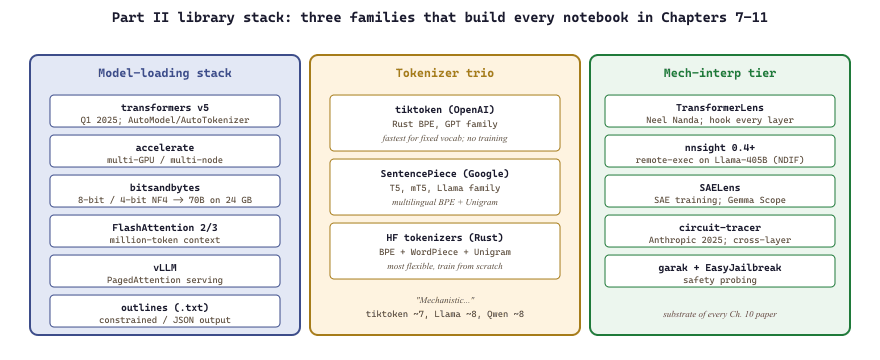
Part II's library layer is the shelf of off-the-shelf code that turns Chapters 7 to 11's ideas into runnable notebooks. Three families dominate: the model-loading stack (transformers, accelerate, bitsandbytes) that gets weights onto your GPU; the tokenizer trio (tiktoken, SentencePiece, HF tokenizers) that converts text into model inputs; and the mechanistic-interpretability tier (TransformerLens, nnsight, SAELens) that exposes attention heads, residual streams, and sparse autoencoders for the research probes in Chapter 10. The pages that follow are reference catalogs, not deep theory; the goal is to know which library to reach for when a notebook in Chapter 7 calls for it.
Part II's library layer splits into three families: the model-loading stack (transformers, accelerate, bitsandbytes), the tokenizer trio (tiktoken, SentencePiece, HF tokenizers), and the mechanistic-interpretability tier (TransformerLens, nnsight, SAELens). Almost every figure and notebook in Chapters 7 to 11 is built from this exact set.
10.7.1 The model-loading stack
- transformers v5 (2025-Q1): the canonical model-loading library.
AutoModel,AutoTokenizer,AutoConfig. Every open-weight model in this part is loadable in one line. v5 is a major break from v4 (refactored model registry, redesigned config API, removed many legacy methods); code written against v4.x often needs small updates to load with v5. The 2025 deprecation notes list the breaking changes. - accelerate: multi-GPU / multi-node loader. The right abstraction for "this model does not fit on one GPU".
- bitsandbytes: 8-bit and 4-bit (NF4) quantization. The reason 70B models fit on a single 24 GB consumer GPU.
- FlashAttention (versions 2 and 3): kernels for long-context inference. Required for million-token contexts on commodity hardware. Speculative decoding (a small draft model proposes tokens, the large model verifies in a single forward pass) and prefix caching (sharing the KV cache across requests with the same system prompt) are now production-default inference techniques; vLLM v1 and SGLang both ship them out of the box. Attention sinks (Xiao et al., 2024) let you keep early tokens pinned in the cache for streaming inference without quality collapse.
- vLLM: a high-throughput serving engine with PagedAttention. The right runtime when latency matters; covered in Chapter 10.
- outlines (.txt, 2023+): constrained generation via finite-state-machine guidance, the de facto library for structured output and JSON-mode in 2025-26.
10.7.2 The tokenizer trio
- tiktoken: OpenAI's Rust-backed BPE tokenizer. The canonical tokenizer for the GPT family from GPT-2 onwards; the way to count tokens for OpenAI billing.
- SentencePiece: Google's subword tokenizer (BPE and Unigram). Default for T5, mT5, ALBERT, XLNet, Llama family, and most Asian-language models.
- Hugging Face tokenizers: the Rust-backed superset library. Implements BPE, WordPiece, Unigram. The way to train a tokenizer from scratch on your own corpus.
10.7.3 The mech-interp tier
- TransformerLens (Neel Nanda): the mech-interp library. Hooks every layer, head, and residual stream of a model for inspection. The substrate of nearly every paper in Chapter 10.
- nnsight 0.4+: PyTorch-native model introspection. Lets you write Python that runs inside a model's forward pass on a remote GPU. The newer alternative to TransformerLens for larger models. The companion National Deep Inference Fabric (NDIF) is the public infrastructure that runs remote-execution mech-interp jobs on Llama-405B-scale models, free for academic researchers as of 2025.
- SAELens: sparse-autoencoder training and inspection. The library behind Anthropic's "Scaling Monosemanticity" (2024) and OpenAI's "Scaling and evaluating sparse autoencoders" (Gao et al., 2024, arXiv:2406.04093) work; both ground SAE-based interpretability for newcomers.
- circuit-tracer (Anthropic, 2025): cross-layer-transcoder tooling for circuit-level interpretability, building on "Sparse Crosscoders for Cross-Layer Features in Superposition" (Lindsey et al., 2024).
- garak and EasyJailbreak: tokenizer and model probing libraries for the safety-related chapters; useful when you want to programmatically probe a model's failure surface.
They optimise for different things. tiktoken is fastest at encoding existing OpenAI vocabularies but cannot train a new tokenizer. SentencePiece can train multilingual tokenizers from scratch but its training loop is slower than HF's Rust implementation. HF tokenizers is the most flexible but its on-disk format is not interchangeable with the others. In practice: use tiktoken when you must match OpenAI's tokenization exactly; use HF tokenizers for everything else; reach for SentencePiece only when you are replicating a paper that explicitly used it.
In the early 2000s a dozen Linux distros all bundled the same kernel with different package managers, and people argued about it as if it were a religion. The Transformers, vLLM, and TGI ecosystems are at the same moment: same models underneath, different packaging upstairs, and the choice of framework quietly decides what experiments are easy versus impossible. Picking a stack is half engineering and half taste.
Code Fragment 10.7.1 below tokenizes the same English sentence with the GPT-4o, Llama 3.3, and Qwen3 tokenizers; the same string gets carved into different pieces by every model family. The numbers diverge sharply for non-English text and source code; Chapter 6 walks through the consequences.
import tiktoken, sentencepiece as spm
from transformers import AutoTokenizer

text = "Mechanistic interpretability of transformer models."

# For OpenAI: use encoding_for_model with the latest model you care about
gpt = tiktoken.encoding_for_model("gpt-4o")  # swap for current model when billing matters
llama = AutoTokenizer.from_pretrained("meta-llama/Llama-3.3-70B-Instruct")
qwen = AutoTokenizer.from_pretrained("Qwen/Qwen3-7B")

print(len(gpt.encode(text)))    # GPT family: ~7 tokens
print(len(llama.encode(text)))  # Llama 3.3: ~8 tokens
print(len(qwen.encode(text))) # Qwen3: ~8 tokens10.7.4 Versions to pin
Install with uv (10-100x faster than pip and the default modern installer): uv pip install transformers tokenizers accelerate bitsandbytes flash-attn. For Part II the safe pin set is transformers>=5.0 (the 2025-Q1 major release; >=4.45 still works for legacy notebooks but expect deprecation warnings), tokenizers>=0.20, accelerate>=1.0, bitsandbytes>=0.43, flash-attn>=2.6 (only required for FA3 training; inference uses PyTorch's built-in scaled_dot_product_attention). The mech-interp libraries move faster; for those, pin to the commit hash of whichever paper you are reproducing. The interpretability literature is full of breaking API changes between minor versions.
Hugging Face Transformers Deep Dive
The transformers library is the central hub of the Hugging Face ecosystem. It provides a unified API for loading, configuring, and running inference with thousands of pretrained models spanning text, vision, audio, and multimodal tasks. This deep-dive walks through the three layers of abstraction the library offers: high-level pipelines for quick prototyping, AutoClasses for flexible model loading, and direct model/tokenizer access for full control.
Prerequisites
This section assumes familiarity with the Hugging Face transformers ecosystem from Section 12.1 and LLM inference fundamentals from Section 9.1. The platform shelf in Section 10.6 provides the context for why each library exists.
1. The Pipeline API: Inference in One Line
The fastest way to use a pretrained model is through the pipeline() function. Pipelines bundle a model, a tokenizer, and task-specific pre/post-processing into a single callable object. You specify a task name, and the library selects a suitable default model from the Hub.
The following example creates pipelines for three common NLP tasks: sentiment analysis, named entity recognition, and text generation.
from transformers import pipeline

# Sentiment analysis (default: distilbert-base-uncased-finetuned-sst-2-english)
classifier = pipeline("text-classification")
result = classifier("HuggingFace makes NLP accessible to everyone.")
print(result)
# [{'label': 'POSITIVE', 'score': 0.9998}]

# Named entity recognition
ner = pipeline("ner", aggregation_strategy="simple")
entities = ner("Yann LeCun works at Meta in New York.")
for ent in entities:
    print(f"  {ent['word']:<15} {ent['entity_group']:<10} {ent['score']:.3f}")

# Text generation with a specific model
generator = pipeline("text-generation", model="gpt2", max_new_tokens=40)
output = generator("The future of AI is", do_sample=True, temperature=0.7)
print(output[0]["generated_text"])pipeline() calls covering sentiment analysis, NER with entity aggregation, and text generation with a specified model. Each pipeline handles tokenization, inference, and output formatting internally, making single-line inference possible for 30+ task types.Pipelines support over 30 task types including question-answering, summarization, translation, zero-shot-classification, image-classification, and automatic-speech-recognition. Each task maps to a specific pipeline class that handles the input/output formatting appropriate for that task.
By default, pipelines run on CPU. Pass device=0 to place the model on the first GPU, or use device="cuda" for automatic GPU selection. For Apple Silicon, use device="mps". Starting with Transformers v4.36, you can also pass device_map="auto" to let the library distribute a large model across multiple GPUs automatically.
2. AutoClasses: Flexible Model and Tokenizer Loading
When you need more control than pipelines offer, AutoClasses provide the next level of abstraction. The two most important are AutoTokenizer and AutoModel (plus its task-specific variants). These classes inspect a model's configuration on the Hub and instantiate the correct architecture automatically.
The code below loads a tokenizer and a sequence classification model, then runs a forward pass to obtain logits.
from transformers import AutoTokenizer, AutoModelForSequenceClassification
import torch

model_name = "distilbert-base-uncased-finetuned-sst-2-english"

# Load tokenizer and model from the Hub
tokenizer = AutoTokenizer.from_pretrained(model_name)
model = AutoModelForSequenceClassification.from_pretrained(model_name)

# Tokenize input
text = "This library is incredibly well designed."
inputs = tokenizer(text, return_tensors="pt", padding=True, truncation=True)

# Forward pass
with torch.no_grad():
    outputs = model(**inputs)

# Convert logits to probabilities
probs = torch.softmax(outputs.logits, dim=-1)
labels = model.config.id2label
for idx, prob in enumerate(probs[0]):
print(f" {labels[idx]}: {prob:.4f}")AutoTokenizer and AutoModelForSequenceClassification. Unlike pipelines, this approach gives direct access to raw logits, enabling custom post-processing such as calibration or thresholding. The id2label mapping from the config converts indices to human-readable class names.The AutoModelFor* family includes task-specific heads. The most commonly used variants are listed in Figure C.1.1.
| AutoClass | Task | Output |
|---|---|---|
AutoModelForCausalLM | Text generation (decoder-only) | Next-token logits |
AutoModelForSeq2SeqLM | Translation, summarization (encoder-decoder) | Sequence logits |
AutoModelForSequenceClassification | Sentiment, NLI, topic classification | Class logits |
AutoModelForTokenClassification | NER, POS tagging | Per-token logits |
AutoModelForQuestionAnswering | Extractive QA | Start/end logits |
AutoModelForMaskedLM | Fill-mask (encoder-only) | Vocabulary logits |
3. Model Architectures: Encoder, Decoder, and Encoder-Decoder
See Chapter 3 (Transformer Architecture) for why each family exists. When picking an AutoClass: encoder-only (BERT, RoBERTa, DeBERTa) maps to AutoModel or AutoModelForSequenceClassification; decoder-only (GPT-2, LLaMA, Mistral) maps to AutoModelForCausalLM; encoder-decoder (T5, BART, mBART) maps to AutoModelForSeq2SeqLM.
The following example demonstrates loading one model from each family.
from transformers import (
    AutoModel,
    AutoModelForCausalLM,
    AutoModelForSeq2SeqLM,
    AutoTokenizer,
)

# Encoder-only: BERT
enc_tokenizer = AutoTokenizer.from_pretrained("bert-base-uncased")
enc_model = AutoModel.from_pretrained("bert-base-uncased")
enc_out = enc_model(**enc_tokenizer("Hello world", return_tensors="pt"))
print(f"Encoder hidden states shape: {enc_out.last_hidden_state.shape}")

# Decoder-only: GPT-2
dec_tokenizer = AutoTokenizer.from_pretrained("gpt2")
dec_model = AutoModelForCausalLM.from_pretrained("gpt2")
dec_out = dec_model.generate(
    **dec_tokenizer("Once upon a time", return_tensors="pt"),
    max_new_tokens=20,
    do_sample=True,
)
print(f"Generated: {dec_tokenizer.decode(dec_out[0], skip_special_tokens=True)}")

# Encoder-decoder: T5
s2s_tokenizer = AutoTokenizer.from_pretrained("t5-small")
s2s_model = AutoModelForSeq2SeqLM.from_pretrained("t5-small")
s2s_out = s2s_model.generate(
    **s2s_tokenizer("translate English to French: Hello, how are you?", return_tensors="pt"),
    max_new_tokens=30,
)
print(f"Translation: {s2s_tokenizer.decode(s2s_out[0], skip_special_tokens=True)}")AutoModel variant must match the architecture type.4. Model Configuration and Customization
Every model has an associated configuration object (AutoConfig) that stores architectural hyperparameters such as the number of layers, hidden size, number of attention heads, and vocabulary size. You can inspect or modify configuration before instantiating a model.
This example loads a configuration, modifies it, and creates a randomly initialized model with the new settings.
from transformers import AutoConfig, AutoModelForCausalLM

# Load existing config
config = AutoConfig.from_pretrained("gpt2")
print(f"Original: {config.n_layer} layers, {config.n_head} heads, "
      f"hidden size {config.n_embd}")

# Create a smaller variant for experimentation
config.n_layer = 4
config.n_head = 4
config.n_embd = 256

# Instantiate a randomly initialized model with modified config
small_model = AutoModelForCausalLM.from_config(config)
num_params = sum(p.numel() for p in small_model.parameters())
print(f"Custom model: {num_params / 1e6:.1f}M parameters")AutoConfig. Reducing GPT-2 from 12 layers to 4 and the hidden size from 768 to 256 produces an 11.2M parameter model suitable for rapid experimentation. Note that from_config() creates randomly initialized weights.from_config() creates a model with random weights. This is useful for architecture experiments or training from scratch, but not for inference. Always use from_pretrained() when you need a model with learned weights.
5. Efficient Loading and Precision Control
Modern LLMs can be extremely large. The Transformers library provides several mechanisms for loading models efficiently, including reduced-precision formats, quantization, and memory-mapped loading. These techniques are essential for working with billion-parameter models on consumer hardware.
The following example shows how to load a large model with reduced precision and automatic device mapping.
from transformers import AutoTokenizer, AutoModelForCausalLM
import torch

model_name = "mistralai/Mistral-7B-Instruct-v0.3"

# Load in float16 with automatic device mapping across GPUs
tokenizer = AutoTokenizer.from_pretrained(model_name)
model = AutoModelForCausalLM.from_pretrained(
    model_name,
    torch_dtype=torch.float16,   # Half precision (saves ~50% memory)
    device_map="auto",           # Distribute across available devices
    low_cpu_mem_usage=True,      # Avoid peak memory during loading
)

# For even smaller memory footprint, use 4-bit quantization
model_4bit = AutoModelForCausalLM.from_pretrained(
    model_name,
    load_in_4bit=True,                  # Requires bitsandbytes
    bnb_4bit_compute_dtype=torch.float16,
    device_map="auto",
)

print(f"FP16 memory: ~14 GB")
print(f"4-bit memory: ~4 GB")device_map="auto" for multi-GPU distribution, then in 4-bit NF4 quantization for consumer GPUs. The low_cpu_mem_usage=True flag avoids a temporary peak where both the full model and the shard coexist in CPU memory.| Precision | Bits per Parameter | 7B Model Size | Use Case |
|---|---|---|---|
| float32 | 32 | ~28 GB | Training (full precision) |
| float16 / bfloat16 | 16 | ~14 GB | Inference, mixed-precision training |
| int8 | 8 | ~7 GB | Inference with minimal quality loss |
| int4 (NF4) | 4 | ~4 GB | Inference on consumer GPUs; QLoRA fine-tuning |
6. Inference Patterns and Generation Strategies
For causal language models, the generate() method provides a rich set of decoding strategies. Understanding these strategies is critical for controlling the quality, diversity, and determinism of generated text. For a thorough discussion of sampling methods, see Chapter 4: Decoding Strategies & Text Generation.
The example below demonstrates several generation strategies on the same prompt.
from transformers import AutoTokenizer, AutoModelForCausalLM

tokenizer = AutoTokenizer.from_pretrained("gpt2")
model = AutoModelForCausalLM.from_pretrained("gpt2")
input_ids = tokenizer("The key to good AI is", return_tensors="pt").input_ids

# Greedy decoding: deterministic, often repetitive
greedy = model.generate(input_ids, max_new_tokens=30, do_sample=False)
print("Greedy:", tokenizer.decode(greedy[0], skip_special_tokens=True))

# Top-k sampling: sample from the top 50 tokens at each step
topk = model.generate(input_ids, max_new_tokens=30, do_sample=True, top_k=50)
print("Top-k:", tokenizer.decode(topk[0], skip_special_tokens=True))

# Nucleus (top-p) sampling: sample from smallest set whose cumulative
# probability exceeds p
topp = model.generate(input_ids, max_new_tokens=30, do_sample=True, top_p=0.92)
print("Top-p:", tokenizer.decode(topp[0], skip_special_tokens=True))

# Beam search: explore multiple hypotheses in parallel
beam = model.generate(
    input_ids,
    max_new_tokens=30,
    num_beams=5,
    no_repeat_ngram_size=2,
    early_stopping=True,
)
print("Beam:", tokenizer.decode(beam[0], skip_special_tokens=True))no_repeat_ngram_size=2 preventing verbatim repetition.For factual and deterministic outputs (code generation, structured extraction), use greedy decoding or beam search. For creative and diverse outputs (story writing, brainstorming), use nucleus sampling with top_p between 0.9 and 0.95 and temperature between 0.7 and 1.0. For conversational agents, nucleus sampling with moderate temperature (0.6 to 0.8) typically gives the best balance of coherence and variety.
What's Next?
In the next section, Section 10.8: Serving Runtimes, we shift from interpretability tooling to production serving: vLLM (PagedAttention, continuous batching), Hugging Face Text Generation Inference (TGI), and SGLang.