"Cloud GPUs are billed by the hour; phone GPUs are billed by the degree Celsius. The first run finishes; the tenth one throttles. Plan for the tenth."
Quant, Edge-Squeezing AI Agent
Running LLM inference on a phone, laptop, or embedded device exposes three hard physical limits that do not exist on a cloud GPU: a finite battery, a thermal ceiling that drops clock speeds within seconds of sustained compute, and a memory budget that is two orders of magnitude smaller than a data-center node. This section quantifies each constraint, walks through the canonical "fits on a phone" reference models for 2026 (Phi-3.5-mini, Gemma 2 2B, Apple Foundation Models), and the mitigations that keep on-device inference responsive without melting the device.
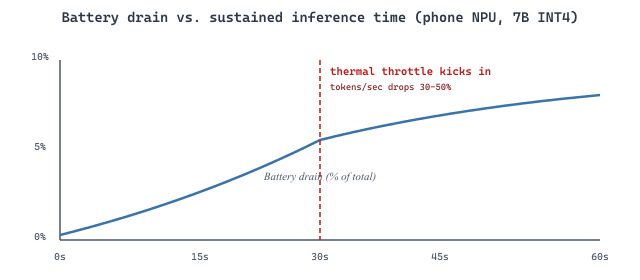
The 2025-era Snapdragon 8 Elite Hexagon NPU pushes about 45 TOPS at INT4, which beats a discrete RTX 3060 (~12 TFLOPS FP16) on quantized 7B-class inference for short prompts. The catch: only if the model fits in 8 GB unified memory, only if you tolerate a smaller context window, and only if you accept the thermal throttling that kicks in after ~30 seconds of sustained generation. Edge AI is faster than you think and shorter-lived than you hope.
Prerequisites
This section assumes the motivations from Section 60.1 and the runtimes from Section 60.2. Quantization fundamentals from Section 9.1 are also useful background.
60.3.1 Battery Budgets
Running LLM inference on a mobile device introduces constraints that do not exist in server environments. Battery drain is the most visible: sustained LLM inference can consume 3 to 5 watts on a modern smartphone, draining the battery at a rate of roughly 1% per minute of continuous generation. For a 4000 mAh phone battery at 3.85 V (about 15.4 Wh of usable energy), 4 W of inference burns through the entire battery in roughly four hours of continuous use, which is a useful upper bound but not a realistic workload pattern. The realistic worry is shorter: a five-minute chat session that drops the battery by 5%, repeated a dozen times a day, becomes the dominant battery drain on the device.
The tokens-per-watt metric is the right efficiency target for mobile. On a 2026 Snapdragon 8-class SoC running a 3B-parameter Q4_K_M model, GPU inference delivers roughly 30 to 40 tokens per watt, while the Hexagon NPU delivers 80 to 120 tokens per watt on the same workload because it operates at lower precision (int8) and lower voltage. The NPU path is therefore the right default for any sustained-use feature; the GPU path is acceptable for burst use (a single chat turn) but should not host an "always on" feature.
60.3.2 Thermal Throttling
Thermal throttling is equally important; most mobile SoCs reduce clock speeds after 30 to 60 seconds of sustained compute to prevent overheating, which degrades generation speed mid-response. The throttling curve is not a soft taper but a step function in most devices: the SoC monitors a junction-temperature sensor, and when it crosses a vendor-specific threshold (typically 85 to 95 degrees Celsius), the firmware halves the GPU clock, which halves the tokens-per-second of any in-flight generation. A user who starts a generation at 40 tokens per second and finds it slowing to 20 tokens per second mid-response is experiencing thermal throttling, not a model bug.
Five practical mitigations stack to keep generation responsive without melting the device:
- Use speculative decoding with a tiny draft model to reduce the number of full-model forward passes.
- Cap generation length to prevent extended inference sessions.
- Batch requests when possible to amortize model loading overhead.
- Monitor device temperature and gracefully degrade to shorter responses or cloud fallback when thermal limits approach.
- Use the smallest model variant that meets quality requirements.
60.3.3 Memory and Quantization Tradeoffs
Memory is the third constraint and the one that decides which models can even be loaded. A 2026 mid-range Android phone ships with 8 GB of RAM; a flagship phone, 12 to 16 GB; a base-model MacBook Air, 16 to 24 GB unified. The OS, the browser, and the foreground app already claim 4 to 6 GB before the LLM ever loads, so the practical model budget on a phone is 2 to 4 GB, and on a laptop 6 to 12 GB. That puts a hard ceiling on the model size: a 3B model in Q4_K_M (about 1.8 GB of weights plus 0.5 GB of KV cache at typical context lengths) fits comfortably on a phone; an 8B Q4_K_M (about 4.6 GB) does not, even before counting the KV cache.
Those two verdicts are not assertions to take on faith; they fall straight out of a working-set sum. The RAM a model needs on-device is three terms added together: the quantized weights, the KV cache for the context you intend to support, and a scratch budget for activations and runtime overhead. With $P$ parameters quantized to $b$ bits each, a context of $T$ tokens, and the same KV-cache shape used throughout this part (reused from the server-side sizing in Section 57.1), the total is
$$M_{\text{total}} = \underbrace{P \cdot \tfrac{b}{8}}_{\text{weights}} \;+\; \underbrace{2 \cdot L \cdot H_{kv} \cdot d_{\text{head}} \cdot T \cdot 2}_{\text{KV cache}} \;+\; M_{\text{scratch}} ,$$
where the weight term converts bits to bytes by dividing by 8, the KV term keeps the fp16 cache at 2 bytes per element (most runtimes do not quantize the cache on-device), and $M_{\text{scratch}}$ covers the activation buffers, the runtime, and per-layer temporaries (200 to 400 MB is typical for llama.cpp-class runtimes). The device must satisfy $M_{\text{total}} \le M_{\text{budget}}$, where the budget is the physical RAM minus what the OS and foreground app already hold (the 2 to 4 GB phone budget stated above).
Work the two models at 4-bit ($b = 4$) and a $T = 4096$ context against a phone budget of $M_{\text{budget}} = 3.5$ GB (a 12 GB flagship with roughly 8 GB already claimed by the OS, the launcher, and a foreground app). The 3B model (Phi-3.5-class shape: $L = 32$, $H_{kv} = 8$, $d_{\text{head}} = 96$) gives weights of $3 \times 10^9 \cdot 0.5 = 1.5$ GB, a KV cache of $2 \cdot 32 \cdot 8 \cdot 96 \cdot 4096 \cdot 2 \approx 0.40$ GB, and $M_{\text{scratch}} \approx 0.3$ GB, for $M_{\text{total}} \approx 2.2$ GB. That clears the 3.5 GB budget with margin, so the 3B fits. The 8B model (Llama-3.1-8B shape: $L = 32$, $H_{kv} = 8$, $d_{\text{head}} = 128$) gives weights of $8 \times 10^9 \cdot 0.5 = 4.0$ GB on their own, a KV cache of $2 \cdot 32 \cdot 8 \cdot 128 \cdot 4096 \cdot 2 \approx 0.54$ GB, and the same 0.3 GB scratch, for $M_{\text{total}} \approx 4.8$ GB. The weights alone exceed the budget, and the full working set overshoots it by 37%, so the 8B does not fit. Table 60.3.2 lays the two sums side by side.
| Term | 3B @ 4-bit | 8B @ 4-bit |
|---|---|---|
| Quantized weights | 1.5 GB | 4.0 GB |
| KV cache (4K context, fp16) | 0.40 GB | 0.54 GB |
| Activation / runtime scratch | 0.30 GB | 0.30 GB |
| Total working set | 2.2 GB | 4.8 GB |
| Phone budget (12 GB device) | 3.5 GB | 3.5 GB |
| Verdict | Fits (1.3 GB margin) | Does not fit (1.3 GB over) |
The sum also explains the two levers that change the verdict. Dropping to a more aggressive quantization shrinks only the weight term: an 8B at 3-bit would weigh $8 \times 10^9 \cdot 0.375 = 3.0$ GB, bringing the total to about 3.8 GB, still over the 3.5 GB budget, which is why sub-4-bit 8B deployment usually waits for a 16 GB device rather than a 12 GB one. Shrinking the context shrinks only the KV term, which is small here but dominates at long context: the same 8B at a 32K context would carry a 4.3 GB KV cache on top of the weights, putting the working set above 8 GB and out of reach of any current phone. Context length, not just parameter count, is a first-class sizing variable on-device.
The quality difference between a Q4_K_M and Q5_K_M quantization on a 3B model is often imperceptible to users, but the memory and power savings can extend battery life by 15 to 20%.
Canonical "Fits on a Phone" Reference Models for 2026
Three model families dominate the on-device "useful, fits, runs at acceptable speed" envelope as of 2026:
- Phi-3.5-mini (Microsoft, ~3.8B parameters): the successor to Phi-3-mini that retains the same "trained on heavily curated synthetic data" recipe and the same 3.8B-parameter footprint. At Q4_K_M it is about 2.3 GB, fits on every flagship phone with margin, and benchmarks at GPT-3.5-class quality. It is the default reference for chat-class on-device workloads.
- Gemma 3 1B / 4B (Google, March 2025): the current Gemma generation, which superseded the Gemma 2 2B that long held this slot. The 1B variant is roughly half the size of Phi-3.5 with a permissive license; the 4B variant adds vision and a 128K context window. The right pick when you need the model to share RAM with a heavy foreground app, or when you target mid-range phones with 6 GB total RAM.
- Apple Foundation Models (Apple, ~3B parameters): the on-device model that ships in iOS 18.x and powers Apple Intelligence's writing tools, message summarization, and Genmoji. It is not directly callable from third-party apps, but the Foundation Models framework exposes it through guided generation APIs in iOS 18.1+. Apple's design notes (announced at WWDC 2024 and detailed in subsequent Apple ML Research posts) describe an architecture where the on-device model handles short interactive tasks and a privacy-preserving Private Cloud Compute tier handles longer prompts on Apple Silicon servers running attested code. Together they define the privacy-preserving fallback pattern that the rest of the industry is converging on.
Extend the lab benchmark to include Q5_K_M as a third quantization level. Plot tokens/sec vs. quality score for all three levels. Is Q5_K_M the best compromise, or does Q4_K_M offer sufficient quality at meaningfully better speed?
Answer Sketch
Q5_K_M typically sits midway between Q4_K_M and Q8_0 on both metrics. The quality difference between Q4_K_M and Q5_K_M is usually small (0.1 to 0.3 points on the 5-point scale), while the speed difference is also modest (5 to 15% faster for Q4_K_M). For applications where every millisecond matters (autocomplete, real-time suggestions), Q4_K_M is preferred. For applications where quality is paramount but memory is limited (medical reference, legal document review), Q5_K_M provides a better balance.
Design a tiered inference system for a mobile application that uses a Q4_K_M model on-device for simple queries and routes complex queries to a cloud API. Define the routing criteria, implement a complexity classifier, and measure the cost savings compared to sending all queries to the cloud.
Answer Sketch
Route queries to the on-device model when: (1) the query is under 50 tokens, (2) the task is classification, extraction, or short-form generation, and (3) the device battery is above 20%. Route to the cloud when: the query requires multi-step reasoning, long-form generation (over 500 tokens), or references context beyond the on-device model's knowledge. A simple keyword/length classifier can achieve 85%+ routing accuracy. At 70% on-device routing, total API costs drop by approximately 70%, with user-perceived quality dropping less than 5% (measured by blind comparison).
If you have access to an Apple Silicon Mac, benchmark the same model using both MLX and llama.cpp. Compare tokens/sec, time to first token, memory usage, and power consumption (using the powermetrics tool). Which runtime is faster for your hardware?
Answer Sketch
On M1/M2 Macs, MLX typically outperforms llama.cpp by 10 to 30% in tokens/sec for 4-bit quantized models, with the gap widening for larger models that benefit more from Metal's unified memory access patterns. llama.cpp may show better time-to-first-token for small models due to lower initialization overhead. Power consumption is similar because both frameworks saturate the same GPU cores; the difference in tokens/sec means MLX completes the same work using less total energy per response.
Step 1: Set Up the Environment
This snippet installs the required dependencies and configures environment variables for the benchmark.
# Ensure Ollama is installed and running
ollama --version

# Pull two quantization levels of the same model
ollama pull llama3.2:3b-instruct-q4_K_M
ollama pull llama3.2:3b-instruct-q8_0Step 2: Run the Benchmark
This snippet executes the benchmark suite and collects the results.
"""Benchmark two quantization levels on the same prompts."""

import time
import json
from openai import OpenAI

client = OpenAI(base_url="http://localhost:11434/v1", api_key="ollama")

PROMPTS = [
 "Explain the concept of quantization in neural networks in 3 sentences.",
 "Write a Python function that computes the Fibonacci sequence iteratively.",
 "Summarize the key differences between TCP and UDP protocols.",
 "What are the main causes of the French Revolution? List 5 factors.",
 "Translate this to formal English: 'gonna grab some food brb'",
 "Write a SQL query to find the top 10 customers by total order value.",
 "Explain photosynthesis to a 10-year-old in simple terms.",
 "What are three common logical fallacies? Give an example of each.",
 "Write a bash one-liner to count the number of .py files recursively.",
 "Compare and contrast microservices and monolithic architectures.",
]

MODELS = ["llama3.2:3b-instruct-q4_K_M", "llama3.2:3b-instruct-q8_0"]

def benchmark_model(model_name: str, prompts: list[str]) -> dict:
 results = []
 for prompt in prompts:
     start = time.perf_counter()
     response = client.chat.completions.create(
         model=model_name,
         messages=[{"role": "user", "content": prompt}],
         max_tokens=300,
         temperature=0.0, # Deterministic for comparison
     )
     elapsed = time.perf_counter() - start
     output = response.choices[0].message.content
     token_count = response.usage.completion_tokens

     results.append({
         "prompt": prompt[:60],
         "output": output,
         "tokens": token_count,
         "time_s": round(elapsed, 2),
         "tok_per_s": round(token_count / elapsed, 1),
     })

     avg_tps = sum(r["tok_per_s"] for r in results) / len(results)
     return {
         "model": model_name,
         "avg_tokens_per_sec": avg_tps,
         "results": results,
     }

# Run benchmarks
for model in MODELS:
 print(f"\nBenchmarking {model}...")
 report = benchmark_model(model, PROMPTS)
 print(f" Average: {report['avg_tokens_per_sec']:.1f} tokens/sec")
 with open(f"benchmark_{model.replace(':', '_')}.json", "w") as f:
json.dump(report, f, indent=2)Step 3: Evaluate Quality
Compare the outputs from both quantization levels side by side. For each of the 10 prompts, rate the Q4_K_M output on a 1 to 5 scale relative to the Q8_0 output: 5 means identical quality, 4 means minor differences that do not affect usefulness, 3 means noticeable degradation, 2 means significant quality loss, and 1 means the output is unusable. Compute the average quality score and report it alongside the latency numbers. Typical results for a 3B model show average quality scores of 4.2 to 4.7, confirming that Q4_K_M is viable for most applications.
The edge-LLM frontier is being pushed simultaneously from two directions: smaller models that retain useful capability, and clever inference tricks that stretch the hardware further. Phi-3-mini and Phi-3.5 (Microsoft Research, Abdin et al., 2024, arXiv:2404.14219) demonstrated that a 3.8B-parameter model trained on heavily curated synthetic data can match the benchmark performance of much larger 2023-era models, defining a new viable target size for phones. Gemma 2 2B (Google, 2024) and Llama-3.2 1B/3B (Meta, 2024) pushed the same trend further and are now the practical default for laptop and mid-range mobile deployment.
On the inference side, PowerInfer (Song et al., SOSP 2024, arXiv:2312.12456) exploits the power-law distribution of neuron activations to keep "hot" neurons in GPU memory and "cold" ones on the CPU, achieving 11x speedups on consumer hardware for 30B-class models. LLM in a Flash (Alizadeh et al., Apple, 2024) streams weights from SSD with windowing and row-column bundling, enabling models 2x larger than DRAM. MobileLLM (Liu et al., Meta, 2024) revisits architectural choices for sub-1B-parameter models, showing that depth beats width at that scale.
Where the field is headed: 1 to 3B-parameter "default" models on every device, with selective offload to a hosted frontier model only when needed; specialized NPUs (Apple Neural Engine, Qualcomm Hexagon, Google Tensor) replacing the CPU and GPU paths in inference runtimes; and on-device fine-tuning via LoRA-class methods so that personalization happens without leaving the device. The privacy implications follow directly from these systems trends.
Objective
Run a 7B-parameter model quantized to Q4_K_M through llama.cpp on (a) a CPU-only laptop and (b) an Apple Silicon Mac with the Metal backend (or, if no Mac, compare CPU vs. CUDA on the same x86 host). Measure prompt-eval tokens/sec and generation tokens/sec, plus memory footprint. By the end, you will have hard numbers for the throughput delta between accelerated and CPU paths.
Setup
Download a Q4_K_M GGUF of Llama-3.1-8B-Instruct or Qwen2.5-7B-Instruct from Hugging Face (about 4.5 GB). Install llama.cpp from source so you can toggle Metal and OpenBLAS at build time.
git clone https://github.com/ggerganov/llama.cpp && cd llama.cpp && make LLAMA_METAL=1Steps
- Build two flavors: Build once with
LLAMA_METAL=1(orLLAMA_CUDA=1) and once with CPU-only (makewith no flags). Keep the binaries side by side. - Run llama-bench: Use the bundled benchmarking tool:
./llama-bench -m model.gguf -p 512 -n 128 -t 8. Run on both binaries, capture prompt-eval and generation tokens/sec. - Probe context-length scaling: Re-run with
-c 2048,-c 8192,-c 16384. Plot tokens/sec vs. context length; you should see the prefill dominate at long context. - Measure memory: While each run is active, sample resident memory with
ps -o rssorvm_stat. Compare to the GGUF file size; the live RSS should be model size + KV cache. - Run a real prompt: Use
./llama-cli -m model.gguf -p "Explain MoE in one paragraph" -n 256and qualitatively compare output between Metal and CPU runs. Token-by-token output should be identical with greedy decoding.
Expected Output
On an M2 Pro with Metal, expect 35 to 45 tokens/sec generation and 250 to 400 tokens/sec prefill for a 7B Q4_K_M model. On a recent x86 laptop CPU, expect 8 to 15 tokens/sec generation and 30 to 60 tokens/sec prefill. Memory should be around 5 to 6 GB resident.
Extension
Re-run with Q5_K_M and Q8_0 quantizations and chart the quality-vs-throughput tradeoff using a 20-prompt perplexity probe.
- Battery caps sustained inference at roughly four hours of continuous generation on a phone; the realistic worry is the cumulative drain from many short sessions, not a single long one. NPU paths deliver 3-4x more tokens per watt than GPU paths.
- Thermal throttling is a step function, not a taper: most SoCs halve the GPU clock when junction temperature crosses 85 to 95 degrees Celsius. Plan for the throttled steady state, not the burst peak.
- Memory is the gatekeeping constraint. A 3B Q4_K_M model is the sweet spot for flagship phones in 2026; 2B for mid-range; 8B and above require a laptop.
- Reference models that fit: Phi-3.5-mini (3.8B) and Gemma 3 1B/4B (the current Gemma generation, succeeding Gemma 2 2B) are the open-weight defaults; Apple Foundation Models (3B on-device + Private Cloud Compute) define the privacy-preserving commercial pattern.
1. What is the key architectural advantage of llama.cpp that makes it run on such a wide range of hardware (CPUs, GPUs, mobile devices)?
Show Answer
llama.cpp is pure C++ with no Python runtime or CUDA dependency in its core path. Optional GPU backends (CUDA, Metal, Vulkan, ROCm) are compile-time choices, so the same source tree builds for Mac, Linux x86, ARM mobile, and Windows. Quantization is baked into the GGUF model-file format (Q4_K_M, Q8_0, …), so the runtime does not have to compute quantization tables dynamically. The result is a single self-contained binary plus a GGUF file: drops onto almost any device with a C++17 compiler and runs.2. Ollama exposes an OpenAI-compatible API. Why is API compatibility important for edge deployment, and how does it simplify the transition from cloud to local inference?
Show Answer
base_url from api.openai.com to localhost:11434 and get back the same response shape. No code change beyond environment variables, no rewriting prompts, no retraining client libraries. The cloud-to-edge transition becomes a configuration change rather than an engineering project, which is the practical reason Ollama spread so quickly.3. MLX exploits Apple Silicon's unified memory architecture. Explain why this gives MLX a performance advantage over llama.cpp on Mac hardware for large models.
Show Answer
llama.cpp on Mac still operates as if the GPU were discrete and pays the copy cost.4. In the quantization benchmark lab, you compared Q4_K_M and Q8_0 variants. What quality/latency trade-offs would you expect, and how would you decide which to deploy in production?
Show Answer
With edge deployment patterns and hardware constraints established, the next part of the book addresses Safety & Strategy, beginning with Chapter 47: Safety, Ethics, and Regulation. Privacy and data sovereignty requirements for on-device models connect directly to the regulatory frameworks covered there.