"A title and three tags is not an item. It is a stub of an item."
Pixel, Curious Librarian Agent
Entry point (B) from Section 38.1 sits at the catalog side of the pipeline. Most real-world catalogs are dominated by long-tail items whose entire record is a short title, a category label, and a handful of structured attributes. Embedding such a record produces a thin, ambiguous vector. The LLM fix is to expand the record into rich descriptive text before encoding, so the resulting embedding carries the semantic depth the original record lacks. This section walks through synthetic description generation, multi-modal item embeddings, and LLM-labeled clustering, the three main enrichment patterns.
Picture a long-tail product whose entire database record reads "ABX-9000, Black, 1.2 lb." That is the shopping equivalent of a Tinder profile that says only "alive." The embedding model, asked to encode this into 768 dimensions, basically shrugs and assigns it to the loneliest corner of vector space, next to all the other items that gave up. LLM enrichment is the friend who rewrites your profile for you: it knows ABX-9000 is a foldable laptop stand and confidently adds "perfect for cramped cafe tables and Zoom-call posture redemption." The encoder, now properly informed, places the vector somewhere a shopper might actually find it.
Prerequisites
This section assumes the reader has finished Section 38.1 (LLM entry points into recsys) and is comfortable with sentence-transformer embeddings from the embeddings-and-vector-database chapter in Part VII. Background on multimodal vision-language models from Part V helps for the image-aware enrichment subsection.
38.3.1 The Sparse Item Problem
A typical e-commerce row looks like the one on the left of Figure 38.3.1. The title is a single noisy line ("Anker Soundcore Q35 BT5.0"), the category is two levels deep ("Electronics > Headphones"), and three or four structured attributes capture brand, color, and a key spec. The same item, after LLM enrichment, looks like the version on the right: a 60-word paragraph that names the use cases, contrasts the item against typical alternatives, and surfaces attributes a shopper actually cares about. When both versions are encoded with the same sentence-transformer, the right-hand vector lives in a far more useful neighborhood of the embedding space than the left-hand one.
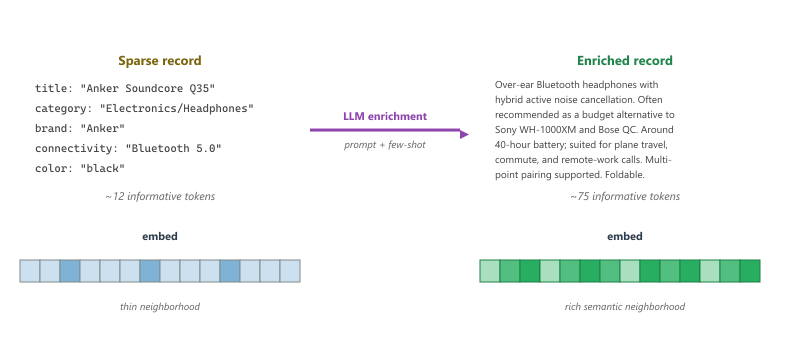
The intuition is simple. A sentence-transformer projects text into a vector by averaging contextualized token embeddings. With twelve informative tokens, the average is noisy and dominated by the most frequent terms ("headphones," "Bluetooth"). With seventy-five informative tokens that cover use cases, comparators, and key features, the average has many more signal-carrying directions. Cosine retrieval against a query embedding then has many more axes to match on. The lift on cold-start items is large, often 10 to 20 percent recall@20, because the cold items go from "indistinguishable from any other headphone" to "uniquely placed near similar items with similar use cases."
38.3.2 Synthetic Descriptions
The first and simplest enrichment pattern is synthetic description generation. The LLM is prompted with the sparse record and asked to produce a fixed-length paragraph in a consistent style. The voice can be tailored to the surface: a film-critic voice for a movie catalog, a recipe-writer voice for a food catalog, a product-review voice for e-commerce.
from openai import OpenAI
import json, jsonlines

client = OpenAI()

DESC_SYSTEM = """You are a product-catalog editor. Given a sparse product record,
write a 60-word description in the voice of an honest review.

Rules:
  - Mention the product category and 2 to 4 key use cases.
  - If the record names a brand, mention 1 or 2 typical alternative brands
    customers compare against.
  - Surface the most distinctive attribute first.
  - Do NOT invent specifications. If a number is not in the record, do not state one.
  - Do NOT use promotional language ("amazing", "best ever").
  - Return STRICT JSON: {"description": "..."} with no preamble."""

def enrich_one(record: dict) -> str:
    user = "Sparse record:\n" + json.dumps(record, indent=2)
    resp = client.chat.completions.create(
        model="gpt-4o-mini",
        messages=[
            {"role": "system", "content": DESC_SYSTEM},
            {"role": "user", "content": user},
        ],
        response_format={"type": "json_object"},
        temperature=0.3,
    )
    return json.loads(resp.choices[0].message.content)["description"]

def enrich_catalog(records: list[dict], out_path: str):
    with jsonlines.open(out_path, mode="w") as w:
        for r in records:
            desc = enrich_one(r)
            w.write({**r, "enriched_text": desc})

# Example record
example = {
    "title": "Anker Soundcore Q35",
    "category": "Electronics/Headphones",
    "brand": "Anker",
    "connectivity": "Bluetooth 5.0",
    "color": "black",
}
print(enrich_one(example))
Code Fragment 38.3.1b: Synthetic description generation for a sparse catalog. Two rules matter most: forbid invented numeric specs (the hallucination guard) and forbid promotional language (the review-voice guard). The output is appended to the record as enriched_text for the next pipeline stage to embed.
The most common failure mode of synthetic descriptions is invented numbers. Asked to describe a "Bluetooth headphone," a frontier LLM will helpfully add "40-hour battery life" because most premium Bluetooth headphones have around 40-hour batteries. Sometimes this is true. Sometimes the actual battery is 12 hours and the synthetic description has just lied to the user. The fix is a two-stage validation. First, the prompt forbids inventing numbers. Second, an offline regex pass extracts any numeric claim from the synthetic text and verifies it appears verbatim in the source record. Mismatches are flagged and either re-prompted or stripped.
38.3.3 Encoding the Enriched Records
Once the catalog is enriched, the encoding stage is mechanical. A sentence-transformer ingests the enriched text and writes a vector to a vector database. The choice of encoder matters: small encoders (384-dimensional all-MiniLM) are fast and cheap but miss subtle semantics; large encoders (1024-dimensional bge-large or text-embedding-3-large) capture more but cost ten to twenty times more per call. For catalogs in the 100K to 10M item range, the embedding cost is dominated by the encoder choice, not the LLM enrichment cost.
from sentence_transformers import SentenceTransformer
import chromadb, jsonlines

encoder = SentenceTransformer("BAAI/bge-base-en-v1.5")
client = chromadb.PersistentClient(path="./catalog_db")
col = client.get_or_create_collection("items_enriched")

BATCH = 64
buf_ids, buf_texts, buf_meta = [], [], []

with jsonlines.open("enriched.jsonl") as r:
    for row in r:
        buf_ids.append(row["item_id"])
        buf_texts.append(row["enriched_text"])
        buf_meta.append({"title": row["title"], "category": row["category"]})
        if len(buf_ids) >= BATCH:
            vecs = encoder.encode(buf_texts, normalize_embeddings=True)
            col.add(ids=buf_ids, embeddings=vecs.tolist(),
                    documents=buf_texts, metadatas=buf_meta)
            buf_ids, buf_texts, buf_meta = [], [], []

if buf_ids:
    vecs = encoder.encode(buf_texts, normalize_embeddings=True)
    col.add(ids=buf_ids, embeddings=vecs.tolist(),
            documents=buf_texts, metadatas=buf_meta)
Code Fragment 38.3.2: Encoding the enriched catalog with a HuggingFace sentence-transformer and writing the vectors to chromadb. Batching of 64 keeps the GPU busy without exhausting memory on a single-card machine. normalize_embeddings=True ensures cosine similarity reduces to a dot product.
For catalogs of millions of items, the single-process encoder loop is the bottleneck. sentence-transformers v3 ships SentenceTransformer.encode_multi_process, which spawns one worker per GPU and shards the input list automatically. On a 4-GPU box, encoding throughput rises by roughly 3.6x, with the missing 0.4x going to inter-process communication. The same pattern applies to image encoders (CLIP) for the multi-modal variant in Section 38.3.4.
38.3.4 Multi-Modal Item Embeddings
Many catalogs are not pure text. A clothing item has product photographs that carry more design information than any title can. A real-estate listing has floor plans and street-view images. A restaurant has a menu in a photo and the dish names in text. Multi-modal item embeddings combine these signals into a single vector that downstream retrieval can match against either a text query or another item.
The simplest multi-modal pattern uses CLIP-style models (Chapter 16) that align images and text into a shared embedding space. The LLM-enriched text from Section 38.3.2 and the product image are each encoded; the two vectors are averaged (or concatenated and re-projected through a small learned head) to produce the final item vector. The averaged vector beats the text-only vector on visually distinctive categories (clothing, furniture, food) and matches it on categories where text dominates (books, software, electronics specs).
from sentence_transformers import SentenceTransformer
from PIL import Image
import numpy as np, torch

# CLIP-style multi-modal encoder
mm = SentenceTransformer("clip-ViT-B-32")

def encode_item(enriched_text: str, image_path: str) -> np.ndarray:
    text_vec = mm.encode(enriched_text, convert_to_numpy=True, normalize_embeddings=True)
    img_vec = mm.encode(Image.open(image_path), convert_to_numpy=True, normalize_embeddings=True)
    # Average and re-normalize. A learned projection head can replace the average.
    fused = (text_vec + img_vec) / 2.0
    fused /= np.linalg.norm(fused) + 1e-9
    return fused

vec = encode_item(
    enriched_text="Over-ear Bluetooth headphones with hybrid ANC ...",
    image_path="./images/anker_q35.jpg",
)
print(vec.shape)  # (512,)
Code Fragment 38.3.3: Multi-modal item encoding with CLIP. The text branch encodes the LLM-enriched description; the image branch encodes the product photo; the two vectors are averaged and renormalized to produce a fused vector that lives in the same space as a text query. A learned projection head (a small MLP) typically outperforms the naive average once labeled training data exists.
Multi-modal embeddings pay off on categories where the image carries information the text does not (visual style, color combinations, room layouts). On categories where the user's query is intrinsically text-anchored (book genre, software feature, ingredient list), the image branch adds noise and slightly hurts retrieval. The simple rule: if a human shopper would scroll past the image to read the description, skip CLIP for that category.
38.3.5 LLM-Labeled Clustering
Once the catalog is embedded, an unsupervised clustering pass groups similar items. The cluster labels are valuable for navigation, faceted search, and diversification (Section 38.6). Before LLMs, cluster labels were either anonymous integers ("cluster #47") or extracted by TF-IDF top-terms (which often returned uninformative words like "the" and "size"). LLMs label each cluster by reading the top items and writing a one-line description, mirroring the BERTopic pattern from Section 31.7.
from sklearn.cluster import KMeans
from openai import OpenAI
import chromadb, numpy as np

client = OpenAI()
db = chromadb.PersistentClient(path="./catalog_db")
col = db.get_or_create_collection("items_enriched")

# Pull all vectors and texts
all_data = col.get(include=["embeddings", "documents"])
X = np.array(all_data["embeddings"])
texts = all_data["documents"]

# Cluster (k chosen by silhouette in practice; fixed to 50 here for brevity)
km = KMeans(n_clusters=50, n_init=10, random_state=0).fit(X)
labels = km.labels_

LABEL_SYSTEM = """You name a cluster of catalog items. Given 8 example descriptions
from one cluster, return STRICT JSON {"name": "short noun phrase", "summary": "1 sentence"}.
The name must be 2 to 6 words. Do not use the cluster number or quotes."""

def label_cluster(examples: list[str]) -> dict:
    user = "Examples:\n\n" + "\n---\n".join(examples)
    resp = client.chat.completions.create(
        model="gpt-4o-mini",
        messages=[
            {"role": "system", "content": LABEL_SYSTEM},
            {"role": "user", "content": user},
        ],
        response_format={"type": "json_object"},
        temperature=0.2,
    )
    import json
    return json.loads(resp.choices[0].message.content)

cluster_labels = {}
for c in range(km.n_clusters):
    idx = np.where(labels == c)[0][:8]
    sample = [texts[i] for i in idx]
    cluster_labels[c] = label_cluster(sample)

# Example output:
# {0: {"name": "over-ear ANC headphones", "summary": "..."},
#  1: {"name": "true-wireless sport earbuds", "summary": "..."}, ...}
Code Fragment 38.3.4: LLM-labeled clustering pipeline. KMeans groups the enriched-text embeddings; for each cluster, eight representative items are sent to the LLM with a tight schema for the cluster name. The resulting labels are human-readable and reusable for navigation, faceting, and the diversification step in Section 38.6.
38.3.6 Cost and Cache Discipline
Catalog enrichment is the single largest LLM cost in most production pipelines. A million-item catalog at one enrichment call per item costs roughly the same as a hundred thousand user-facing chat turns. Three patterns control the cost.
First, run enrichment offline as a batch job, not on the request path. The enriched text is cached in object storage and refreshed only when the source record changes. Second, use the cheapest model that produces acceptable output: gpt-4o-mini or a small open-weights model is usually enough for description generation, with the frontier model reserved for the harder cluster labeling. Third, route the long tail of identical or near-identical items through a single enrichment by hashing the normalized record before the LLM call. A surprising fraction of e-commerce catalogs has thousands of duplicate-up-to-color SKUs that all map to the same description.
The clustering pipeline in Code Fragment 38.3.4 is the BERTopic pattern from Section 31.7 applied to a product catalog instead of a document corpus. The choice of embedding model, the cluster sizing tradeoff, and the LLM labeling discipline carry over directly.
A common mistake is to re-enrich the whole catalog nightly. The catalog rarely changes nightly; only a few percent of records get updated per day. Track a content hash of each source record and re-enrich only the records whose hash changed since the last pass. This drops the daily LLM bill by one or two orders of magnitude with no quality loss.
Suppose a catalog of 500K items has been enriched and embedded. A new product launches with a sparse record. What is the minimum set of steps the pipeline must run to make the new product retrievable, and which of those steps are blocking the user-visible ship?
Show Answer
The blocking steps are: (1) run the single-item enrichment prompt to produce the enriched text, (2) encode the enriched text with the same sentence-transformer used for the rest of the catalog, and (3) upsert the vector and metadata into the vector database. None of the cluster-labeling, multi-modal fusion, or duplicate-detection steps blocks the ship; they can run asynchronously after the item is live. The total blocking latency is one LLM call (a few seconds) plus one encoder call (milliseconds) plus a vector-DB upsert. The launch is therefore a sub-10-second pipeline.
Item-side enrichment is the LLM intervention with the largest measurable lift on cold-start and long-tail retrieval. The recipe has three steps: write rich synthetic descriptions for each sparse record, encode them with a strong sentence-transformer (optionally fused with image features through CLIP), and apply LLM-labeled clustering for navigation and diversification. The cost is real but is dominated by the offline batch pass; on the request path the enriched embeddings are no more expensive than the raw ones.
What Comes Next
With the query side and the catalog side both enriched, the next section, Section 38.4: Conversational Recsys, turns to entry point (C): the dialogue wrapper around the whole pipeline. Preference elicitation through conversation, clarifying questions, justifications for each suggestion, and the warm-conversation UX that traditional widget-based filters cannot match.