Speech-to-speech skips the text in the middle and saves 200 milliseconds. It also skips the audit log in the middle and saves 200 milliseconds of compliance review. Choose your trade.
Echo, End-to-End-Audio AI Agent
Voice is the most natural human interface, and multimodal AI is making it programmable. The convergence of high-quality speech recognition (Whisper, Deepgram), expressive text-to-speech (ElevenLabs, Cartesia), and real-time orchestration frameworks (LiveKit, Pipecat) has made it possible to build voice-first conversational AI that feels responsive and natural. Combined with vision capabilities, these systems can see what users see and respond in real time. This section covers the complete voice and multimodal stack, from individual components to production-ready pipelines. The streaming API patterns from Section 11.1 are essential for achieving the low latency that voice interfaces demand.
Prerequisites
Voice and multimodal conversational interfaces build on the dialogue system architecture from Section 37.1 and the persona design principles in Section 37.2. Understanding the multimodal model landscape from Section 31.1 will help you appreciate how vision and audio capabilities integrate into conversational systems.
Building on the STT, TTS, and real-time pipeline foundations from Section 39.6, this part extends conversational AI in two directions. First, we add vision so an assistant can see what the user is pointing at. Second, we look at the new wave of native speech-to-speech models that skip the text bottleneck, and we compare the orchestration frameworks (LiveKit, Pipecat, Vocode) that production teams actually deploy.
The old voice stack was the ultimate game of telephone: microphone to STT to text-LLM to TTS to speaker, with each box losing a little personality on the way. By the time your sarcasm reached the model, it had been flattened into a sentence in 11-point Helvetica; by the time the response came back, it was being read by a polite robot who had never heard of inflection. Native speech-to-speech models (GPT-4o Realtime, Moshi) skip all the intermediate boxes and learn directly that your sigh means "explain it again, but simpler". The latency drops from 1500 ms to under 300 ms, which is the difference between "Hello, my name is Claude" and "hey what's up".
39.7.1 Vision in Conversations
Multimodal LLMs (GPT-4o, Claude Sonnet 4, Gemini) can process images alongside text, enabling conversational AI systems that can see. Users can share photos, screenshots, documents, or live camera feeds, and the system can discuss what it sees. This capability transforms many use cases: visual troubleshooting ("what is wrong with this error message?"), product identification ("what plant is this?"), accessibility assistance, and interactive tutoring with visual materials. Figure 39.7.2 illustrates the multimodal conversational pipeline.
import base64
from openai import OpenAI
client = OpenAI()
def encode_image_to_base64(image_path: str) -> str:
    """Read an image file and encode it as base64."""
    with open(image_path, "rb") as f:
        return base64.b64encode(f.read()).decode("utf-8")
class MultimodalConversation:
    """Conversational AI with vision capabilities."""
    def __init__(self, system_prompt: str):
        self.system_prompt = system_prompt
        self.history: list[dict] = []
    def send_text(self, user_message: str) -> str:
        """Send a text-only message."""
        self.history.append({
            "role": "user",
            "content": user_message
            })
        return self._get_response()
    def send_image(self, image_path: str,
        question: str = "What do you see?") -> str:
        """Send an image with an optional question."""
        b64_image = encode_image_to_base64(image_path)
        # Determine MIME type from extension
        ext = image_path.rsplit(".", 1)[-1].lower()
        mime_map = {"jpg": "jpeg", "jpeg": "jpeg",
            "png": "png", "gif": "gif", "webp": "webp"}
        mime_type = f"image/{mime_map.get(ext, 'jpeg')}"
        self.history.append({
            "role": "user",
            "content": [
            {"type": "text", "text": question},
            {
            "type": "image_url",
            "image_url": {
            "url": f"data:{mime_type};base64,{b64_image}",
            "detail": "high"
            }
            }
            ]
            })
        return self._get_response()
    def send_image_url(self, url: str, question: str) -> str:
        """Send an image via URL with a question."""
        self.history.append({
            "role": "user",
            "content": [
            {"type": "text", "text": question},
            {
            "type": "image_url",
            "image_url": {"url": url, "detail": "auto"}
            }
            ]
            })
        return self._get_response()
    def _get_response(self) -> str:
        """Get a response from the multimodal LLM."""
        messages = [
            {"role": "system", "content": self.system_prompt},
            *self.history
            ]
        response = client.chat.completions.create(
            model="gpt-4o",
            messages=messages,
            max_tokens=1000
            )
        assistant_msg = response.choices[0].message.content
        self.history.append({
            "role": "assistant", "content": assistant_msg
            })
        return assistant_msg
# Example: Visual troubleshooting assistant
troubleshooter = MultimodalConversation(
    system_prompt=(
    "You are a technical support assistant that can analyze "
    "screenshots and photos to help users troubleshoot issues. "
    "When shown an image, describe what you see and provide "
    "specific, actionable solutions."
    )
    )
# User shares a screenshot of an error
response = troubleshooter.send_image(
    "error_screenshot.png",
    "I keep getting this error when I try to start the application. "
    "What should I do?"
    )
print(response)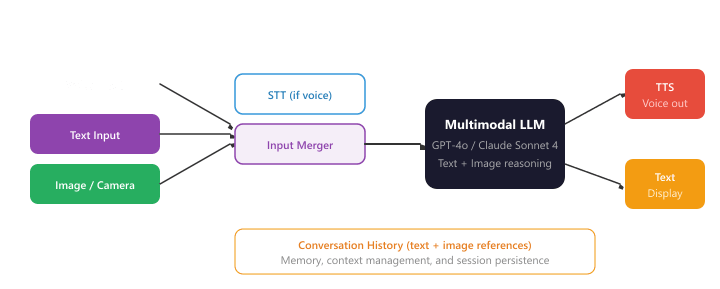
The voice AI landscape is evolving rapidly. OpenAI's GPT-4o natively processes audio without a separate STT step, significantly reducing latency and enabling the model to understand tone, emotion, and non-verbal cues. Google's Gemini 2.0 offers similar native multimodal processing. These "speech-native" models are beginning to replace the traditional STT/LLM/TTS pipeline with a single model that hears, thinks, and speaks. However, the component-based pipeline remains important for customization, cost control, and vendor flexibility.
39.7.2 Native Speech-to-Speech Models
A transformative shift in voice AI is the emergence of native speech-to-speech models that process audio directly, without decomposing the task into separate speech-to-text, language model reasoning, and text-to-speech stages. These models represent a fundamental architectural departure from the pipeline approach described above, and they promise lower latency, richer expressiveness, and a more natural conversational experience.
39.7.2.1 The Pipeline Problem
The traditional STT/LLM/TTS pipeline introduces several limitations that stem from its cascaded architecture. First, each stage adds latency: 200 to 500ms for STT transcription, 500 to 2000ms for LLM generation, and 200 to 500ms for TTS synthesis, yielding a total round-trip time of 1 to 3 seconds. Second, the text bottleneck between stages loses crucial information. When speech is transcribed to text, paralinguistic signals (tone, emotion, pacing, emphasis, hesitation) are discarded. The LLM reasons over flat text, unable to perceive that the user sounds frustrated, confused, or sarcastic. Third, the TTS stage must synthesize prosody from scratch, since it has no access to the original audio input. The result is responses that sound fluent but lack the contextual expressiveness of natural human conversation.
39.7.2.2 Architecture of Speech-Native Models
Native speech-to-speech models replace the three-stage pipeline with an end-to-end architecture that maps audio input directly to audio output. The core idea is to train a single model on speech tokens rather than (or in addition to) text tokens. Audio is encoded into discrete tokens using a neural audio codec (such as EnCodec or SoundStorm), producing a sequence of audio tokens that capture both linguistic content and acoustic properties. The model then generates output audio tokens autoregressively, which are decoded back into a waveform by the codec decoder.
Several architectural variants have emerged:
- Audio-in, audio-out softmax: The model's vocabulary includes both text and audio tokens. During training, it learns to map audio token sequences to audio token sequences, with text tokens serving as an intermediate representation that anchors semantic understanding. GPT-4o uses this approach, processing audio natively within the same transformer that handles text and images.
- Dual-stream architectures: Models like Moshi (by Kyutai) use parallel streams for the user's speech and the model's speech, enabling the model to listen and speak simultaneously. This addresses the turn-taking problem by allowing overlap and interruption without explicit endpointing logic. Moshi processes both streams at 12.5 Hz (one audio frame every 80ms), achieving 200ms theoretical latency.
- Codec language models: These models treat audio codec tokens as a "language" and apply standard language modeling techniques. The model generates multiple codebook levels in parallel or hierarchically: the first level captures semantic content, while subsequent levels add acoustic detail (timbre, pitch, room acoustics). This hierarchical generation enables high-quality audio output at interactive speeds.
39.7.2.3 Key Models and Platforms
OpenAI GPT-4o Realtime API. Released in late 2024, the Realtime API provides WebSocket-based access to GPT-4o's native audio capabilities. The model accepts audio input and produces audio output without intermediate text conversion, achieving round-trip latencies of 300 to 500ms (compared to 1 to 3 seconds for the pipeline approach). The API supports function calling during audio conversations, allowing the model to invoke tools while maintaining a natural voice interaction. Developers can configure voice presets, control turn detection sensitivity, and implement interruption handling through the WebSocket protocol.
Kyutai Moshi. Moshi is an open-weight speech-to-speech model that introduced the concept of full-duplex conversation. Unlike turn-based systems that alternate between listening and speaking, Moshi maintains simultaneous input and output audio streams. The architecture combines a text language model (Helium, a 7B parameter model) with an audio codec model (Mimi) that compresses speech to 1.1 kbps. Moshi achieves a theoretical latency of 160ms and a practical latency of 200ms, making it one of the fastest conversational AI systems. The model was released with open weights and can run on consumer GPUs.
Google Gemini Live. Gemini 2.0 Flash incorporates native audio understanding and generation as part of its multimodal architecture. Gemini Live enables real-time conversational interactions where the model can see (via camera), hear (via microphone), and respond with synthesized speech. The model natively understands audio context, including environmental sounds, multiple speakers, and emotional tone. Gemini Live's integration with Google's ecosystem (Search, Maps, Home) enables voice-driven agent interactions that span multiple modalities and data sources.
39.7.2.4 Pipeline vs. Native: Tradeoffs
| Dimension | STT/LLM/TTS Pipeline | Native Speech-to-Speech |
|---|---|---|
| Latency | 1,000 to 3,000ms round-trip | 200 to 500ms round-trip |
| Expressiveness | Limited by text bottleneck | Preserves tone, emotion, pacing |
| Interruption handling | Requires explicit VAD logic | Natural full-duplex support |
| Customization | Mix-and-match components | Limited to model's capabilities |
| Cost | Pay per component, can optimize | Single model cost, often higher |
| Transparency | Full transcript at each stage | Intermediate text may not exist |
| Language support | Broad (use best STT/TTS per language) | Limited to model's training languages |
Native speech-to-speech models are not simply faster versions of the pipeline approach; they represent a qualitative shift in what voice AI can do. By reasoning directly over audio, these models can understand and generate paralinguistic cues (sarcasm, emphasis, hesitation, emotional tone) that are fundamentally lost when speech is compressed into text. The practical impact is conversations that feel more natural, more responsive, and more human. However, the pipeline approach retains important advantages in customization, cost control, transparency, and language coverage. Most production systems in 2025 will benefit from a hybrid strategy: use native models for high-value, latency-sensitive interactions, and pipeline approaches for cost-sensitive or highly customized deployments.
39.7.2.5 Building with the Realtime API
Working with native speech-to-speech APIs requires a shift from REST-based request/response patterns to persistent WebSocket connections with streaming audio. The developer sends audio chunks as the user speaks, and the model streams audio chunks back as it generates a response. Function calls can be interleaved with audio output, and the model manages turn-taking internally.
Key implementation considerations include: audio format negotiation (PCM 16-bit at 24kHz is common), voice activity detection configuration (sensitivity thresholds, silence duration for turn detection), interruption policy (whether the model should stop speaking when the user starts), and session management (maintaining conversation state across audio turns). Frameworks like LiveKit and Pipecat are adding native support for these APIs, abstracting the WebSocket management and audio buffering into higher-level constructs.
39.7.3 Comparing Voice AI Orchestration Frameworks
| Framework | Type | Key Strengths | Best For |
|---|---|---|---|
| LiveKit Agents | Open-source framework | WebRTC transport, plugin system, self-hostable | Custom voice bots, self-hosted deployments |
| Pipecat | Open-source framework | Composable pipelines, multi-provider, Python-native | Rapid prototyping, flexible architectures |
| Vapi | Managed platform | Turnkey API, phone integration, low-code setup | Phone bots, rapid deployment |
| Retell AI | Managed platform | Telephony focus, call analytics, enterprise features | Call center automation, enterprise voice |
| Custom WebSocket | DIY | Full control, no vendor lock-in | Specialized requirements, existing infrastructure |
Who: A product manager and a speech engineer at a telehealth platform with 800 clinics
Situation: The clinic's text-based chatbot handled 60% of appointment bookings, but 35% of patients (especially older demographics) preferred calling. The company wanted a voice interface that shared the same backend logic as the text chatbot.
Problem: Speech-to-text errors transformed critical medical terms: "Metformin" became "met for men," "ENT" became "aunt," and "Dr. Patel" was transcribed as "Dr. Patell." These errors cascaded into incorrect slot filling and confused the booking system.
Dilemma: A custom ASR model fine-tuned on medical terms would fix accuracy but cost $150K and 4 months to develop. Using Whisper with a general model and adding post-processing was cheaper but risked missing edge cases in drug and provider names.
Decision: They used Whisper Large-v3 with a domain-specific vocabulary biasing list (2,000 provider names, 500 common medications, specialty terms). A lightweight correction model mapped common ASR errors to intended terms using an edit-distance lookup table.
How: The voice pipeline used WebSocket streaming for real-time transcription, with voice activity detection to segment utterances. Text-to-speech responses used a warm, measured voice profile selected from user testing with patients aged 55+. Latency was kept under 800ms turn-to-turn.
Result: Voice booking completion rate reached 74% (vs. 60% for text). Medical term recognition accuracy improved from 71% to 94% with vocabulary biasing. Patient satisfaction among the 55+ demographic increased from 3.1 to 4.3 out of 5.
Lesson: Voice interfaces for specialized domains need vocabulary biasing and error correction layers rather than general-purpose ASR alone. Testing with your actual user demographic (not just engineers) is critical for voice UX design.
Real-time speech-to-speech models (e.g., GPT-4o voice mode, Gemini Live) bypass the traditional ASR-LLM-TTS pipeline by processing audio tokens directly, reducing latency and preserving prosodic information. Multimodal conversation agents can see, hear, and respond with text, images, and audio in a unified dialogue flow. Emotion-aware voice interfaces detect user sentiment from vocal cues and adjust response tone accordingly. Research into ambient conversational AI is developing always-listening agents (with appropriate consent) that can proactively offer information or assistance based on overheard context, raising important privacy and consent questions.
Objective
Stand up a working voice agent that streams microphone audio over WebRTC into the OpenAI Realtime API, hears the model reply, plays it back, and measures end-to-end latency (time from end-of-user-utterance to start-of-model-audio). By the end, you will have a number on a sub-500 ms target and know which leg of the pipeline owns the lion's share of the delay.
Setup
You need an OpenAI key with Realtime API access, Python 3.11+, a headset, and the LiveKit Agents framework (it wraps the Realtime API in a clean event loop). LiveKit also provides a hosted SFU free tier so you do not need to run your own TURN server.
pip install livekit livekit-agents livekit-plugins-openai sounddeviceSteps
- Bootstrap a LiveKit room: Create a free LiveKit Cloud project, copy the URL and API key. Run the LiveKit playground (a web client) and verify your browser microphone connects.
- Write the agent: Build a Python entrypoint that uses
livekit.agents.multimodal.MultimodalAgentwrappingopenai.realtime.RealtimeModel. Configure server-side VAD withturn_detection={"type": "server_vad", "threshold": 0.5}. - Instrument latency: Subscribe to the
input_audio_buffer.speech_stoppedandresponse.audio.deltaevents from the Realtime API. Record timestamps and compute end-to-end latency on every turn. - Run a structured conversation: Read 10 short scripted prompts ("What is the capital of France?", "Spell mississippi", etc.) into the mic. Log the latency for each turn to a CSV.
- Profile the breakdown: Use the Realtime API event timestamps to attribute latency to VAD-end-detection, model thinking, first audio chunk, and network. Plot a stacked-bar chart.
Expected Output
End-to-end latency typically lands in the 350 to 700 ms range over residential Wi-Fi. Model thinking usually dominates (around 200 to 400 ms); VAD-end detection adds another 200 ms in the default config and is the easiest knob to tune.
Extension
Switch the VAD threshold from 0.5 to 0.3 and add a silence_duration_ms=200 override; measure the latency improvement and the false-cutoff rate.
- STT accuracy is the foundation: Every transcription error propagates through the entire pipeline. Choose STT providers based on your specific requirements: Deepgram for low-latency streaming, Whisper for multilingual batch processing, AssemblyAI for analytics-rich transcription.
- TTFB trumps total latency: In voice AI, time-to-first-byte is the most important latency metric. Streaming TTS that starts playing quickly creates a perception of responsiveness even if total generation takes longer.
- Orchestration is the hard part: The individual components (STT, LLM, TTS) are well-solved problems. The engineering challenge is orchestrating them with proper VAD, turn-taking, interruption handling, and transport. Frameworks like Pipecat and LiveKit Agents abstract much of this complexity.
- Voice requires different response design: Text responses do not translate well to voice. Keep responses short, avoid visual formatting, optimize for spoken delivery, and use conversational phrasing. Add filler phrases to indicate processing.
- Multimodal is more than voice: Vision-capable models enable powerful new interaction patterns where users share images, screenshots, or camera feeds. The conversation history must track both text and image references to maintain context across multimodal interactions.
Show Answer
Show Answer
Show Answer
Show Answer
Show Answer
Exercises
Describe the three main stages of a traditional voice AI pipeline. What is the bottleneck that determines end-to-end latency?
Show Answer
Three stages: (1) Speech-to-Text (STT): convert audio to text. (2) LLM processing: generate a text response. (3) Text-to-Speech (TTS): convert text response to audio. The LLM processing step is typically the latency bottleneck, though TTS quality/latency tradeoffs matter for user experience.
Explain why turn-taking is harder in voice conversations than in text chat. What is Voice Activity Detection (VAD) and how does it help?
Show Answer
In text, turn boundaries are explicit (user presses send). In voice, the system must detect when the user has finished speaking, handling pauses, filler words ("um"), and interruptions. VAD analyzes audio energy and spectral features to detect speech vs. silence, signaling when the user has stopped talking.
Compare streaming TTS (audio starts playing before generation completes) with batch TTS (wait for full generation). When is each appropriate?
Show Answer
Streaming: lower perceived latency, audio starts immediately, ideal for conversational interfaces. Batch: higher quality (the TTS can plan prosody for the entire utterance), better for pre-generated content like audiobooks. Use streaming for interactive conversations, batch for offline content generation.
How can a voice AI system detect user frustration from audio alone? What actions should the system take when frustration is detected?
Show Answer
Frustration signals in audio: increased volume, faster speech rate, rising pitch, sighing, repetition of keywords. Actions: acknowledge the frustration ("I understand this is frustrating"), simplify the response, offer to escalate to a human agent, and reduce response verbosity.
Explain how native speech-to-speech models (like GPT-4o voice) differ from the traditional STT-LLM-TTS pipeline. What advantages do they offer in terms of latency and expressiveness?
Show Answer
Native speech-to-speech models process audio tokens directly without intermediate text conversion. Advantages: lower latency (no STT/TTS overhead), preservation of prosody and emotion from input to output, ability to generate non-verbal sounds (laughter, sighs), and better handling of multilingual or code-switched speech.
Transcribe 5 audio clips using Whisper (local) and a cloud STT API. Compare accuracy, latency, and handling of background noise.
Generate speech from the same text using 3 different TTS services. Compare naturalness, pronunciation accuracy, and emotional expressiveness. Score each on a 1 to 5 scale.
Build a simple voice chatbot: record user speech, transcribe with Whisper, generate a response with an LLM, convert to speech with a TTS API, and play the audio. Measure the total round-trip latency.
Build a conversation system that accepts both text and image inputs. When the user uploads an image, use a vision model to describe it, then incorporate the description into the conversation context.
You have now surveyed the multimodal and framework landscape for voice and real-time AI. The next chapter walks through the production tooling used to ship these systems end to end. Continue with Section 40.1 (Chapter 40 opening).