A truly good conversation is one where both parties leave knowing something they did not know before.
Echo, Genuinely Curious AI Agent
Every conversational AI system makes fundamental architectural decisions that shape what it can and cannot do. A customer support bot that needs to look up orders, modify reservations, and process refunds requires a fundamentally different architecture than an open-ended creative writing partner. Understanding the spectrum from task-oriented to open-domain dialogue, and the hybrid approaches that combine both, is the starting point for building effective conversational systems. This section provides the architectural foundations that every subsequent section builds upon. The prompt engineering techniques from Section 12.1 and the RAG patterns from Chapter 32 are key building blocks for conversational systems.
Prerequisites
Conversational AI builds on the prompt engineering techniques from Section 12.1 and the LLM API patterns from Section 11.1. Understanding how RAG systems retrieve context (Section 32.1) will help you see how conversation systems integrate external knowledge. The dialogue management concepts here lay the foundation for the agent architectures in Section 26.1.
37.1.1 The Dialogue System Spectrum
The deep treatment of the perception--reasoning--action loop lives in Section 26.1. The discussion below focuses on the dialogue framing.
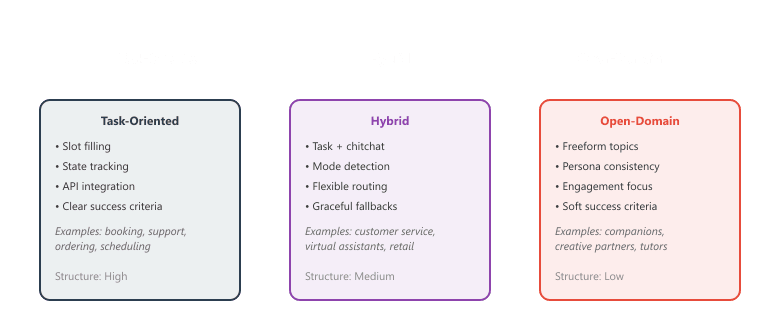
Conversational AI systems sit along a spectrum based on how constrained the conversation is. At one end, task-oriented dialogue systems guide users through structured workflows toward specific goals. At the other end, open-domain chatbots can discuss any topic without a predefined agenda. Most production systems fall somewhere between, combining structured task completion with freeform conversation.
Task-Oriented Dialogue
Task-oriented systems accomplish specific objectives: booking a flight, ordering food, troubleshooting a technical issue, or scheduling an appointment. These systems need to collect required information (slot filling), track the conversation state, call external APIs, and confirm actions with the user. Success is clear: did the user accomplish their goal?
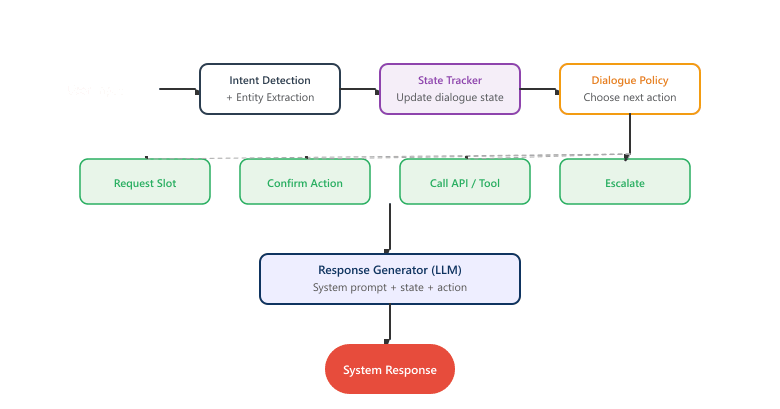
Traditional task-oriented systems relied on intent classification and named entity recognition (NER) to understand user inputs, combined with a dialogue policy that determined the next system action. With LLMs, much of this pipeline can be replaced by a single model that understands the task, tracks state, and generates responses, though the underlying concepts remain essential for system design.
Open-Domain Dialogue
Open-domain systems engage in freeform conversation without a specific task to complete. Success criteria are softer: was the conversation engaging, coherent, and interesting? These systems face unique challenges around topic management, persona consistency, factual grounding (often through RAG), and knowing when to say "I don't know" rather than hallucinating.
ELIZA, the 1966 chatbot that simulated a Rogerian therapist, worked entirely by pattern matching and rephrasing the user's own words as questions. Some users became emotionally attached to it anyway. Sixty years later, we have trillion-parameter models, and the core design challenge is still "how do we make the conversation feel natural?"
Because LLMs can follow conversations naturally, many developers assume they can skip explicit state tracking and let the model "figure it out" from the conversation history. This works in demos and breaks in production. When conversations grow long, the model loses track of which slots have been filled. When users backtrack ("actually, change the date to Friday"), the model silently misupdates its implicit state and the next turn quietly disagrees with the previous one. When you need to log, audit, or debug a conversation, there is no inspectable state object to examine; you read the transcript and guess. Even with frontier LLMs, an explicit state representation you can validate, persist, and inspect is non-negotiable for reliable task-oriented dialogue.
Hybrid Approaches
Most production chatbots are hybrid systems. A customer support bot might handle structured tasks (checking order status, processing returns) while also engaging in small talk, answering general questions about products, and gracefully handling out-of-scope requests. The architecture needs to detect when a user is pursuing a task versus chatting freely, and switch modes accordingly. maps the spectrum from task-oriented to open-domain systems.
37.1.2 Dialogue State Tracking
Always implement explicit state tracking for task-oriented flows, even when using powerful LLMs. Implicit tracking (relying on the model to remember what it collected from conversation history) works well in demos but breaks in production when conversations get long, users backtrack, or context windows overflow. A structured state object that you can log, inspect, and debug is worth the extra code.
Dialogue state tracking (DST) is the process of maintaining a structured representation of what has been discussed, what information has been collected, and what remains to be resolved. In task-oriented systems, the dialogue state typically consists of a set of slots (required pieces of information) and their values. For example, a restaurant booking system might track slots for cuisine type, party size, date, time, and location.
With LLMs, dialogue state tracking can be implemented either explicitly (maintaining a structured state object that gets updated each turn) or implicitly (relying on the model's ability to track state through the conversation history). Explicit tracking is more reliable and debuggable; implicit tracking is simpler but can lose information in long conversations.
Explicit State Tracking with LLMs
This snippet uses an LLM to extract and update dialogue state from the conversation history at each turn.
# implement update_dialogue_state, get_missing_slots
import json
from openai import OpenAI
client = OpenAI()
# Define the dialogue state schema
BOOKING_SCHEMA = {
    "cuisine": None,
    "party_size": None,
    "date": None,
    "time": None,
    "location": None,
    "special_requests": None
}
def update_dialogue_state(current_state: dict, user_message: str,
    conversation_history: list) -> dict:
    """Use an LLM to extract slot values from the user message."""
    system_prompt = """You are a dialogue state tracker for a restaurant booking system.
    Given the conversation history and the current user message, extract any new
    information that fills the following slots:
    - cuisine: type of food (e.g., Italian, Japanese, Mexican)
    - party_size: number of people (integer)
    - date: reservation date (YYYY-MM-DD format)
    - time: reservation time (HH:MM format)
    - location: city or neighborhood
    - special_requests: any dietary needs or preferences
    Return ONLY a JSON object with the slots that have new values.
    If no new information is found, return an empty JSON object {}.
    Do not include slots that were not mentioned."""
    response = client.chat.completions.create(
        model="gpt-4o",
        messages=[
        {"role": "system", "content": system_prompt},
        *conversation_history,
        {"role": "user", "content": user_message}
        ],
        response_format={"type": "json_object"},
        temperature=0.0
    )
    # Parse extracted slots
    new_slots = json.loads(response.choices[0].message.content)
    # Merge with current state (new values override old ones)
    updated_state = {**current_state, **new_slots}
    return updated_state
def get_missing_slots(state: dict) -> list:
    """Identify which required slots still need to be filled."""
    required = ["cuisine", "party_size", "date", "time"]
    return [slot for slot in required if state.get(slot) is None]
# Example usage
state = BOOKING_SCHEMA.copy()
history = []
# Simulate a conversation turn
user_msg = "I'd like to book a table for 4 people at an Italian place"
state = update_dialogue_state(state, user_msg, history)
missing = get_missing_slots(state)
print(f"State: {json.dumps(state, indent=2)}")
print(f"Missing: {missing}")Explicit state tracking (as shown above) adds an extra LLM call per turn but provides a structured, inspectable representation of what the system knows. Implicit tracking relies on the model reading the full conversation history each turn, which works well for short conversations but becomes unreliable as context grows. For production task-oriented systems, explicit state tracking is strongly recommended because it enables validation, logging, and recovery from errors.
37.1.3 Slot Filling and Turn Management
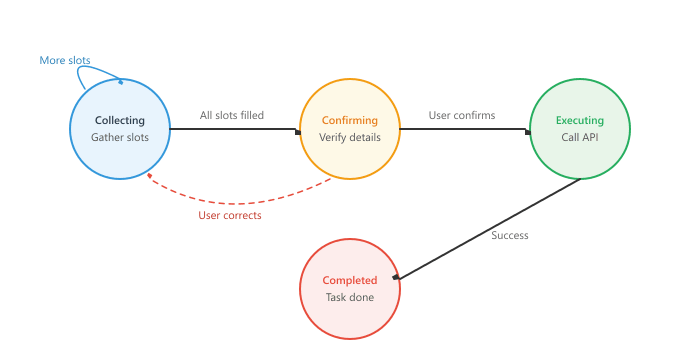
Once the dialogue state tracker identifies missing information, the system needs a strategy for collecting it. Slot filling prompts the user for missing values, validates responses, and handles corrections. Turn management decides when to ask for more information, when to confirm collected data, and when to execute the requested action.
Building a Slot-Filling Dialogue Manager
This snippet implements a slot-filling dialogue manager that tracks required fields and prompts the user for missing information.
from dataclasses import dataclass, field
from typing import Optional
from enum import Enum
class DialoguePhase(Enum):
    COLLECTING = "collecting"
    CONFIRMING = "confirming"
    EXECUTING = "executing"
    COMPLETED = "completed"
@dataclass
class DialogueManager:
    """Manages dialogue flow for task-oriented conversations."""
    state: dict = field(default_factory=lambda: {
            "cuisine": None, "party_size": None,
            "date": None, "time": None,
            "location": None, "special_requests": None
            })
    phase: DialoguePhase = DialoguePhase.COLLECTING
    required_slots: list = field(
        default_factory=lambda: ["cuisine", "party_size", "date", "time"]
        )
    turn_count: int = 0
def get_next_action(self) -> dict:
    """Determine the next system action based on current state."""
    self.turn_count += 1
    if self.phase == DialoguePhase.COLLECTING:
        missing = [s for s in self.required_slots
            if self.state.get(s) is None]
        if missing:
            return {
                "action": "request_slot",
                "slot": missing[0],
                "missing_count": len(missing)
                }
        else:
                self.phase = DialoguePhase.CONFIRMING
                return {"action": "confirm", "state": self.state}
        elif self.phase == DialoguePhase.CONFIRMING:
                    self.phase = DialoguePhase.EXECUTING
                    return {"action": "execute", "state": self.state}
                elif self.phase == DialoguePhase.EXECUTING:
                        self.phase = DialoguePhase.COMPLETED
                        return {"action": "complete", "state": self.state}
                        return {"action": "done"}
def update_slot(self, slot: str, value) -> None:
    """Update a single slot value with validation."""
    if slot == "party_size":
        value = int(value)
        if value < 1 or value > 20:
            raise ValueError("Party size must be between 1 and 20")
            self.state[slot] = value
def handle_correction(self, slot: str, new_value) -> None:
    """Handle user corrections to previously filled slots."""
    self.update_slot(slot, new_value)
    if self.phase == DialoguePhase.CONFIRMING:
        # Go back to collecting to re-confirm
        self.phase = DialoguePhase.COLLECTING
        # Slot-specific prompt templates
        SLOT_PROMPTS = {
            "cuisine": "What type of cuisine are you in the mood for?",
            "party_size": "How many people will be dining?",
            "date": "What date would you like to book? (e.g., March 15, next Friday)",
            "time": "What time works best for your reservation?",
            "location": "Any preferred neighborhood or area?",
}37.1.4 System Prompts as Behavioral Specification
In LLM-powered conversational systems, the system prompt serves as the primary mechanism for specifying agent behavior. A well-designed system prompt functions as a behavioral specification document that defines the agent's identity, capabilities, constraints, response style, and escalation procedures. Writing effective system prompts is one of the most impactful skills in conversational AI engineering.
Anatomy of a Production System Prompt
This snippet shows the structure of a production system prompt, including persona, instructions, guardrails, and output formatting.
# Implementation example
CUSTOMER_SUPPORT_PROMPT = """You are Aria, a customer support specialist for TechFlow,
an electronics retailer. Follow these guidelines precisely.
## Identity and Tone
- Professional yet warm; use the customer's name when available
- Empathetic but efficient; acknowledge frustration, then move to solutions
- Never sarcastic, condescending, or dismissive
- Use simple language; avoid technical jargon unless the customer uses it first
## Capabilities
You CAN:
- Look up order status using the check_order tool
- Process returns and exchanges for orders within 30 days
- Apply discount codes and promotional offers
- Update shipping addresses before an order ships
- Provide product information and recommendations
You CANNOT:
- Modify payment methods or access credit card information
- Override manager-level pricing decisions
- Make promises about delivery dates beyond what the system shows
- Discuss competitor products or pricing
## Response Format
- Keep responses under 3 sentences unless a detailed explanation is needed
- Use bullet points for multi-step instructions
- Always end with a clear next step or question
## Escalation Rules
Transfer to a human agent when:
- The customer requests a human three or more times
- The issue involves a billing dispute over $100
- The customer expresses extreme distress or uses threatening language
- You cannot resolve the issue within 5 exchanges
## Safety and Compliance
- Never share other customers' information
- Do not speculate about internal company policies
- If unsure about a policy, say "Let me check on that" and escalate
"""The most effective system prompts follow the principle of explicit enumeration over implicit understanding. Rather than saying "be helpful," specify exactly what helpful means in each scenario. Rather than saying "escalate when appropriate," list the precise conditions for escalation. LLMs follow explicit instructions more reliably than they infer implicit expectations. Figure 37.1.2a shows the complete dialogue pipeline from input to response.
37.1.5 Building a Complete Dialogue Pipeline
Bringing together state tracking, slot filling, policy decisions, and response generation, we can build a complete dialogue pipeline. The following implementation shows how these components connect in a production-style architecture.
from dataclasses import dataclass, field
from typing import Optional
from openai import OpenAI
import json
client = OpenAI()
@dataclass
class ConversationTurn:
    role: str
    content: str
    metadata: dict = field(default_factory=dict)
class DialoguePipeline:
    """End-to-end dialogue pipeline combining state tracking,
    policy, and generation."""
    def __init__(self, system_prompt: str, state_schema: dict):
        self.system_prompt = system_prompt
        self.state = state_schema.copy()
        self.history: list[ConversationTurn] = []
        self.max_history = 20 # Keep last N turns
    def process_turn(self, user_message: str) -> str:
        """Process one turn of dialogue and return the response."""
        # 1. Add user message to history
        self.history.append(
            ConversationTurn(role="user", content=user_message)
            )
        # 2. Update dialogue state
        self._update_state(user_message)
        # 3. Determine next action
        action = self._get_policy_action()
        # 4. Generate response using LLM
        response = self._generate_response(action)
        # 5. Add assistant response to history
        self.history.append(
            ConversationTurn(
            role="assistant", content=response,
            metadata={"action": action, "state": self.state.copy()}
            )
            )
        # 6. Trim history if needed
        if len(self.history) > self.max_history:
            self.history = self.history[-self.max_history:]
            return response
    def _update_state(self, user_message: str):
        """Extract slot values from user message."""
        messages = [
            {"role": "system", "content": (
            "Extract slot values from the user message. "
            f"Current state: {json.dumps(self.state)}. "
            "Return JSON with only newly mentioned slots."
            )},
            {"role": "user", "content": user_message}
            ]
        resp = client.chat.completions.create(
            model="gpt-4o-mini", messages=messages,
            response_format={"type": "json_object"}, temperature=0
            )
        new_values = json.loads(resp.choices[0].message.content)
        self.state.update(new_values)
    def _get_policy_action(self) -> dict:
        """Simple rule-based policy for next action."""
        required = ["cuisine", "party_size", "date", "time"]
        missing = [s for s in required if not self.state.get(s)]
        if missing:
            return {"type": "request", "slot": missing[0]}
            return {"type": "confirm"}
            def _generate_response(self, action: dict) -> str:
                """Generate natural language response for the chosen action."""
                context = (
                    f"\n\nCurrent booking state: {json.dumps(self.state)}"
                    f"\nNext action: {json.dumps(action)}"
                    )
                messages = [
                    {"role": "system",
                    "content": self.system_prompt + context},
                    *[{"role": t.role, "content": t.content}
                    for t in self.history[-10:]]
                    ]
                resp = client.chat.completions.create(
                    model="gpt-4o", messages=messages, temperature=0.7
                    )
return resp.choices[0].message.contentOnce your dialogue loop works, you need a UI: streaming tokens, message history, file uploads, and feedback buttons. The chainlit framework (v1.3+, 2024 to 2026) ships all of those out of the box. Decorate a handler with @cl.on_message, stream tokens with cl.Message().stream_token(), and the browser frontend, session store, and OAuth login are handled for you. Reach for it before reinventing a chat UI in React.
Show code
pip install chainlit openai
# app.py - run with: chainlit run app.py
import chainlit as cl
from openai import AsyncOpenAI

client = AsyncOpenAI()

@cl.on_chat_start
async def start():
    cl.user_session.set("history", [
        {"role": "system", "content": "You are a helpful assistant."}
    ])

@cl.on_message
async def main(message: cl.Message):
    history = cl.user_session.get("history")
    history.append({"role": "user", "content": message.content})

    msg = cl.Message(content="")
    stream = await client.chat.completions.create(
        model="gpt-4o-mini", messages=history, stream=True,
    )
    async for chunk in stream:
        token = chunk.choices[0].delta.content or ""
        await msg.stream_token(token)
    await msg.send()
history.append({"role": "assistant", "content": msg.content})When using LLMs for state extraction, always validate the extracted values against expected formats and ranges. An LLM might extract "party_size": "a couple" instead of "party_size": 2, or interpret "next Friday" differently depending on context. Add a validation layer between the LLM's output and your state update to catch these issues before they propagate through the pipeline. Figure 37.1.3a depicts the turn management state machine.
"A couple" is the entry that breaks every state-tracking pipeline ever shipped. Users say it because it is natural; LLMs extract it faithfully; downstream code expects an integer; the booking system gets party_size = "a couple"; and somewhere a Postgres column is now sad. The cure is a validator that knows "a couple" is 2, "a few" is 3 to 5, and "the whole gang" is "ask a follow-up question". Every production conv-AI team eventually maintains a private gazetteer of these idioms. Yours will too.
37.1.6 Comparing Dialogue Architectures
| Characteristic | Task-Oriented | Hybrid | Open-Domain |
|---|---|---|---|
| Goal | Complete specific task | Task completion + engagement | Engaging conversation |
| State Tracking | Explicit slot-based | Slots + conversation context | Implicit in context |
| Success Metric | Task completion rate | Completion + satisfaction | Engagement, coherence |
| Conversation Length | Short (5-15 turns) | Medium (10-30 turns) | Long (unlimited) |
| Error Recovery | Re-prompt for slot | Re-prompt or redirect | Topic change |
| System Prompt Size | Large (detailed rules) | Very large (rules + persona) | Medium (persona focus) |
| Tool Use | Essential | Common | Rare |
| Typical LLM Calls/Turn | 2-3 (NLU + policy + gen) | 2-4 (routing + NLU + gen) | 1 (direct generation) |
37.1.7 Routing in Hybrid Systems
Hybrid dialogue systems need to detect whether the user is pursuing a structured task or engaging in freeform conversation, and route accordingly. This routing decision can be implemented as a classifier that runs before the main dialogue pipeline.
from enum import Enum


class ConversationMode(Enum):
    TASK = "task"
    CHITCHAT = "chitchat"
    FAQ = "faq"
    ESCALATION = "escalation"


def classify_intent(user_message: str, context: list) -> ConversationMode:
    """Route user message to the appropriate dialogue mode."""
    classification_prompt = """Classify the user's intent into one of these categories:
- TASK: User wants to perform a specific action (book, order, cancel, modify, check status)
- CHITCHAT: Casual conversation, greetings, small talk, opinions
- FAQ: Asking a question about products, policies, or general information
- ESCALATION: Requesting a human agent, expressing frustration, threatening

Recent context: {context}
User message: {message}

Respond with exactly one word: TASK, CHITCHAT, FAQ, or ESCALATION"""
    response = client.chat.completions.create(
        model="gpt-4o-mini",
        messages=[{
            "role": "user",
            "content": classification_prompt.format(
                context=context[-3:] if context else "None",
                message=user_message
            )
        }],
        temperature=0,
        max_tokens=10
    )
    label = response.choices[0].message.content.strip().upper()
    return ConversationMode(label.lower())


class HybridDialogueRouter:
    """Routes conversations between task and freeform modes."""

    def __init__(self):
        self.task_pipeline = None      # TaskDialoguePipeline instance
        self.chitchat_pipeline = None  # OpenDomainPipeline instance
        self.faq_pipeline = None       # RAG-based Q&A
        self.active_mode = None

    def handle_message(self, user_message: str, history: list) -> str:
        mode = classify_intent(user_message, history)
        # If already in a task, stay in task mode unless explicitly leaving
        if (self.active_mode == ConversationMode.TASK
                and mode == ConversationMode.CHITCHAT):
            # Check if the task is still active
            if self.task_pipeline and not self.task_pipeline.is_complete:
                mode = ConversationMode.TASK  # Stay in task mode
        self.active_mode = mode
        if mode == ConversationMode.TASK:
            return self.task_pipeline.process(user_message)
        elif mode == ConversationMode.FAQ:
            return self.faq_pipeline.answer(user_message)
        elif mode == ConversationMode.ESCALATION:
            return self._handle_escalation(user_message)
        else:
            return self.chitchat_pipeline.respond(user_message)

    def _handle_escalation(self, message: str) -> str:
        return ("I understand your concern. Let me connect you with "
"a human agent who can help further. Please hold.")In production hybrid systems, implement "sticky" routing that keeps the user in the current mode until the task is complete or the user explicitly switches. Without this, a user might say "sounds good" (classified as chitchat) in the middle of a booking flow, causing the system to lose track of the ongoing task. Sticky routing ensures mode transitions are intentional.
In production chatbots, send only the last 5 to 10 turns of conversation history, not the entire session. Long histories waste tokens, increase latency, and can confuse the model when early context contradicts recent messages.
Who: A conversational AI engineer at a hospitality tech company serving 3,000 restaurants
Situation: Restaurants lost an estimated 15% of potential reservations because phone calls went unanswered during peak hours. The company wanted an AI phone agent to handle booking requests 24/7.
Problem: Early prototypes used a single LLM call per turn with the full conversation history, but the system frequently forgot details mentioned earlier (party size, dietary restrictions) or asked the same question twice.
Dilemma: A fully structured slot-filling approach (like traditional Dialogflow) handled standard bookings perfectly but broke down on open-ended requests ("something romantic for an anniversary, maybe with a view"). A pure LLM approach handled creativity but was unreliable at collecting all required fields.
Decision: They built a hybrid architecture: a state machine managed the booking flow (greeting, collecting slots, confirming, completing), while the LLM handled natural language understanding within each state and generated conversational responses.
How: Each state defined required slots and validation rules. The LLM extracted slot values from user utterances and generated contextual follow-up questions. A structured JSON schema enforced that all required fields were filled before transitioning to the confirmation state.
Result: The system completed 82% of reservation requests without human handoff. Average call duration was 90 seconds. Customer satisfaction scores matched human-handled calls (4.2 out of 5.0).
Lesson: Hybrid architectures that combine state machines for flow control with LLMs for language understanding offer the reliability of structured systems and the flexibility of generative models.
Structured dialogue generation with constrained decoding (Outlines, Instructor) ensures that conversational agents produce responses that conform to predefined schemas, enabling reliable slot filling and action invocation. Proactive dialogue agents are moving beyond reactive question-answering to systems that anticipate user needs, ask clarifying questions, and steer conversations toward productive outcomes. Multi-party conversation modeling addresses the challenge of group chats and meetings where multiple users interact simultaneously. Research into personality-consistent long-form dialogue is developing methods to maintain character coherence across hundreds of turns without persona drift.
- Architecture follows purpose: Task-oriented, open-domain, and hybrid systems have fundamentally different designs. Choose your architecture based on the specific use case rather than defaulting to the simplest approach.
- Explicit state beats implicit state: For task-oriented conversations, maintaining a structured dialogue state with validation is more reliable than relying on the LLM to track everything from conversation history alone.
- System prompts are behavioral specifications: Treat system prompts as engineering documents that define identity, capabilities, constraints, format, and escalation rules. Be explicit and exhaustive rather than vague and hopeful.
- Routing is critical for hybrid systems: The mechanism that detects whether a user is pursuing a task or chatting freely determines the entire downstream experience. Implement sticky routing to prevent accidental mode switches.
- Turn management is a state machine: Model the conversation flow as explicit phases (collecting, confirming, executing, completed) with defined transitions. This makes the system's behavior predictable and debuggable.
Show Answer
Show Answer
Show Answer
Show Answer
Show Answer
Exercises
Explain the difference between task-oriented, open-domain, and hybrid dialogue systems. Give an example of each.
Show Answer
Task-oriented: helps users complete a specific goal (e.g., booking a flight). Open-domain: can discuss any topic without a specific goal (e.g., ChatGPT). Hybrid: primarily task-oriented but can handle small talk and off-topic queries (e.g., a customer service bot that also handles chitchat).
A restaurant booking chatbot tracks slots for date, time, party_size, and cuisine. The user says "Actually, make that 6 people instead of 4." How should the system update its state? What if the user says "Never mind the time"?
Show Answer
Update party_size from 4 to 6 (the word "instead" signals a replacement, not an addition). For "never mind the time," clear the time slot and re-prompt for it. The system should handle both updates and deletions of slot values.
Compare rule-based slot filling (regex patterns) with LLM-based slot extraction. When would you use each approach?
Show Answer
Rule-based: fast, deterministic, good for structured inputs like phone numbers, dates, emails. LLM-based: handles ambiguity, paraphrasing, and complex slot types (e.g., "dietary restrictions"), but is slower and may hallucinate values. Use rules for well-defined formats, LLMs for free-form extraction.
Why does the principle of "explicit enumeration over implicit understanding" produce more reliable chatbot behavior? Give an example of an implicit instruction and its explicit equivalent.
Show Answer
LLMs follow literal instructions better than inferred intent. Implicit: "be professional." Explicit: "Always address the customer by name, never use slang or emojis, apologize if the wait time exceeds 2 minutes, and end each response with a follow-up question."
Design a routing layer for a customer service chatbot that handles billing, technical support, and general inquiries. How do you route ambiguous queries?
Show Answer
First-pass: keyword/intent classification. Second-pass: if confidence is below threshold, ask a clarifying question. Fallback: route to a general agent that can handle or re-route. Track routing accuracy over time and retrain the classifier on misrouted queries.
Build a simple task-oriented chatbot that books restaurant reservations. It should track dialogue state (date, time, party_size) and confirm before booking.
Implement an LLM-based dialogue state tracker: given the conversation history and a schema of expected slots, use the LLM to extract and update slot values after each turn.
Build an intent classifier that routes user messages to one of 5 categories (billing, technical, account, general, escalation) using an embedding model and cosine similarity against example utterances for each category.
Build a complete dialogue pipeline with intent detection, state tracking, policy logic (what to say next), and response generation. Test it with a 10-turn conversation scenario.
What Comes Next
In the next section, Section 37.2: Personas, Companionship & Creative Writing, we explore personas, companionship, and creative writing capabilities, designing conversational agents with distinctive voices.