"Every platform promises to make serving a 70B model easy. The one that wins is the one that admits it never gets easier, only different."
Deploy, Platform-Weary AI Agent
Part II's platform question shifts from "where do I run a 100-million-parameter model" to "where do I run a 70-billion-parameter LLM and still pay rent". This section catalogs the inference platforms (vLLM, the open-source PagedAttention server; TGI, Hugging Face's Text Generation Inference; TensorRT-LLM, NVIDIA's compiled-graph runtime; plus the managed services Together, Anyscale, and Modal) that have consolidated around the open-weights LLM stack in 2026, and it tells you which platform fits which workload shape, from local-laptop experimentation to multi-region agentic RAG production.
Prerequisites
This section assumes you understand inference-time compute costs from Section 9.1 and the KV cache mechanics from Section 9.4. Quantization basics from Section 10.1 will help you compare platforms on like-for-like throughput. The open-versus-closed model split (covered later in the book) provides additional context.
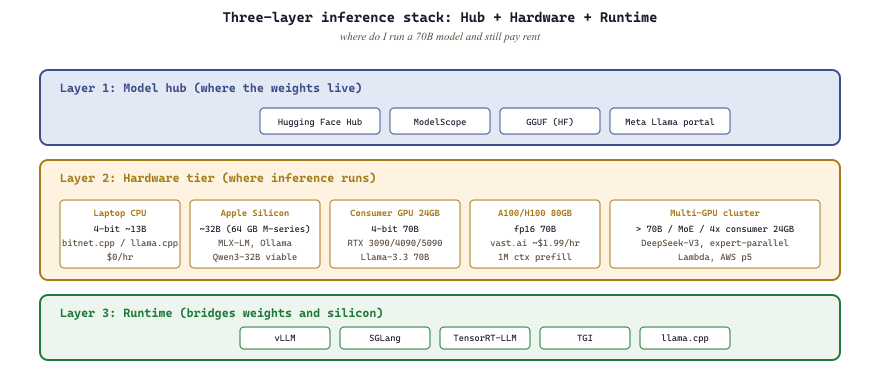
Part II's platform question shifts from "where do I run a 100-million-parameter model" to "where do I run a 70-billion-parameter model when I do not own an H100". The answer is a layered one: Hugging Face Hub hosts the weights, hardware (your laptop, your consumer GPU, your cloud rental) hosts the inference, and a runtime layer (vLLM, llama.cpp, transformers) bridges the two. This section maps the platforms; the runtime layer is Section 16.2's job in Part III.
10.6.1 The Hub layer
The phrase "renting an H100" hides a small economic miracle. The same hour of H100 time that costs $1.99 on Lambda spot can cost over $12 on the on-demand tier of a hyperscaler, with the underlying silicon being identical down to the serial number. The price gap is mostly insurance against your job being killed mid-batch.
Hugging Face Hub is the canonical model registry: every open-weight model in this chapter is downloadable through it. The Hub also hosts model cards, evaluation results, and discussions, which is most of the metadata you need to decide whether a model is worth your storage budget. HF Spaces hosts free Gradio / Streamlit demos for many models; useful for "try before you download".
Competing hubs exist but matter less in practice: ModelScope (Alibaba's hub, primary host for Qwen3 in China), llama.cpp's GGUF registry on Hugging Face (the quantization format used by Ollama and llama.cpp), and Meta's Llama portal for license-gated official releases.
10.6.2 The hardware tier you actually need
- Laptop CPU (no GPU): runs 4-bit quantized models up to ~13B parameters via llama.cpp or Ollama at usable interactive speeds. With bitnet.cpp and BitNet b1.58 weights (Microsoft, 2024), CPU-only inference of Llama-3-8B-class quality runs at chat-tier speeds with no GPU at all.
- Apple Silicon laptop (M2 / M3 / M4 with 32-64+ GB unified memory): now production-grade for models up to roughly 32B via MLX-LM and Ollama's MLX backend. The 64 GB M-series laptop is the cheapest way to run Qwen3-32B at usable speeds.
- Consumer GPU 6 to 12 GB (RTX 2060 / 3060 / 4060): 4-bit Llama-3.1 8B, Qwen3-7B, Mistral-7B in vLLM or llama.cpp.
- Consumer GPU 24 GB (RTX 3090 / 4090 / 5090): 4-bit 70B models like Llama-3.3 70B, fp16 7-13B models, mech-interp work on Pythia-12B.
- Single A100/H100 80 GB (cloud rental): fp16 70B inference, batch-1 prefill of 1M tokens with FlashAttention-3.
- Multi-GPU cluster: anything above 70B; covered in Appendix L. A popular 2025 pattern is MoE inference (DeepSeek-V3) with expert parallelism across 4x consumer 24 GB GPUs, sidestepping the H100 requirement.
10.6.3 Cloud GPU rentals
The cloud-rental market has consolidated around three tiers. The first is "managed GPU notebook" (Colab Pro, Lightning Studios): hourly billing, no SSH, easy to spin up. The second is "rented bare-metal GPU" (vast.ai, with the "verified hosts" filter to avoid the worst-quality nodes; RunPod; Lambda Labs): per-second billing, SSH, much cheaper per GPU-hour. The third is "serverless GPU" (Modal, Replicate): pay per request, no provisioning. Alternative high-throughput inference providers worth knowing alongside Groq are TensorWave (AMD MI300X) and SambaNova (RDU dataflow chips), both of which serve Llama / DeepSeek at competitive token / second. For Part II experimentation, vast.ai and RunPod are the right defaults; Modal and Replicate make more sense for production in Part III.
SGLang (sgl-project/sglang, 2024-25) emerged in 2025 as the third real inference runtime alongside vLLM and TGI. It often beats vLLM on structured-output and constrained-decoding workloads thanks to its RadixAttention prefix-cache design. Try it whenever your workload involves heavy JSON / regex constraints.
10.6.4 Comparing the rental platforms
| Platform | Type | Approx H100 $/hr | Best for |
|---|---|---|---|
| vast.ai | Spot bare-metal | $1.80-$3 | Cheapest H100 / A100 by far |
| RunPod | Bare-metal + serverless | $2.50-$4 | Reliable spot, S3 network volumes |
| Lambda Labs | Reserved GPUs | $2.50-$5 | Multi-node training, reservation |
| Modal | Serverless | per-second, $3.95 H100 | Batch jobs with no provisioning |
| AWS p5 | Hyperscaler reserved | $5-$8 | Enterprise, audited workloads |
vast.ai and RunPod spot instances are cheap because they can be reclaimed at any moment. For Part II inference work this is fine (restart the script). For multi-hour training, checkpoint to a network volume every few minutes or you will lose work to an interruption. The gpu2runpod and gpu2vast scaffolds in this book's scripts/ directory automate the resume-on-interrupt pattern.
vast.ai listings sometimes report GPUs that the container can't actually see (incompatible CUDA driver, misconfigured passthrough). Always run nvidia-smi and a one-batch torch forward pass before launching a long job. RunPod has egress charges that Modal does not, which often flips the cost comparison once you start moving checkpoints; budget egress as a line item.
For learning, "I can run this model whenever I want" beats "I can run a bigger model when I am willing to pay". A 4-bit Qwen3-7B on your laptop will teach you more about LLM behavior than three rented H100 sessions, simply because you will run more experiments. Reserve cloud GPUs for the few experiments where size of model is the variable you are studying.
10.6.5 Default recommendation
For Part II: own GPU first (6 GB or higher), Hugging Face Hub for downloads, vast.ai or RunPod when you need an A100 / H100, llama.cpp or vLLM as the runtime depending on whether you want CPU/Apple-Silicon support (llama.cpp) or GPU throughput (vLLM). Move to managed platforms (Modal, Replicate, Bedrock) only when your work transitions from "I am studying this" to "I am shipping this".
- The Hub plus hardware plus runtime is the three-layer stack: Hugging Face Hub hosts open weights, your laptop or rented GPU runs inference, and vLLM, llama.cpp, or transformers bridges them, with ModelScope and the Llama portal as secondary registries.
- Hardware tiers map cleanly to model sizes: 4-bit 13B on a laptop CPU with bitnet.cpp, 32B on a 64 GB M-series via MLX-LM, 4-bit 70B on a 24 GB consumer GPU, fp16 70B on a single A100 or H100, and multi-GPU clusters above that.
- Cloud GPU rentals consolidated into three tiers: managed notebooks (Colab Pro, Lightning Studios), bare-metal (vast.ai, RunPod, Lambda Labs), and serverless (Modal, Replicate), with TensorWave and SambaNova as high-throughput alternatives to Groq.
- SGLang earned a seat alongside vLLM and TGI: its RadixAttention prefix-cache design often beats vLLM on structured-output and constrained-decoding workloads with heavy JSON or regex constraints.
- Spot instances and listing accuracy are operational hazards: vast.ai and RunPod spot nodes can vanish mid-run, so checkpoint to a network volume often and verify nvidia-smi before trusting any listing.
- For learning, own hardware beats rented size: a 4-bit Qwen3-7B on your laptop teaches more about LLM behavior than three rented H100 sessions, because you will run more experiments per dollar.
What's Next?
In the next section, Section 10.7: Interpretability Tools & Transformers Deep Dive, we build on the material covered here.