"TGI, vLLM, and TensorRT-LLM all post the same throughput on the same benchmark. The one you pick will be decided by which one your on-call engineer can fix at 3 AM."
Pip, Library-Triage AI Agent
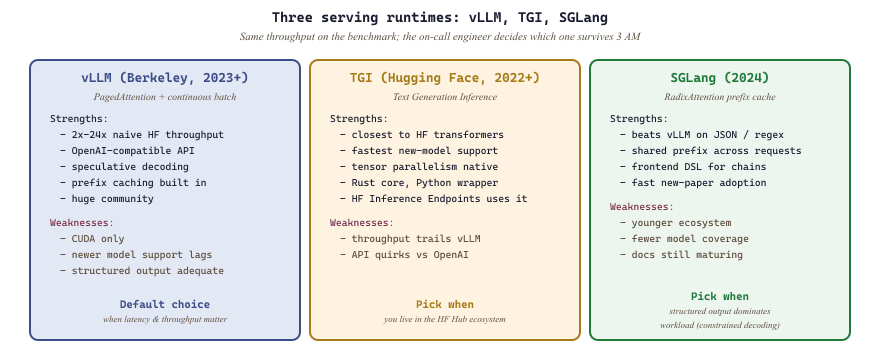
Section 10.7 covered the library catalog and the Hugging Face Transformers deep dive: the model-loading stack, tokenizer trio, and mech-interp tier (TransformerLens, nnsight, SAELens). This section covers the three production serving runtimes that turn those models into low-latency, high-throughput endpoints: vLLM with PagedAttention and continuous batching, Hugging Face Text Generation Inference (TGI), and SGLang.
vLLM Deep Dive
vLLM's PagedAttention took its name from the operating-system trick of paging virtual memory, repurposed for KV cache blocks. The original Berkeley paper opens with a screenshot of a Linux page table and an attention mask side by side, an analogy so direct it stuck and the term is now standard across every competing serving runtime.
vLLM is an open-source inference engine that achieves state-of-the-art serving throughput through PagedAttention and continuous batching (see Section 9.3 for the theory behind both techniques). Together, these deliver 2x to 24x higher throughput than naive Hugging Face inference. vLLM also exposes an OpenAI-compatible API, making it a drop-in replacement for cloud-hosted models.
Prerequisites
This section assumes the Hugging Face Transformers library deep dive from Section 10.7, the KV cache and PagedAttention theory from Section 9.3, and the LLM-serving platform shelf from Section 10.6. Familiarity with the OpenAI-compatible API patterns from Section 11.1 helps you read the deployment recipes.
For the theoretical foundations of PagedAttention, KV cache memory management, and continuous batching, see Section 9.3: KV cache & Memory Optimization. This section focuses on the practical setup and usage of vLLM as a serving engine.
1. Installing and Running vLLM
vLLM supports Linux with CUDA 11.8 or later. The simplest installation path is through pip. The following command installs vLLM along with its dependencies.
# Install vLLM (requires CUDA 11.8+ and Linux)
pip install vllmOnce installed, you can verify the installation and check which GPU devices are visible.
import vllm
print(f"vLLM version: {vllm.__version__}")

from vllm import LLM
# This will print available GPU information during model loading1.1 Offline (Batch) Inference
The simplest way to use vLLM is for offline batch inference, where you have a list of prompts and want
to generate completions as fast as possible. The LLM class handles model loading,
tokenization, and generation in a single interface.
from vllm import LLM, SamplingParams

# Load the model (downloads from HuggingFace on first run)
llm = LLM(model="meta-llama/Llama-3.1-8B-Instruct")

# Define sampling parameters
sampling_params = SamplingParams(
    temperature=0.7,
    top_p=0.9,
    max_tokens=256,
    stop=["\n\n"],          # Stop generation at double newline
    presence_penalty=0.1,
)

# Batch of prompts to process
prompts = [
    "Explain the difference between TCP and UDP in one paragraph.",
    "Write a Python function to calculate the Fibonacci sequence.",
    "What are the three laws of thermodynamics?",
    "Translate 'Hello, how are you?' into French, German, and Japanese.",
]

# Generate completions (vLLM handles batching internally)
outputs = llm.generate(prompts, sampling_params)

for output in outputs:
    prompt = output.prompt
    generated = output.outputs[0].text
    print(f"Prompt:  {prompt[:60]}...")
    print(f"Output:  {generated[:200]}")
    print()
Behind the scenes, vLLM applies PagedAttention and continuous batching to process all four prompts
concurrently, fully utilizing the GPU. On an A100 GPU, this batch completes roughly 8x faster than
sequential model.generate() calls.
1.2 Sampling Parameters
The SamplingParams class provides fine-grained control over text generation. The table
below summarizes the most commonly used parameters.
| Parameter | Default | Description |
|---|---|---|
temperature | 1.0 | Controls randomness; lower values produce more deterministic output |
top_p | 1.0 | Nucleus sampling; considers tokens whose cumulative probability reaches this threshold |
top_k | -1 | Limits sampling to top-k most probable tokens (-1 disables) |
max_tokens | 16 | Maximum number of tokens to generate |
stop | None | List of strings that trigger generation to stop |
presence_penalty | 0.0 | Penalizes tokens that have already appeared |
frequency_penalty | 0.0 | Penalizes tokens proportional to their frequency |
best_of | 1 | Generates N candidates and returns the one with highest log-probability |
SamplingParams class.2. The OpenAI-Compatible Server
vLLM ships with a built-in HTTP server that mirrors the OpenAI Chat Completions and Completions API.
This means you can point any application that uses the OpenAI Python SDK at your local vLLM instance by
changing the base_url. No other code changes are needed.
To start the server, use the vllm serve CLI command.
# Start the OpenAI-compatible server
vllm serve meta-llama/Llama-3.1-8B-Instruct \
    --host 0.0.0.0 \
    --port 8000 \
    --max-model-len 4096 \
    --gpu-memory-utilization 0.90 \
--dtype autoOnce the server is running, you can send requests using curl or any HTTP client. The following example demonstrates using the OpenAI Python SDK to chat with the locally hosted model.
from openai import OpenAI

# Point the OpenAI client at the local vLLM server
client = OpenAI(
    base_url="http://localhost:8000/v1",
    api_key="not-needed",  # vLLM does not require an API key by default
)

# Use the standard Chat Completions API
response = client.chat.completions.create(
    model="meta-llama/Llama-3.1-8B-Instruct",
    messages=[
        {"role": "system", "content": "You are a helpful coding assistant."},
        {"role": "user", "content": "Write a binary search function in Python."},
    ],
    temperature=0.3,
    max_tokens=512,
)

print(response.choices[0].message.content)Streaming is also supported. Replace client.chat.completions.create(...) with
client.chat.completions.create(..., stream=True) and iterate over the response chunks.
This gives users a token-by-token experience identical to the OpenAI API.
3. Model Loading and Configuration
vLLM can load models from Hugging Face Hub, local directories, or S3-compatible storage. The
LLM constructor and the vllm serve CLI accept several important
configuration flags that control memory usage and performance.
from vllm import LLM

# Load a quantized model with tensor parallelism across 2 GPUs
llm = LLM(
    model="TheBloke/Llama-2-70B-Chat-GPTQ",
    quantization="gptq",
    tensor_parallel_size=2,        # Shard across 2 GPUs
    gpu_memory_utilization=0.85,   # Reserve 15% for overhead
    max_model_len=4096,            # Maximum context length
    dtype="float16",               # Use FP16 for non-quantized layers
    trust_remote_code=True,        # Required for some custom models
)| Flag | Description |
|---|---|
gpu_memory_utilization | Fraction of GPU memory to use for model weights and KV cache (0.0 to 1.0) |
tensor_parallel_size | Number of GPUs for tensor parallelism; the model is sharded across them |
max_model_len | Maximum sequence length; lower values free memory for larger batches |
quantization | Quantization method: "gptq", "awq", "squeezellm", or None |
enforce_eager | Disable CUDA graph capture; useful for debugging or variable-length workloads |
swap_space | CPU swap space in GB for offloading KV cache when GPU memory is exhausted |
Setting gpu_memory_utilization too high (above 0.95) can cause out-of-memory errors under bursty load, because the scheduler may attempt to admit more requests than the remaining KV cache space can accommodate. A value of 0.85 to 0.90 provides a good balance between throughput and stability.
4. Benchmarking vLLM Throughput
vLLM includes a built-in benchmarking script that measures tokens per second for both prefill (prompt processing) and decode (token generation) phases. The following command benchmarks the server with synthetic requests.
# Benchmark with 100 requests, input length 512, output length 128
python -m vllm.entrypoints.openai.api_server &

python -m vllm.benchmark_serving \
    --backend vllm \
    --model meta-llama/Llama-3.1-8B-Instruct \
    --num-prompts 100 \
    --input-len 512 \
    --output-len 128
Typical results on a single A100-80GB GPU for Llama-3.1 8B show throughput of approximately 2,000 to
3,500 output tokens per second with 32 concurrent requests, depending on sequence lengths and
quantization settings. This compares to roughly 150 to 300 tokens per second with naive
Hugging Face generate().
Summary
vLLM transforms LLM serving into a high-throughput system by combining PagedAttention and continuous batching (both covered in depth in Section 9.3) with an OpenAI-compatible API that makes it a drop-in replacement for cloud-hosted models, enabling local inference with zero code changes. In the next section, we examine Hugging Face's Text Generation Inference (TGI), which takes a different architectural approach to the same serving challenge.
Text Generation Inference (TGI)
Text Generation Inference (TGI) is Hugging Face's production-grade inference server, built in Rust and Python for maximum throughput and reliability. TGI provides Docker-first deployment, built-in quantization support, token streaming, and a battle-tested router that handles concurrent requests efficiently. If you are already invested in the Hugging Face ecosystem, TGI offers the shortest path from a model on the Hub to a production API endpoint.
For a comparative analysis of TGI against vLLM, SGLang, TensorRT-LLM, and other frameworks (including benchmarking methodology and decision criteria), see Section 9.5: Serving Infrastructure. This section focuses on TGI-specific deployment recipes and configuration.
1. What Is TGI and When Should You Use It?
Text Generation Inference (TGI) is an open-source serving framework developed by Hugging Face, purpose-built for deploying large language models. Unlike general-purpose model servers such as Triton or TorchServe, TGI is specialized for autoregressive text generation. Its architecture consists of two main components: a Rust-based router that handles HTTP connections, request queuing, and token streaming, and a Python model server that runs the actual inference on GPU using custom CUDA kernels.
TGI is an excellent choice when you need a production-ready serving solution with minimal configuration, when your models are hosted on Hugging Face Hub, or when you want built-in support for features like watermarking, grammar-constrained generation, and speculative decoding. It powers Hugging Face's own Inference Endpoints service, which means it has been tested at significant scale.
TGI's Rust router is a critical architectural decision. By handling all I/O, connection management, and request scheduling in Rust, TGI avoids Python's GIL bottleneck for the networking layer. The Python process only handles the GPU-bound inference work, where the GIL is released during CUDA kernel execution anyway.
2. Docker Deployment
The recommended way to deploy TGI is through its official Docker image. This bundles all CUDA dependencies, the Rust router, and the Python model server into a single container. The following command pulls and runs TGI with a Llama model.
# Pull and run TGI with a Llama 3.1 8B model
docker run --gpus all --shm-size 1g -p 8080:80 \
    -v /data:/data \
    ghcr.io/huggingface/text-generation-inference:latest \
    --model-id meta-llama/Llama-3.1-8B-Instruct \
    --max-input-tokens 2048 \
    --max-total-tokens 4096 \
    --max-batch-prefill-tokens 4096
Let us break down the key parts of this command. The --gpus all flag exposes all host GPUs
to the container. The --shm-size 1g flag increases shared memory, which is required for
PyTorch's data loader workers. The -v /data:/data mount provides persistent storage for
downloaded model weights so they survive container restarts.
2.1 Docker Compose for Persistent Deployments
For production deployments, a Docker Compose file provides a declarative and reproducible setup. The following configuration defines a TGI service with health checks and automatic restarts.
# docker-compose.yml
version: "3.9"

services:
  tgi:
    image: ghcr.io/huggingface/text-generation-inference:latest
    ports:
      - "8080:80"
    volumes:
      - model-cache:/data
    environment:
      - HUGGING_FACE_HUB_TOKEN=${HF_TOKEN}
    deploy:
      resources:
        reservations:
          devices:
            - driver: nvidia
              count: all
              capabilities: [gpu]
    shm_size: "1g"
    command: >
      --model-id meta-llama/Llama-3.1-8B-Instruct
      --quantize awq
      --max-input-tokens 2048
      --max-total-tokens 4096
      --max-concurrent-requests 128
    healthcheck:
      test: ["CMD", "curl", "-f", "http://localhost:80/health"]
      interval: 30s
      timeout: 10s
      retries: 3
    restart: unless-stopped

volumes:
model-cache:3. Environment Variables and Configuration
TGI accepts configuration through both command-line arguments and environment variables. Environment
variables are prefixed with TGI_ or use Hugging Face-standard names. The table below lists
the most important configuration options.
| CLI Flag / Env Variable | Default | Description |
|---|---|---|
--model-id | (required) | Hugging Face model ID or local path |
--quantize | None | Quantization method: awq, gptq, bitsandbytes, eetq |
--max-input-tokens | 1024 | Maximum allowed input prompt length |
--max-total-tokens | 2048 | Maximum combined input + output token count |
--max-batch-prefill-tokens | 4096 | Maximum tokens processed in a single prefill step |
--max-concurrent-requests | 128 | Maximum number of simultaneous requests the router accepts |
--num-shard | 1 | Number of GPU shards for tensor parallelism |
HUGGING_FACE_HUB_TOKEN | None | Token for accessing gated models on Hugging Face Hub |
The --max-batch-prefill-tokens parameter directly affects GPU memory usage during the prompt processing phase. Setting it too high can cause out-of-memory errors, especially on GPUs with less than 40 GB of VRAM. Start with 4096 and increase gradually while monitoring memory usage.
4. Quantization Options
TGI supports several quantization backends that reduce model memory footprint and often increase throughput. You select the quantization method at startup; TGI then loads the model weights in the specified format. The model must have been pre-quantized in the chosen format (with the exception of bitsandbytes, which quantizes on the fly).
# Run with AWQ quantization (model must be pre-quantized)
docker run --gpus all --shm-size 1g -p 8080:80 \
    -v /data:/data \
    ghcr.io/huggingface/text-generation-inference:latest \
    --model-id TheBloke/Llama-2-13B-Chat-AWQ \
    --quantize awq

# Run with bitsandbytes 4-bit quantization (quantizes on the fly)
docker run --gpus all --shm-size 1g -p 8080:80 \
    -v /data:/data \
    ghcr.io/huggingface/text-generation-inference:latest \
    --model-id meta-llama/Llama-3.1-8B-Instruct \
--quantize bitsandbytes-nf45. Making Requests: Streaming and Non-Streaming
TGI exposes two primary HTTP endpoints: /generate for standard request/response and
/generate_stream for server-sent events (SSE) streaming. It also provides an
OpenAI-compatible endpoint at /v1/chat/completions. The following Python examples
demonstrate both modes.
import requests

TGI_URL = "http://localhost:8080"

# Non-streaming request
response = requests.post(
    f"{TGI_URL}/generate",
    json={
        "inputs": "What is the capital of France?",
        "parameters": {
            "max_new_tokens": 100,
            "temperature": 0.7,
            "top_p": 0.9,
            "do_sample": True,
        },
    },
)
result = response.json()
print(result["generated_text"])For applications that benefit from displaying tokens as they are generated (chatbots, for example), streaming provides a much better user experience. TGI uses server-sent events for its streaming endpoint.
import requests
import json

# Streaming request using server-sent events
response = requests.post(
    f"{TGI_URL}/generate_stream",
    json={
        "inputs": "Explain gradient descent in simple terms.",
        "parameters": {
            "max_new_tokens": 200,
            "temperature": 0.5,
        },
    },
    stream=True,
)

for line in response.iter_lines():
    if line:
        decoded = line.decode("utf-8")
        if decoded.startswith("data:"):
            token_data = json.loads(decoded[5:])
            # Each chunk contains a single token
            if not token_data.get("details"):
                print(token_data["token"]["text"], end="", flush=True)

print() # Final newline6. Health Checks and Monitoring
TGI provides health and metrics endpoints that integrate with standard monitoring stacks. The
/health endpoint returns HTTP 200 when the model is loaded and ready to serve. The
/metrics endpoint exposes Prometheus-format metrics for throughput, latency, and queue
depth.
# Check if TGI is healthy
curl http://localhost:8080/health

# Fetch Prometheus metrics
curl http://localhost:8080/metrics

# Key metrics to monitor:
#   tgi_request_duration_seconds    - End-to-end request latency
#   tgi_request_count               - Total requests processed
#   tgi_queue_size                  - Current queue depth
# tgi_batch_current_size - Active batch sizeSet up a Grafana dashboard that tracks tgi_queue_size and tgi_batch_current_size over time. When the queue consistently exceeds your --max-concurrent-requests limit, it is time to scale horizontally by adding more TGI replicas behind a load balancer.
7. Router Configuration and Batching Behavior
The Rust router is the entry point for all requests. It maintains a priority queue, groups requests into batches for the model server, and handles backpressure when the system is overloaded. Several parameters control how aggressively the router batches requests.
| Parameter | Effect |
|---|---|
--max-waiting-tokens | Maximum tokens a request can wait in queue before being scheduled; lower values reduce latency, higher values improve throughput |
--waiting-served-ratio | Ratio of waiting vs. running tokens; controls how aggressively new requests are admitted to the batch |
--max-batch-size | Hard limit on batch size; useful for controlling memory usage on smaller GPUs |
The router also supports request prioritization and token budgets. When a request exceeds the
--max-input-tokens limit, TGI returns an HTTP 422 error immediately rather than
attempting to process and fail partway through. This fail-fast behavior prevents wasted GPU cycles.
Summary
TGI provides a Docker-native, production-ready serving solution for LLMs with a clean separation between its Rust networking layer and Python inference layer. Its built-in quantization support, streaming endpoints, health checks, and Prometheus metrics make it well-suited for deployment behind container orchestration systems like Kubernetes. In the next section, we explore SGLang, which takes a fundamentally different approach by providing a programming language for structured LLM interactions.
SGLang
SGLang (Structured Generation Language) is a serving framework and programming DSL developed at UC Berkeley that introduces two powerful ideas: a frontend language for composing complex LLM programs with control flow, branching, and constraints; and RadixAttention, a backend optimization that automatically reuses KV cache across requests sharing common prefixes. Together, these make SGLang particularly well-suited for agentic workflows, structured JSON extraction, and any workload involving repeated prompts with varying suffixes.
1. Why Another Serving Framework?
vLLM and TGI excel at serving single-turn completions efficiently. However, many real-world LLM applications involve multi-turn interactions, branching logic (generate multiple candidates and pick the best), and structured output constraints (the model must produce valid JSON matching a schema). These patterns require sending many related requests to the server, and traditional serving frameworks treat each request independently, recomputing the KV cache from scratch even when requests share long common prefixes.
SGLang addresses this with two innovations. The frontend DSL lets you express complex LLM programs as Python functions with primitives for generation, selection, branching, and constraints. The RadixAttention backend automatically detects and reuses shared prefixes across requests (see Section 9.3 for the theory). For workloads with high prefix overlap (such as few-shot prompting, retrieval-augmented generation, or multi-turn chat), this can yield 3x to 5x speedups.
For the theoretical foundations of prefix caching, RadixAttention, and how they compare to PagedAttention's block-level sharing, see Section 9.3: KV cache & Memory Optimization (subsection 5: Prefix Caching and RadixAttention). This section focuses on the practical SGLang DSL and deployment recipes.
2. Installing SGLang
SGLang can be installed from pip. It requires a CUDA-capable GPU and Python 3.9 or later.
# Install SGLang with all dependencies
pip install "sglang[all]"

# Or install just the frontend (for connecting to a remote SGLang server)
pip install sglang3. The SGLang Frontend DSL
The SGLang frontend provides Python primitives for constructing LLM programs. The key building blocks
are gen() for text generation, select() for constrained choice among options,
and fork() for parallel branching. The following example demonstrates a structured
extraction task.
import sglang as sgl

@sgl.function
def extract_entity(s, text):
    s += sgl.system("You are a precise entity extraction system.")
    s += sgl.user(f"Extract information from this text: {text}")
    s += sgl.assistant(
        "Entity name: " + sgl.gen("name", max_tokens=50, stop="\n")
        + "\nEntity type: " + sgl.select("type", [
            "Person", "Organization", "Location", "Product", "Event"
        ])
        + "\nConfidence: " + sgl.select("confidence", [
            "High", "Medium", "Low"
        ])
    )

# Run the function
runtime = sgl.Runtime(model_path="meta-llama/Llama-3.1-8B-Instruct")
sgl.set_default_backend(runtime)

state = extract_entity.run(text="Apple Inc. announced the new iPhone 16 at their Cupertino headquarters.")

print(f"Name: {state['name']}")
print(f"Type: {state['type']}")
print(f"Confidence: {state['confidence']}")

runtime.shutdown()
Notice how sgl.select() constrains the model to choose from a predefined list rather
than generating free-form text. SGLang implements this efficiently by evaluating the log-probabilities
of each option in parallel, choosing the one with the highest likelihood. This is both faster and more
reliable than prompting the model to pick from a list and then parsing the output.
3.1 Branching with fork()
The fork() primitive creates parallel branches that share the same prefix KV cache. This
is useful for generating multiple candidates and selecting the best one, implementing tree-of-thought
reasoning, or running A/B tests on different continuations.
@sgl.function
def best_of_n(s, question, n=3):
    s += sgl.system("You are a helpful assistant. Think step by step.")
    s += sgl.user(question)

    # Fork into n parallel branches (all share the prefix KV cache)
    forks = s.fork(n)
    for i, f in enumerate(forks):
        f += sgl.assistant(sgl.gen(f"answer_{i}", max_tokens=300, temperature=0.8))

    # Collect all answers
    answers = [forks[i][f"answer_{i}"] for i in range(n)]
return answers4. Structured Output with Constraints
One of SGLang's strongest features is its ability to constrain generation to match a regular expression or JSON schema. This guarantees that the model output is syntactically valid, eliminating the need for retry loops or post-processing. The constraint is applied at the token level during decoding using a finite-state machine.
@sgl.function
def generate_json_record(s, description):
    s += sgl.system("You extract structured data as JSON.")
    s += sgl.user(f"Extract a person record from: {description}")
    s += sgl.assistant(
        sgl.gen(
            "json_output",
            max_tokens=200,
            regex=r'\{"name": "[^"]+", "age": \d+, "city": "[^"]+"\}',
        )
    )

state = generate_json_record.run(
    description="John Smith is a 34-year-old software engineer living in Seattle."
)

import json
record = json.loads(state["json_output"])
print(record)
# Output: {"name": "John Smith", "age": 34, "city": "Seattle"}For complex JSON schemas, use SGLang's json_schema parameter instead of writing regexes by hand. Pass a Pydantic model or a JSON Schema dictionary, and SGLang will compile it into an efficient token-level constraint automatically.
5. RadixAttention in Practice
For the theory behind RadixAttention (radix tree data structures, LRU eviction, and comparison to vLLM's block-level sharing), see Section 9.3: KV cache & Memory Optimization. Below we focus on the practical impact for SGLang workloads.
RadixAttention is the backend optimization that makes SGLang's frontend primitives fast. When a new request arrives, the SGLang server walks its radix tree of cached KV states to find the longest matching prefix and reuses those states, avoiding redundant computation.
Consider a customer support chatbot that includes a 500-token system prompt with company policies and 5 few-shot examples. Without RadixAttention, each of 100 concurrent users would need their own copy of the system prompt's KV cache (50,000 tokens worth of KV state). With RadixAttention, a single copy is shared, freeing GPU memory for 3x more concurrent users.
6. Server Deployment
SGLang provides a server mode that exposes both its native API and an OpenAI-compatible API. The server can be launched from the command line.
# Launch the SGLang server
python -m sglang.launch_server \
    --model-path meta-llama/Llama-3.1-8B-Instruct \
    --port 30000 \
    --tp 1 \
--mem-fraction-static 0.85Once the server is running, you can connect to it using the SGLang client or any OpenAI-compatible client library.
from openai import OpenAI

# Connect to SGLang's OpenAI-compatible endpoint
client = OpenAI(base_url="http://localhost:30000/v1", api_key="none")

response = client.chat.completions.create(
    model="meta-llama/Llama-3.1-8B-Instruct",
    messages=[
        {"role": "system", "content": "You are a helpful assistant."},
        {"role": "user", "content": "Explain RadixAttention in two sentences."},
    ],
    temperature=0.3,
    max_tokens=100,
)
print(response.choices[0].message.content)7. Batch Inference with SGLang
For offline batch processing, SGLang provides efficient parallel execution that automatically exploits prefix sharing across the batch. The following example processes a batch of classification tasks.
@sgl.function
def classify_sentiment(s, review):
    s += sgl.system("Classify the sentiment of the following review.")
    s += sgl.user(review)
    s += sgl.assistant(
        "Sentiment: " + sgl.select("sentiment", ["Positive", "Negative", "Neutral"])
    )

# Process a batch of reviews
reviews = [
    "This product exceeded my expectations! Highly recommend.",
    "Terrible quality. Broke after one day.",
    "It works fine. Nothing special, nothing terrible.",
    "Best purchase I've made all year!",
    "Would not buy again. Very disappointing.",
]

# Run batch (SGLang automatically shares the system prompt KV cache)
states = classify_sentiment.run_batch(
    [{"review": r} for r in reviews],
    progress_bar=True,
)

for review, state in zip(reviews, states):
print(f"{state['sentiment']:>10} | {review[:60]}")Summary
SGLang bridges the gap between serving infrastructure and application logic by providing a Python DSL for composing complex LLM programs. Its RadixAttention backend automatically detects and reuses shared prefixes across requests, delivering significant speedups for workloads with prefix overlap. The constrained generation features (regex, JSON schema, select) guarantee structurally valid outputs without post-processing. In the next section, we examine the quantization techniques that reduce model size and increase throughput across all three serving frameworks.
What's Next?
In the next section, Section 10.9: Datasets & Benchmarks, we build on the material covered here.