The base models you fine-tune in Part IV are the open-weights frontier from Chapter 12, with one wrinkle: not every model in that list is a good fine-tuning target. Some checkpoints were released with permissive licenses; others have license riders that affect commercial use. This section names the practical defaults.
19.5.1 Base models for fine-tuning
- Llama-3.3 70B (Meta, Dec 2024) and the Llama 4 family (Meta, 2025-Q2: Scout, Maverick, with Behemoth previewed) are the open-weights flagship line from Meta's GenAI team and remain the most-fine-tuned family by a wide margin. Their objective for fine-tuners is to provide a battle-tested architecture with extensive tooling support (axolotl recipes, vLLM kernels, GGUF quantizations) so you can focus on the data, which matters because most published recipes assume Llama as the base. The core concept is a dense decoder-only transformer (Llama-3.3) or MoE (Llama 4 Scout / Maverick) with grouped-query attention and a 128K+ context; pick Llama-3.3 8B-class for single-GPU work, 70B for 8x H100 fine-tunes, Llama 4 Scout for state-of-the-art open quality. Check the Llama Community License's 700M MAU clause and the 2025 acceptable-use updates; for almost every developer, it is functionally permissive, but enterprise legal teams want it documented.
- Qwen3 (Alibaba, 2025; 0.5B-235B) is the Qwen team's third-generation open release covering a wider size range than Llama and shipping Apache 2.0 for most sizes. Its objective is to be the open default for multilingual workloads, with notably stronger Chinese, Japanese, Korean, and Arabic coverage than the Llama family, which matters when your application is not English-only. The core concept is a dense + MoE family (235B-A22B is the active MoE flagship) sharing the same tokenizer and template across sizes. Pick Qwen3 for multilingual use cases or when you want sizes Llama does not publish (1.5B, 4B, 14B, 32B fill important gaps).
- Mistral / Mixtral (Mistral AI, 2023+) is the French open-weights lineage that introduced sliding-window attention (7B) and competitive mixture-of-experts (Mixtral 8x7B, 8x22B). Its objective is to ship Apache 2.0 weights for small-to-mid models with above-class performance, which matters when your downstream license demands maximum permissiveness. The core concept for fine-tuners is that Mistral 7B's tokenizer and template are well-supported in TRL and the model fits comfortably in 24 GB for QLoRA. Pick Mistral 7B as the single-GPU LoRA default; for production at scale, Mistral Large requires a separate commercial license.
- Gemma 3 (Google DeepMind, 2025; 2B, 9B, 27B) is Google's open release built from Gemini's research codebase. Its objective is to offer edge-friendly model sizes (the 2B runs on a phone, the 9B fits in 24 GB easily) with strong out-of-the-box quality, which matters for on-device or constrained deployments. The core concept is a dense decoder with a tokenizer optimized for multilingual efficiency and a long 128K context on the 27B. The Gemma license adds use restrictions Apache 2.0 does not, so read it; for many enterprises, Llama-3 8B is a smoother license fit than Gemma 9B even if quality is similar.
- DeepSeek-V3 / V3.1 and DeepSeek-R1 (DeepSeek, 2024-2025) is the cost-efficient MoE frontier from a Chinese hedge-fund-backed lab whose weights are MIT-licensed. Its objective is to train and ship frontier-class models at a fraction of the cost of US labs (V3 reported around $5.6M of training compute), which matters when you want to do research fine-tunes at the truly large scale. The core concept is a heavily-MoE architecture (256 experts in V3) with only ~37B parameters active per token, plus the GRPO algorithm that powered the R1 reasoning variant. Pick DeepSeek when you need MoE economics and have the multi-node infrastructure to fine-tune it; avoid on single-GPU setups where it does not fit.
- Phi-4 (Microsoft, 2024-12; 14B) is a small dense model trained on heavily-curated synthetic data with strong reasoning per parameter. Good fine-tuning base when you want a dense 14B that fits on a single 24 GB GPU at LoRA and beats Llama 8B on many reasoning tasks.
- Granite 3 (IBM, 2024) is an Apache 2.0 open family relevant to enterprise readers who need a fully-permissive base; sizes 2B, 8B; coverage for code, RAG, and tool use.
- Distilled-reasoning bases: DeepSeek-R1-Distill-Llama-70B and DeepSeek-R1-Distill-Qwen-32B are now the preferred starting points for reasoning-task fine-tunes; they inherit R1's reasoning style and are far cheaper to continue-tune than retraining from scratch.
- Task-specific Qwen variants: Qwen3-Coder and Qwen3-Math are the right bases when your downstream task is code or math specifically; they save you from re-running a domain SFT round on top of a general base.
- Pythia (EleutherAI, 2023) is a research-purposes model suite that ships training checkpoints every 1000 steps from 14M to 12B parameters. Its objective is to enable mechanistic interpretability and training-dynamics studies, which matters when you need to study how a behavior emerged across training rather than just what the final model does. Pick Pythia exclusively for research; for production fine-tuning, the modern open frontier is far stronger.
19.5.2 Pre-tuned models as starting points
For most production fine-tunes, you start from an already-instruction-tuned checkpoint, not the base model. Specifically:
- Llama-4 Instruct (Meta, 2025) is the official instruction-tuned variant that ships alongside each base release. Its objective is to give a strong chat-ready checkpoint without you having to redo SFT and DPO yourself, which matters when your fine-tune is a domain adaptation rather than a from-scratch instruction tune. Pick Instruct when adding a vertical (legal, medical, code review) on top of conversational capability; start from base when you want to enforce your own chat template or behavior.
- Qwen3 Instruct (Alibaba, 2025) is the official instruction-tuned variant of Qwen3 across all sizes. Its objective parallels Llama Instruct, with the added benefit of stronger multilingual chat behavior out of the box. Pick when your fine-tune targets multilingual applications and you do not want to retrain the multilingual chat template yourself.
- Tulu 3 (AllenAI, 2024) is AllenAI's fully-open SFT + DPO + RLVR recipe applied to Llama-3 bases, shipping the only state-of-the-art open instruction-tuned model with the complete training pipeline disclosed. Its objective is to provide a reproducible reference: every dataset, every hyperparameter, every eval is published, which matters when you need to defend the provenance of your fine-tuned model. Pick Tulu 3 when you want a known-quantity starting point whose lineage you can fully audit.
- Zephyr (Hugging Face H4 team, 2023) is the canonical DPO-tuned Mistral 7B series, born as the alignment-handbook's reference recipe. Its objective is to demonstrate what a clean DPO pipeline on UltraFeedback can do on top of a small base, which matters because Zephyr is the worked example most tutorials cite. Pick Zephyr today as a teaching reference; for production, Tulu 3 8B is a stronger small-model alignment target.
19.5.3 Comparing the bases
| Model | Sizes | License | Best for |
|---|---|---|---|
| Llama-4 | 8B-405B | Llama Community | General-purpose, most-supported |
| Qwen3 | 0.5B-235B | Apache 2.0 (most sizes) | Multilingual, MoE option |
| Mistral | 7B / Mixtral / Large | Apache 2.0 (small) | Single-GPU LoRA |
| Gemma 3 | 2B-27B | Gemma license | Edge-friendly sizes |
| DeepSeek-V4 | ~671B MoE | MIT | Research-scale fine-tunes |
19.5.4 Defaults by hardware
On a single 24 GB consumer GPU, Llama-4 8B or Qwen3 7B with QLoRA is the sweet spot. On a single 80 GB H100, you can full-fine-tune up to ~13B or QLoRA up to ~70B. For anything above 70B, multi-GPU FSDP/DeepSpeed is required, covered in Appendix L.
If you intend to sell access to the resulting model, the license matters more than the benchmark score. Apache 2.0 and MIT are the safest; Llama Community License is fine for almost everyone but check the MAU threshold; Gemma and Qwen-MoE have their own clauses worth reading. Appendix O (Docker and Containers) includes the consolidated license table.
Beyond the 700M-MAU clause that the LCL has always had, Llama 4 (2025-Q2) added an updated use-case list that explicitly restricts certain critical-infrastructure and military applications, plus an agreement-gating step for download (you must accept the license on the Hugging Face Hub before AutoModelForCausalLM.from_pretrained works). Gemma similarly requires acceptance. Apache 2.0 and MIT downloads do not gate. If your CI pipeline pulls bases at build time, factor in the per-model gating step.
Databricks AI and Foundation Models
Databricks has evolved from a data engineering platform into a full-stack AI platform. With the Mosaic AI suite, Databricks provides managed infrastructure for training large models, hosted foundation model APIs, SQL-native LLM functions, MLflow-based lifecycle management, and a built-in vector search service. This section covers each layer of that stack, from fine-tuning custom models with Composer to building end-to-end RAG applications that keep all components inside the Databricks Lakehouse. Teams that already use Databricks for data engineering can reach production-grade AI applications without introducing separate infrastructure for training, serving, or retrieval.
O.4.1 Mosaic AI: Training LLMs on Databricks
Mosaic AI is the unified AI development layer inside Databricks, built on technology from MosaicML (acquired by Databricks in 2023). It bundles two open-source libraries: Composer (a PyTorch training library with built-in efficiency algorithms) and Streaming (a dataset format designed for efficient random-access reads from object storage during distributed training). Together they let teams train or fine-tune large models on Databricks clusters without managing Ray or DeepSpeed directly, though those backends can be used underneath. See Section O.3 for the underlying Ray integration and Hugging Face Transformers for Hugging Face model loading patterns that combine naturally with Composer.
The Mosaic AI managed fine-tuning endpoint requires no cluster configuration. You submit a training job via the Databricks UI or REST API, specifying a base model, a Delta table of instruction pairs, and hyperparameters. Databricks provisions the compute, runs the training loop, logs results to MLflow, and registers the resulting model in Unity Catalog.
import requests
import json

# Submit a managed fine-tuning job via the Databricks REST API
DATABRICKS_HOST = "https://your-workspace.azuredatabricks.net"
TOKEN = "dapiXXXXXXXXXXXXXXXXXXXXXXXXXXXXXXXX"

payload = {
    "model": "meta-llama/Meta-Llama-3.1-8B-Instruct",
    "train_data_path": "dbfs:/user/data/instruction_pairs_train",
    "eval_data_path": "dbfs:/user/data/instruction_pairs_eval",
    "training_duration": "3ep",           # 3 epochs
    "learning_rate": 5e-6,
    "register_to": "ml_catalog.llm_models.llama_support_ft",
    "data_prep_cluster_id": "0101-123456-abcdefgh",
}

# Production code should wrap this in try/except for network errors.
response = requests.post(
    f"{DATABRICKS_HOST}/api/2.0/fine-tuning/runs/create",
    headers={"Authorization": f"Bearer {TOKEN}"},
    json=payload,
)
run_id = response.json()["run_id"]
print(f"Fine-tuning run started: {run_id}")from composer import Trainer
from composer.models import HuggingFaceModel
from composer.optim import DecoupledAdamW
from streaming import StreamingDataset
from transformers import AutoModelForCausalLM, AutoTokenizer
import torch
model_name = "meta-llama/Meta-Llama-3.1-8B"
tokenizer = AutoTokenizer.from_pretrained(model_name)
base_model = AutoModelForCausalLM.from_pretrained(
model_name, torch_dtype=torch.bfloat16
)
# Wrap in Composer's HuggingFace adapter
composer_model = HuggingFaceModel(
model=base_model,
tokenizer=tokenizer,
use_logits=True,
)
# Streaming dataset from DBFS (MDS format written by Spark)
train_dataset = StreamingDataset(
remote="s3://my-bucket/training-data/mds/",
local="/tmp/streaming_cache/",
shuffle=True,
batch_size=8,
)
trainer = Trainer(
model=composer_model,
train_dataloader=torch.utils.data.DataLoader(train_dataset, batch_size=8),
max_duration="3ep",
optimizers=DecoupledAdamW(composer_model.parameters(), lr=5e-6, weight_decay=0.0),
device="gpu",
precision="bf16_mixed",
save_folder="/dbfs/user/checkpoints/llama_sft/",
loggers=[], # MLflow logger added via mlflow.start_run() context
)
trainer.fit()from openai import OpenAI
# The openai client works with Databricks Foundation Model APIs
# by overriding the base_url and using a Databricks PAT as the key
client = OpenAI(
api_key="dapiXXXXXXXXXXXXXXXXXXXXXXXXXXXXXXXX",
base_url="https://your-workspace.azuredatabricks.net/serving-endpoints",
)
response = client.chat.completions.create(
model="databricks-dbrx-instruct", # or databricks-meta-llama-3-1-70b-instruct
messages=[
{"role": "system", "content": "You are a helpful data engineering assistant."},
{"role": "user", "content": "Explain the difference between Delta Live Tables and standard Delta tables."},
],
max_tokens=512,
temperature=0.3,
)
print(response.choices[0].message.content)
For teams that need more control, Composer can be used directly on a Databricks cluster. The
StreamingDataset class reads sharded MDS-format data from DBFS or cloud storage with
shuffle buffers that keep GPU utilisation high even at slow network speeds.
-- Classify customer support tickets by category using ai_classify()
SELECT
    ticket_id,
    ticket_text,
    ai_classify(
        ticket_text,
        ARRAY('billing', 'technical', 'account_access', 'feature_request', 'other')
    ) AS category,
    ai_extract(
        ticket_text,
        ARRAY('product_name', 'error_code', 'urgency_level')
    ) AS extracted_fields,
    ai_summarize(ticket_text, 50) AS short_summary
FROM raw_support_tickets
WHERE created_date >= CURRENT_DATE - INTERVAL 1 DAY;StreamingDataset streams shards from object storage, avoiding the need to copy the full dataset to local disk before training begins.The MPT model family (MPT-7B, MPT-30B) was trained by MosaicML using Composer and Streaming. These models use ALiBi positional encodings and were designed for long-context use. They remain useful as base models for domain-specific fine-tuning, especially when a commercially licensable model is required. See Hugging Face Transformers for loading MPT models from the Hugging Face Hub.
O.4.2 Foundation Model APIs
Databricks Foundation Model APIs provide pay-per-token access to hosted open-weight models
(DBRX, Llama-3, Mistral, Mixtral) without the overhead of managing GPU infrastructure. The API
follows the OpenAI Chat Completions format, so the standard openai client library
works by pointing it at your Databricks workspace URL. This makes it straightforward to swap
between hosted Databricks models and external providers such as OpenAI or Anthropic during
development. For background on the OpenAI-compatible API contract, see
Chapter 11.
-- Use ai_query() for custom prompts inside a Delta Live Tables pipeline
CREATE OR REFRESH STREAMING TABLE product_reviews_enriched AS
SELECT
    review_id,
    product_id,
    review_text,
    rating,
    -- Call the Foundation Model API for sentiment and entity extraction
    ai_query(
        'databricks-meta-llama-3-1-70b-instruct',
        CONCAT(
            'Analyze this product review. Return a JSON object with keys: ',
            '"sentiment" (positive/negative/neutral), ',
            '"mentioned_features" (array of product features mentioned), ',
            '"improvement_suggestions" (array of suggestions, empty if none). ',
            'Review: ', review_text
        )
    ) AS llm_analysis,
    -- Also classify sentiment directly
    ai_classify(review_text, ARRAY('positive', 'negative', 'neutral')) AS sentiment_label
FROM STREAM(LIVE.raw_product_reviews);base_url and the Databricks personal access token.Provisioned throughput is an alternative pricing tier that reserves dedicated capacity measured in tokens per second. It is appropriate when latency must be predictable (no cold starts, no queuing behind other tenants) or when usage volume makes per-token pricing uneconomical. Provisioned throughput endpoints are created in the Databricks Serving UI and billed per token-per-second of reserved capacity per hour, regardless of actual usage.
For enterprise use cases, Databricks Foundation Model APIs have a governance advantage over external providers: all data stays inside your cloud tenant, audit logs are captured in Unity Catalog, and model access is governed by the same RBAC policies as your data. When comparing with OpenAI or Anthropic APIs, factor in data residency requirements, latency SLAs, and the operational cost of managing separate API keys and audit trails.
O.4.3 AI Functions: LLM Calls from SQL
Databricks AI Functions expose LLM capabilities as built-in SQL functions, allowing data engineers
to invoke models directly inside SQL queries, Delta Live Tables pipelines, and dbt models. The
core function is ai_query(), which calls any Foundation Model API endpoint. Wrapper
functions like ai_classify(), ai_extract(), and
ai_summarize() provide structured interfaces for common text analytics tasks.
This integrates naturally with the Delta Lake architecture covered in
Section 19.4 (Data Pipeline Tooling) and the PySpark pipelines from
Section 19.4 (Data Pipeline Tooling).
import mlflow
import mlflow.openai
from mlflow.models import infer_signature
import pandas as pd

mlflow.set_experiment("/Users/you@company.com/llm-finetuning-v3")

with mlflow.start_run(run_name="llama-support-ft-eval"):
    # Log hyperparameters
    mlflow.log_params({
        "base_model": "meta-llama/Meta-Llama-3.1-8B-Instruct",
        "learning_rate": 5e-6,
        "training_epochs": 3,
        "train_samples": 12400,
    })

    # Log prompt template used for fine-tuning as an artifact
    mlflow.log_text(
        "You are a helpful support agent. Answer the customer's question concisely.\n\nQuestion: {question}\n\nAnswer:",
        "prompt_template.txt",
    )

    # Evaluate the fine-tuned model with mlflow.evaluate()
    eval_data = pd.DataFrame({
        "inputs": ["How do I reset my password?", "Where is my order?"],
        "ground_truth": ["Go to Settings > Security > Reset Password.", "Check your order status at orders.example.com."],
    })

    results = mlflow.evaluate(
        model="endpoints:/ml_catalog.llm_models.llama_support_ft/1",
        data=eval_data,
        targets="ground_truth",
        model_type="question-answering",
        evaluators="default",
        extra_metrics=[
            mlflow.metrics.faithfulness(),
            mlflow.metrics.answer_relevance(),
            mlflow.metrics.toxicity(),
        ],
    )

    # Log aggregate metrics from the evaluation
    mlflow.log_metrics({
        "faithfulness_mean": results.metrics["faithfulness/v1/mean"],
        "relevance_mean": results.metrics["answer_relevance/v1/mean"],
        "toxicity_ratio": results.metrics["toxicity/v1/ratio"],
    })

print(results.tables["eval_results_table"])ai_classify(), ai_extract(), and ai_summarize() to enrich raw support tickets in a single SQL query. Results can be written directly to a Delta table.
ai_query() provides lower-level access, letting you pass a custom prompt and parse
the response. It accepts a model endpoint name and a prompt string, and returns the model's text
response as a SQL string.
from mlflow.tracking import MlflowClient

client = MlflowClient()
model_name = "ml_catalog.llm_models.llama_support_ft"

# Transition version 3 to Champion (replaces the previous champion)
client.set_registered_model_alias(
    name=model_name,
    alias="Champion",
    version="3",
)

# Create or update a Model Serving endpoint to use the new champion
import requests, json

DATABRICKS_HOST = "https://your-workspace.azuredatabricks.net"
TOKEN = "dapiXXXXXXXXXXXXXXXXXXXXXXXXXXXXXXXX"

endpoint_config = {
    "name": "support-llm-endpoint",
    "config": {
        "served_models": [{
            "name": "llama-support-ft-champion",
            "model_name": model_name,
            "model_version": "3",
            "workload_size": "Small",
            "scale_to_zero_enabled": True,
        }]
    }
}

requests.put(
    f"{DATABRICKS_HOST}/api/2.0/serving-endpoints/support-llm-endpoint/config",
    headers={"Authorization": f"Bearer {TOKEN}"},
    json=endpoint_config["config"],
)AI functions add per-token cost to every SQL query or pipeline run that invokes them. At large scales (millions of rows), costs can exceed the compute cost of the query itself. Use column filters and partition pruning to limit rows processed, cache results in a Delta table rather than re-running on every query, and consider batching with the Python API instead of per-row SQL calls for bulk enrichment jobs.
O.4.4 MLflow for LLM Lifecycle Management
MLflow 2.x introduced first-class support for LLM workflows: logging prompts and completions as
structured artifacts, evaluating outputs with LLM-specific metrics, and packaging custom LLM
chains as pyfunc models for deployment. On Databricks, MLflow is pre-installed and
integrated with Unity Catalog, so experiments, runs, and registered models all participate in
the same access control and lineage tracking as your data assets. For the broader context of
experiment tracking, see Weights & Biases;
for LLM evaluation methodology, see
Chapter 42.
from databricks.vector_search.client import VectorSearchClient

vsc = VectorSearchClient()

# Create a vector search endpoint (compute that serves queries)
vsc.create_endpoint(
    name="llm-rag-endpoint",
    endpoint_type="STANDARD",
)

# Create a Delta Sync index: Databricks computes embeddings automatically
# using the specified embedding model endpoint, and re-syncs when the
# source Delta table changes
index = vsc.create_delta_sync_index(
    endpoint_name="llm-rag-endpoint",
    source_table_name="ml_catalog.rag_data.product_docs",
    index_name="ml_catalog.rag_data.product_docs_index",
    pipeline_type="TRIGGERED",           # or CONTINUOUS for near-real-time sync
    primary_key="doc_id",
    embedding_source_column="content",   # column containing text to embed
    embedding_model_endpoint_name="databricks-bge-large-en",
)mlflow.evaluate() to assess a fine-tuned model on faithfulness, relevance, and toxicity. Results are logged to the MLflow run for comparison across model versions.After evaluation, models are promoted through the Unity Catalog Model Registry stages (None, Staging, Champion) via the MLflow client or Databricks UI. Deployment to a Databricks Model Serving endpoint can then be triggered programmatically, completing the CI/CD loop described in Section O.5.
# Query the vector search index at inference time
results = index.similarity_search(
    query_text="How do I configure SSO with Azure AD?",
    columns=["doc_id", "title", "content", "last_updated"],
    num_results=5,
    filters={"doc_type": "integration_guide"},  # optional metadata filter
)

for hit in results["result"]["data_array"]:
    doc_id, title, content, last_updated, score = hit
print(f"[{score:.3f}] {title} ({doc_id})")O.4.5 Databricks Vector Search
Databricks Vector Search is a managed vector index that lives alongside Delta tables in the Lakehouse. Unlike standalone vector databases, it synchronises automatically with its source Delta table: when rows are added, updated, or deleted, the index updates accordingly without requiring a separate ingestion pipeline. Embeddings can be computed by a Foundation Model API embedding endpoint and stored in the index, or you can supply pre-computed embedding columns. This end-to-end integration reduces the operational surface for RAG applications significantly compared to maintaining a separate service such as Pinecone or Weaviate alongside Databricks. For comparison with standalone vector databases, see Chapter 32.
from pyspark.sql import SparkSession
from pyspark.sql.functions import col, udf, monotonically_increasing_id, explode
from pyspark.sql.types import ArrayType, StructType, StructField, StringType, IntegerType

spark = SparkSession.builder.getOrCreate()

# UDF: split document text into overlapping chunks
def chunk_text(text: str, chunk_size: int = 512, overlap: int = 64):
    """Split text into chunks of ~chunk_size characters with overlap."""
    if not text:
        return []
    chunks = []
    start = 0
    while start < len(text):
        end = min(start + chunk_size, len(text))
        chunks.append({"chunk_text": text[start:end], "chunk_index": len(chunks)})
        if end == len(text):
            break
        start += chunk_size - overlap
    return chunks

chunk_schema = ArrayType(StructType([
    StructField("chunk_text", StringType()),
    StructField("chunk_index", IntegerType()),
]))
chunk_udf = udf(chunk_text, chunk_schema)

# Explode raw documents into chunk rows
raw_docs = spark.table("ml_catalog.rag_data.raw_documents")

chunked = (
    raw_docs
    .withColumn("chunks", chunk_udf(col("content")))
    .select("doc_id", "title", "doc_type", "last_updated", explode("chunks").alias("chunk"))
    .select(
        "doc_id", "title", "doc_type", "last_updated",
        col("chunk.chunk_text").alias("content"),
        col("chunk.chunk_index").alias("chunk_index"),
    )
    .withColumn("chunk_id", monotonically_increasing_id().cast("string"))
)

chunked.write.format("delta").mode("append").saveAsTable("ml_catalog.rag_data.product_docs")import mlflow
import mlflow.pyfunc
from databricks.vector_search.client import VectorSearchClient
from openai import OpenAI
class DatabricksRAGChain(mlflow.pyfunc.PythonModel):
"""MLflow pyfunc wrapper for a Databricks-native RAG chain."""
def load_context(self, context):
self.vsc = VectorSearchClient()
self.index = self.vsc.get_index(
endpoint_name="llm-rag-endpoint",
index_name="ml_catalog.rag_data.product_docs_index",
)
self.llm = OpenAI(
api_key=context.model_config["databricks_token"],
base_url=context.model_config["databricks_host"] + "/serving-endpoints",
)
self.model_name = context.model_config.get(
"generation_model", "databricks-dbrx-instruct"
)
def predict(self, context, model_input):
questions = model_input["question"].tolist()
answers = []
for question in questions:
# Retrieve top-5 relevant chunks
results = self.index.similarity_search(
query_text=question,
columns=["title", "content"],
num_results=5,
)
context_text = "\n\n".join(
f"[{row[0]}]\n{row[1]}"
for row in results["result"]["data_array"]
)
# Generate answer with retrieved context
response = self.llm.chat.completions.create(
model=self.model_name,
messages=[
{
"role": "system",
"content": (
"Answer the question using only the provided context. "
"If the context does not contain the answer, say so."
),
},
{
"role": "user",
"content": f"Context:\n{context_text}\n\nQuestion: {question}",
},
],
max_tokens=512,
temperature=0.1,
)
answers.append(response.choices[0].message.content)
import pandas as pd
return pd.DataFrame({"answer": answers})
# Log the chain to MLflow and register it
with mlflow.start_run(run_name="rag-chain-v1"):
model_config = {
"databricks_host": "https://your-workspace.azuredatabricks.net",
"databricks_token": "{{secrets/rag-scope/databricks-token}}",
"generation_model": "databricks-dbrx-instruct",
}
mlflow.pyfunc.log_model(
artifact_path="rag_chain",
python_model=DatabricksRAGChain(),
model_config=model_config,
registered_model_name="ml_catalog.rag_apps.product_docs_rag",
)pyfunc model. The predict method queries the Vector Search index with metadata filters, assembles context, and calls the generation LLM. Once logged and registered, the chain deploys to a Databricks Model Serving endpoint.A team maintaining a product documentation portal can point a Delta Sync index at the product_docs Delta table written by their documentation pipeline. When writers publish new articles, the Spark job appends rows to the Delta table, and the index syncs automatically within minutes (TRIGGERED mode) or seconds (CONTINUOUS mode). No separate vector database ETL job is needed, and the index is always consistent with the source of truth.
O.4.6 Building RAG Applications on Databricks
The Databricks Lakehouse provides every component needed for a production RAG system: Delta Lake for document storage, PySpark for chunking and preprocessing (see Section 19.4 (Data Pipeline Tooling)), Foundation Model APIs for embedding and generation, Vector Search for retrieval, and MLflow for chain evaluation and deployment. This section assembles those components into a complete RAG pipeline, from raw document ingestion through to a deployed Model Serving endpoint. The RAG architecture itself is covered in depth in Chapter 32.
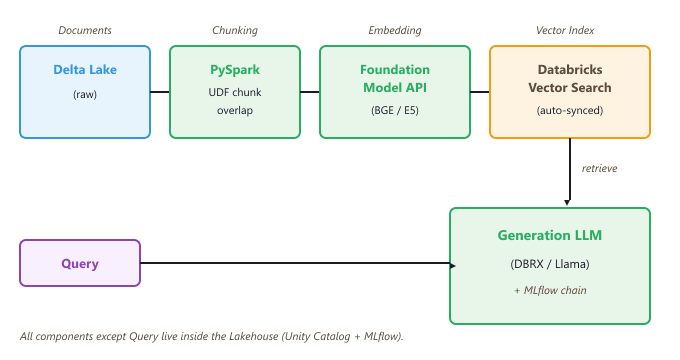
The ingestion pipeline (Code Fragment L.4.8 above) chunks documents with PySpark, writes chunks to a Delta table, and lets Vector Search handle embedding and indexing automatically.
The RAG chain itself (Code Fragment L.4.9 above) is a Python function wrapped as a pyfunc MLflow model. This
makes it deployable to any MLflow-compatible endpoint, including Databricks Model Serving.
Wrapping the RAG chain as an MLflow pyfunc model provides more than just deployment convenience. It enables mlflow.evaluate() to run the full chain end-to-end against a labeled evaluation set, measuring retrieval quality (context recall, context precision) and generation quality (faithfulness, answer relevance) in one call. Evaluation with structured metrics is covered in Chapter 42.
Summary
Databricks provides a vertically integrated path from raw data to deployed AI application. Mosaic AI handles distributed training and managed fine-tuning, with MLflow capturing every experiment for reproducibility (see Weights & Biases). Foundation Model APIs give pay-per-token access to hosted open-weight models using the familiar OpenAI interface, with provisioned throughput available for latency-sensitive workloads. AI Functions bring LLM calls into SQL, making it practical to enrich data at ingestion time inside Delta Live Tables pipelines (see Section 19.4 (Data Pipeline Tooling)). MLflow Evaluate provides LLM-specific metrics for comparing model versions before promotion through the Unity Catalog Model Registry. Vector Search adds a managed retrieval layer that auto-syncs with source Delta tables, removing the need for a separate vector database in most RAG architectures. Finally, all these components compose naturally into end-to-end RAG applications that are deployed, versioned, and evaluated entirely within the Lakehouse, as detailed in Chapter 32 and the evaluation framework of Chapter 42.
What's Next?
In the next section, Section 19.6: External Reading & Communities, we build on the material covered here.