"Architecture is what keeps the agent running at 3 AM when nobody is watching."
Deploy, Production-Hardened AI Agent
A production agent is far more than a model in a loop. The agent loop from Section 26.1 described the conceptual cycle of perceive, reason, and act. Deploying that loop in production requires surrounding it with infrastructure: a planner that decomposes tasks, a tool router that dispatches actions, a memory manager that persists context, an execution sandbox that isolates side effects, an evaluator that checks results, a recovery handler that manages failures, a permissions gate that enforces access control, and a cost controller that keeps spending within budget. This section presents a reference architecture and the first four components (Planner, Tool Router, Execution Sandbox, and resilience primitives); Section 26.5a finishes the wiring (Cost Controller, Permissions Gate, Recovery patterns, full end-to-end AgentSystem).
Prerequisites
This section assumes familiarity with the agent loop and cognitive architectures from Section 26.1 and planning strategies from Section 26.2. Practical experience with Python async programming and basic familiarity with web service patterns (rate limiting, circuit breakers) will help you follow the production-oriented examples.
26.5.1 The Eight Components of a Production Agent
A production agent system looks much less glamorous than the demo. Behind every "the agent autonomously solved your ticket" press release sits a rate limiter, a circuit breaker, a tool router, a cost ledger, an audit log, and at least one human approval queue, eight separate components that all exist mainly to stop the model from doing the most interesting thing it could try.
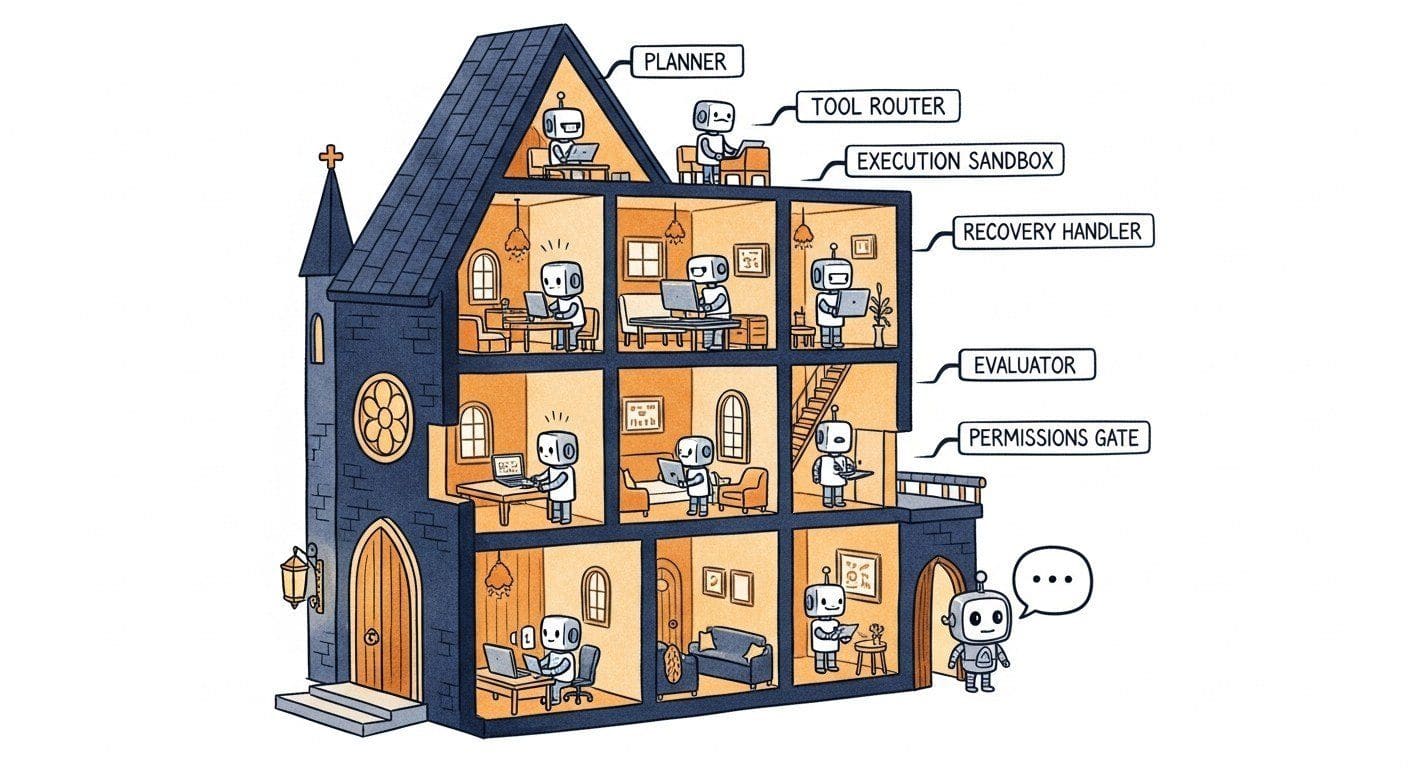
Building a reliable agent system requires eight distinct components, each responsible for a specific concern. The components split naturally into three groups: those that plan and act, those that guard the boundaries, and those that handle outcomes.
- Plan and act:
- The Planner decomposes user requests into executable steps.
- The Tool Router maps planned actions to available tools.
- The Memory Manager reads and writes persistent state.
- The Execution Sandbox runs tool calls in isolation.
- Handle outcomes:
- The Evaluator validates results against expectations.
- The Recovery Handler manages retries, rollbacks, and graceful degradation.
- Guard the boundaries:
- The Permissions Gate enforces access control at every boundary.
- The Cost Controller tracks and limits token and API spending.
The most common production failure mode is not a model hallucination; it is an unhandled edge case in the infrastructure surrounding the model. A tool times out and nobody catches the exception. A context window overflows because memory was not pruned. A user escalates to an expensive model and nobody notices the cost spike. The eight-component architecture exists to handle these failure modes systematically rather than through ad-hoc patches.
26.5.2 Reference Architecture: Request Flow
Every request to the agent system follows a predictable path through the eight components. Understanding this flow is essential for debugging production issues, because the failure mode tells you exactly which component to investigate. The flow has three stages: admit, execute, and respond.
Admit. The user's input arrives at the Permissions Gate, which checks whether the user is authenticated and authorized to invoke the agent. If the request passes, the Cost Controller checks whether the user's budget allows another request. The Memory Manager then loads relevant context.
Execute. The assembled context flows into the Planner, which calls the LLM to produce a step-by-step plan. Each planned step is dispatched to the Tool Router, which selects the appropriate tool and sends the call to the Execution Sandbox. After execution, the Evaluator checks whether the result meets the expected criteria. If the evaluation fails, the Recovery Handler decides whether to retry, try a different approach, or abort with a user-facing message.
Respond. Once all steps complete, the Memory Manager persists any new information and the final response is returned to the user.
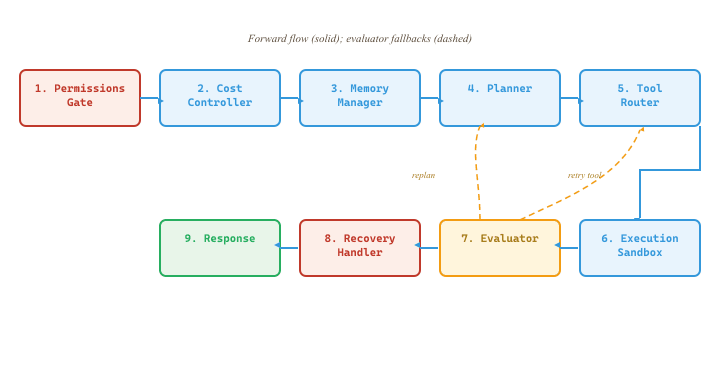
Each component communicates through typed messages, making the interfaces explicit and testable. The Planner component below defines these data structures and then uses them to decompose a user request into a sequence of tool calls via the OpenAI API.
import json
from dataclasses import dataclass, field
from enum import Enum
from typing import Any
from openai import AsyncOpenAI

class StepStatus(Enum):
    PENDING = "pending"; RUNNING = "running"
    SUCCESS = "success"; FAILED = "failed"; SKIPPED = "skipped"

@dataclass
class AgentRequest:
    user_id: str
    session_id: str
    message: str
    permissions: list[str] = field(default_factory=list)
    max_budget_usd: float = 1.0

@dataclass
class PlanStep:
    step_id: int
    description: str
    tool_name: str
    tool_args: dict = field(default_factory=dict)
    status: StepStatus = StepStatus.PENDING
    result: Any = None
    cost_usd: float = 0.0

@dataclass
class AgentPlan:
    steps: list[PlanStep]
    reasoning: str

@dataclass
class AgentResponse:
    message: str
    plan: AgentPlan
    total_cost_usd: float = 0.0
    steps_completed: int = 0
    steps_failed: int = 0

class Planner:
    """Decomposes a user request into an ordered sequence of tool calls."""
    def __init__(self, client: AsyncOpenAI, model: str = "gpt-4o-mini"):
        self.client, self.model = client, model

    async def create_plan(self, request: AgentRequest,
                          memory_context: str,
                          available_tools: list[dict]) -> AgentPlan:
        tool_desc = "\n".join(f"- {t['name']}: {t['description']}" for t in available_tools)
        resp = await self.client.chat.completions.create(
            model=self.model,
            messages=[
                {"role": "system", "content": f"Tools:\n{tool_desc}"},
                {"role": "user", "content": f"Context:\n{memory_context}\n\nRequest: {request.message}"},
            ],
            response_format={"type": "json_object"},
            temperature=0.0,
        )
        data = json.loads(resp.choices[0].message.content)
        steps = [PlanStep(step_id=i, description=s["description"],
                           tool_name=s["tool_name"], tool_args=s.get("tool_args", {}))
                 for i, s in enumerate(data["steps"])]
return AgentPlan(steps=steps, reasoning=data["reasoning"])create_plan() method asks an LLM to decompose a user goal into ordered tool-call steps. Separating planning from execution lets the rest of the system reason over a structured object instead of free-form text.26.5.3 Tool Router and Execution Sandbox
The Tool Router maps a tool name from the plan to the actual callable implementation, while the Execution Sandbox provides isolation for running that tool. Isolation is important for several reasons: a misbehaving tool should not crash the agent, tool execution time should be bounded, and side effects should be trackable for audit logging. In practice, the sandbox can range from a simple try/except with a timeout (shown here) to a full container-based sandbox for code execution agents.
import asyncio
from typing import Callable, Awaitable, Any

class ToolRouter:
    """Maps tool names to implementations and tracks required permissions."""
    def __init__(self):
        self._tools: dict = {}
        self._permissions: dict = {}

    def register(self, name, fn, required_permissions=None):
        self._tools[name] = fn
        self._permissions[name] = required_permissions or []

    def get_tool(self, name):
        return self._tools.get(name)

    def describe_all(self):
        return [{"name": n, "description": fn.__doc__ or n,
                 "permissions": self._permissions[n]} for n, fn in self._tools.items()]

class ExecutionSandbox:
    """Runs tool calls with timeout and error isolation."""
    def __init__(self, timeout_seconds: float = 30.0):
        self.timeout = timeout_seconds

    async def execute(self, tool_fn, tool_args: dict) -> tuple[bool, Any]:
        """Returns (success, result_or_error)."""
        try:
            result = await asyncio.wait_for(tool_fn(**tool_args), timeout=self.timeout)
            return True, result
        except asyncio.TimeoutError:
            return False, f"Tool timed out after {self.timeout}s"
        except Exception as e:
return False, f"Tool error: {type(e).__name__}: {e}"asyncio.wait_for.Never run untrusted tool code in the same process as your agent without sandboxing. A tool that enters an infinite loop, consumes all available memory, or raises an unhandled exception can take down the entire agent. For code execution tools specifically, use container-based isolation (Docker, gVisor, or a cloud sandbox service). The asyncio.wait_for pattern shown above handles timeouts but does not protect against memory exhaustion or malicious system calls.
26.5.4 Production Concerns: Rate Limiting, Circuit Breakers, and Graceful Degradation
Production agent systems must handle the reality that external services fail. Three patterns from distributed systems engineering are essential for building resilient agents:
- Rate limiting: a token bucket per tool prevents the agent from overwhelming any single service. Share the limiter across all agent replicas if you run multiple instances.
- Circuit breakers: track consecutive failures per tool. After a threshold (e.g., five failures), the breaker "opens" and immediately rejects further calls for a cooldown period. After cooldown, the breaker enters a "half-open" state and allows one test call; success closes the breaker, failure re-opens it.
- Graceful degradation: when a tool is unavailable, the agent should fall back to an alternative tool, return a cached result, or provide a partial answer with a clear disclosure that the live data could not be retrieved.
import time

class CircuitBreaker:
    """Prevents repeated calls to a failing tool."""
    def __init__(self, failure_threshold: int = 5, cooldown_seconds: float = 60.0):
        self.failure_threshold = failure_threshold
        self.cooldown = cooldown_seconds
        self._failures: dict = {}
        self._opened_at: dict = {}

    def is_open(self, tool_name):
        if self._failures.get(tool_name, 0) < self.failure_threshold:
            return False
        opened = self._opened_at.get(tool_name, 0)
        if time.time() - opened > self.cooldown:
            self._failures[tool_name] = self.failure_threshold - 1
            return False  # Half-open: allow one test call
        return True

    def record_success(self, tool_name):
        self._failures[tool_name] = 0
        self._opened_at.pop(tool_name, None)

    def record_failure(self, tool_name):
        self._failures[tool_name] = self._failures.get(tool_name, 0) + 1
        if self._failures[tool_name] >= self.failure_threshold:
self._opened_at[tool_name] = time.time()- Production agents need eight key components, organized into plan-and-act, handle-outcomes, and guard-the-boundaries groups.
- The Planner emits a typed
AgentPlan; the rest of the system reasons over that structured object instead of free-form text. - The Tool Router + Execution Sandbox split lets you swap the isolation layer (in-process timeout, Docker, gVisor) without touching the planner.
- Circuit breakers prevent cascading failures; graceful degradation keeps the agent functional with reduced capabilities.
Show Answer
Examples: (1) Rate limiting prevents runaway API costs and respects provider quotas. (2) Circuit breakers stop cascading failures when a downstream service is unhealthy. (3) Checkpoint and resume enables long-running agents to recover from transient failures without restarting from scratch.
Show Answer
A circuit breaker stops making calls to a failing service entirely (fast-fail), while graceful degradation continues operating with reduced functionality, such as falling back to a cheaper model or returning cached results instead of live data.
Modify the ExecutionSandbox to support per-tool timeout overrides. Some tools (like web scraping) legitimately need longer timeouts than others (like database lookups). Add a timeout_overrides: dict[str, float] parameter to the constructor and use it in execute().
Answer Sketch
Store the overrides dict in __init__. In execute(), accept a tool_name parameter. Look up self.timeout_overrides.get(tool_name, self.timeout) and pass that value to asyncio.wait_for(). This allows setting 60s for web_scrape while keeping the default at 15s for everything else.
What's Next?
This section continues in Section 26.5a: Agent Cost Control, Permissions, Recovery & End-to-End Wiring, which covers the remaining four components (Cost Controller with cascade routing, Permissions Gate with audit logging, Recovery patterns) and assembles the complete AgentSystem with a working customer-support example.