The best way to predict the future is to invent it. The second best way is to build an agent and let it figure things out.
Agent X, Self-Starting AI Agent
An AI agent is an LLM operating in a loop. Instead of producing a single response, an agent repeatedly perceives its environment, reasons about what to do, takes an action, and observes the result. This perception-reasoning-action cycle is the fundamental abstraction that transforms language models from passive text generators into active problem solvers. Understanding this loop, and the design patterns built on top of it, is essential for building any agentic system. The ReAct framework from Section 12.2 introduced the reasoning-plus-action pattern that agents formalize.
Prerequisites
This section assumes familiarity with LLM API basics from Section 11.1 and prompt engineering fundamentals from Section 12.1. An understanding of chain-of-thought reasoning (Section 8.1) and the ReAct pattern (Section 12.2) will be particularly helpful, as the agent loop builds directly on those ideas.
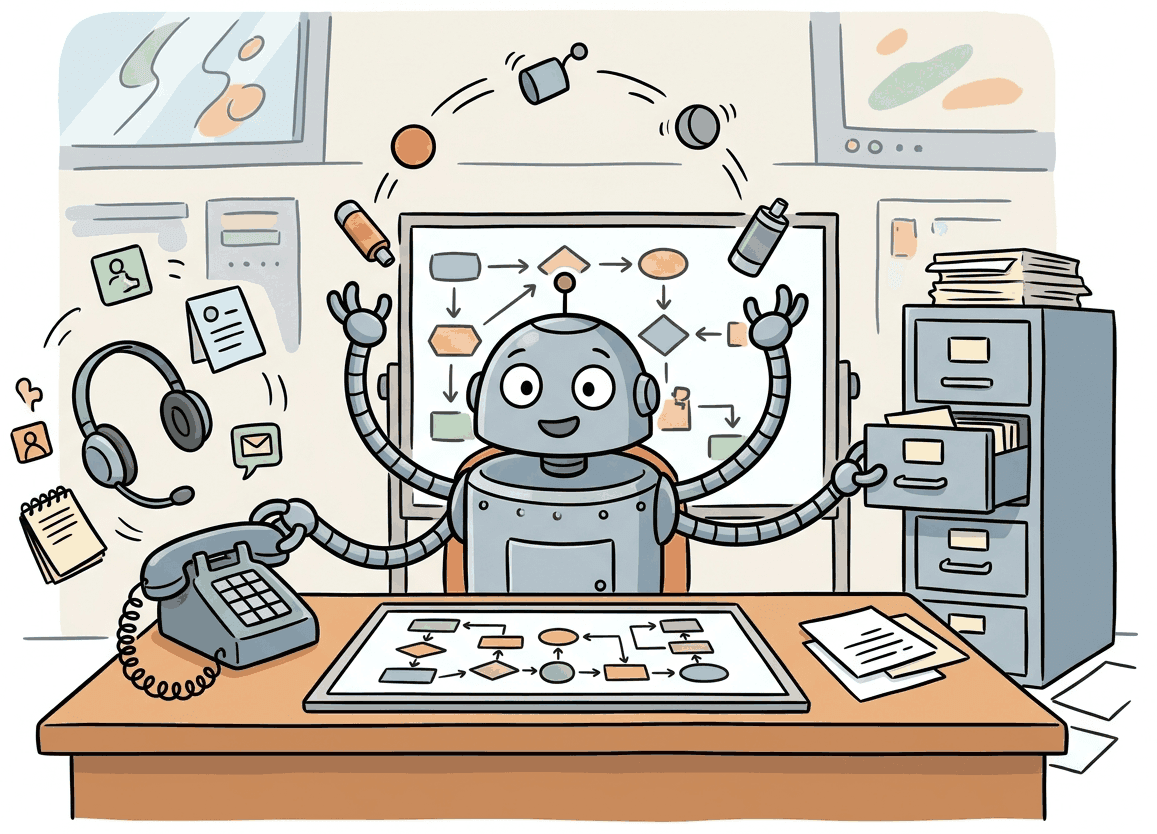
26.1.1 What Makes an Agent?
The same agent loop seen from the safety side (prompt injection, tool-call authorization, sandboxing) is the subject of Section 49.1: Agent Safety & Prompt Injection Defense.
"Agent" gets slapped on everything from a one-shot prompt chain to a fully autonomous system, so it pays to nail down the line. An AI agent uses a language model to pick the next action, then loops (perceive, decide, act) until the task finishes or hits a stop condition. The defining property is autonomy in action selection: the model picks the next step. If the developer hard-coded the sequence, it is a chain, not an agent.
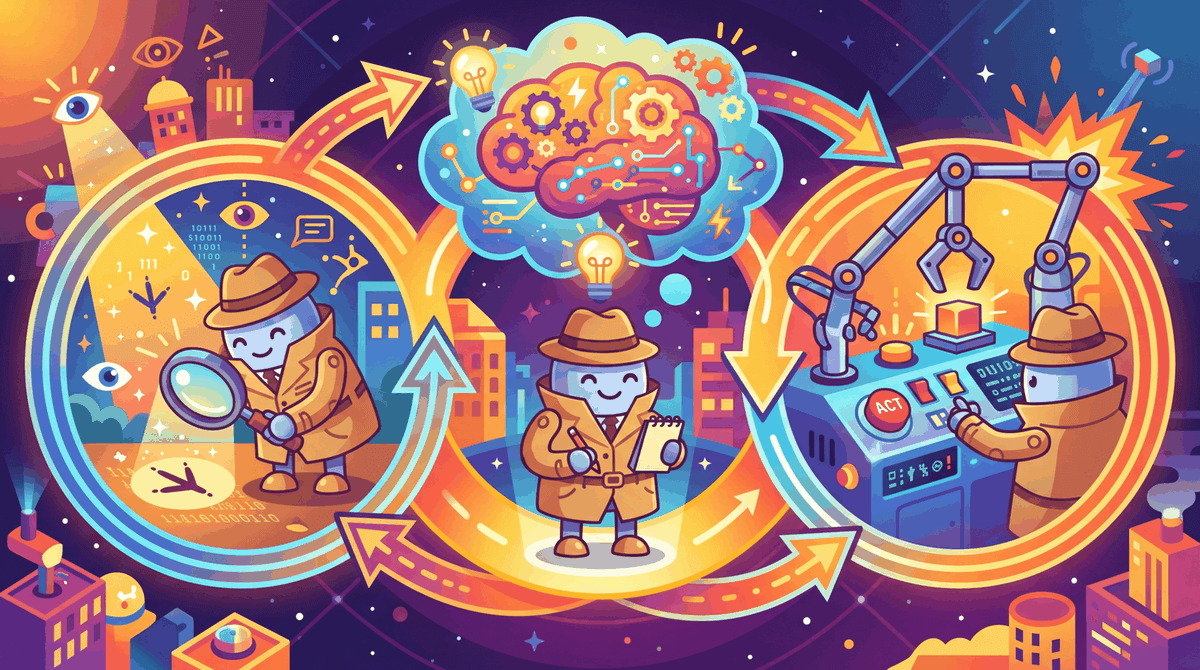
The word "agent" comes from the Latin agere, meaning "to do." By that definition, most chatbots are really just "listeners" pretending to have a to-do list.
The Perception-Reasoning-Action Loop
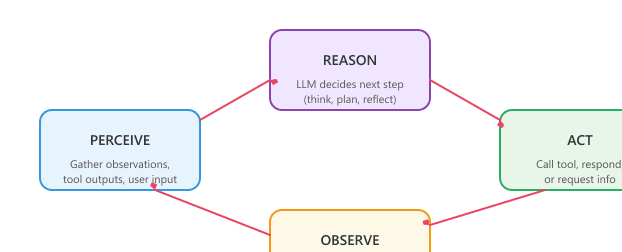
Every agent runs the same four-step cycle. The agent perceives by reading input: user messages, tool outputs, results from the previous step. It reasons with the language model about the next move. It acts: call a tool, write a response, ask for clarification. Then it observes the result and loops back to perceive. Figure 26.1.3 shows the loop.
Agents vs. Chains vs. Workflows
The simple-to-complex orchestration spectrum has three rungs. A chain is a fixed sequence of LLM calls; you wrote the steps in code. A workflow adds if/else and loops, but you wrote those branches too. An agent hands control flow to the LLM: it picks which tool to call, in what order, and when to stop. Use the hybrid ML/LLM decision framework from Chapter 13 to decide whether the extra autonomy is worth the unpredictability.
| Aspect | Chain | Workflow | Agent |
|---|---|---|---|
| Control flow | Fixed sequence | Developer-defined conditionals | LLM-determined |
| Steps known in advance | Yes, always | Paths defined, selection dynamic | No, emergent |
| Determinism | High | Medium | Low |
| Error handling | Static retry logic | Branching on error type | Model reasons about recovery |
| Complexity | Simple | Moderate | High |
| Best for | Predictable pipelines | Structured tasks with variants | Open-ended problem solving |
Start with the simplest approach that works. Anthropic and other leading AI labs recommend using agents only when simpler patterns fail. Chains are easiest to debug and most predictable. Workflows add flexibility with manageable complexity. Agents provide maximum flexibility but introduce non-determinism, higher latency, and harder debugging. Choose the right level of autonomy for your use case.
Readers often confuse "agentic" with "autonomous" or even "AGI." An LLM agent is not a sentient system making independent decisions; it is a loop where a language model repeatedly selects the next action from a predefined set of tools. The model has no goals of its own, no persistent state beyond what the developer provides, and no ability to act outside its tool set. When an agent "decides" to call a search API, it is producing a structured text output that matches a tool schema. The autonomy is in action selection within a constrained loop, not in general intelligence. This distinction matters for both engineering (agents need guardrails, not trust) and for setting realistic expectations with stakeholders.
26.1.2 The Four Agentic Design Patterns
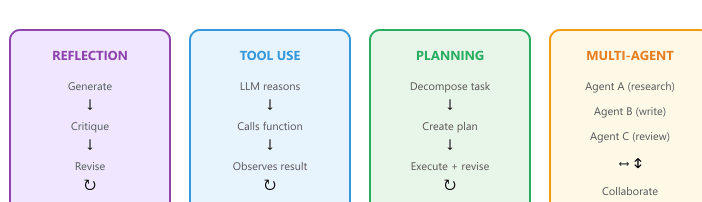
Andrew Ng identified four foundational agentic design patterns that appear across virtually all agent architectures. These patterns can be used individually or composed together, and understanding them provides a vocabulary for designing and analyzing agentic systems.

Pattern 1: Reflection
In the reflection pattern, the LLM reviews its own output and iteratively improves it. This can be as simple as asking the model to critique its response, or as sophisticated as having separate "generator" and "critic" roles. Reflection is powerful because it lets the model catch errors, improve quality, and refine its approach without external feedback.
# Reflection pattern: draft, critique, revise. The same model wears two hats,
# first generator then critic, and we loop until the critic signals no major issues.
from openai import OpenAI

client = OpenAI()

def _chat(messages: list[dict], model: str = "gpt-4o") -> str:
    return client.chat.completions.create(model=model, messages=messages).choices[0].message.content

def reflect_and_improve(task: str, max_rounds: int = 3) -> str:
    """Generate a response, then iteratively critique and revise it."""
    draft = _chat([{"role": "user", "content": task}])
    for _ in range(max_rounds):
        # Ask the critic for specific, actionable feedback on the current draft.
        critique = _chat([
            {"role": "system",
             "content": "You are a critical reviewer. Find flaws, gaps, and areas for improvement. Be specific."},
            {"role": "user",
             "content": f"Task: {task}\n\nDraft:\n{draft}\n\nProvide specific, actionable critique."},
        ])
        if "no major issues" in critique.lower():
            break  # Critic is satisfied; stop early to save tokens.
        # Otherwise revise: feed the original task, the current draft, and the critique back in.
        draft = _chat([
            {"role": "system", "content": "Revise the draft to address all critique points."},
            {"role": "user",
             "content": f"Original task: {task}\n\nCurrent draft:\n{draft}\n\nCritique:\n{critique}\n\nRevised version:"},
        ])
return draftreflect_and_improve drafts an answer, asks the same model to critique it, and revises until the critic returns "no major issues" or max_rounds is hit. The same pattern underpins constitutional-AI fine-tuning, where the critic is a stronger model used at training time.Pattern 2: Tool Use
Tool use extends the LLM beyond text generation by giving it the ability to call external functions: searching the web, querying databases, executing code, sending emails, or interacting with any API. The model receives tool descriptions, decides when and which tools to call, and incorporates the results into its reasoning. This is covered in depth in Section 26.6.
Tool use is architecturally significant, not merely an API feature. When a model gains the ability to call external functions, it transitions from a closed system (bounded by its training data) to an open system that can interact with the live world. This is the same leap that distinguishes a calculator from a spreadsheet connected to a database. The model's role shifts from "answer generator" to "action coordinator," and the design constraints change accordingly: latency now depends on external services, reliability depends on tool robustness, and safety requires controlling what actions the model can take. Chapter 27 explores these architectural implications in depth, including standardized protocols like MCP and A2A that formalize tool interfaces.
Pattern 3: Planning
Planning involves the LLM decomposing a complex task into subtasks before executing them. Rather than acting step by step reactively, a planning agent creates an explicit plan, then executes each step while potentially revising the plan based on intermediate results. Plan-and-execute architectures, reflection loops, and tree search methods all fall under this pattern. Section 26.2 covers planning in detail.
Pattern 4: Multi-Agent Collaboration
In the multi-agent pattern, multiple LLM instances (each potentially with different system prompts, tools, or roles) collaborate to solve a problem. One agent might research while another writes; a supervisor agent might coordinate workers; or agents might debate to reach a consensus. Chapter 27 is dedicated entirely to multi-agent architectures. summarizes these four patterns.
26.1.3 The ReAct Framework
ReAct (Reasoning + Acting) is the most widely adopted agent architecture. We introduced ReAct as a prompting pattern in Section 12.2; here we build it into a full agent system with tool execution, state management, and error handling. Algorithm 1 formalizes the ReAct loop.
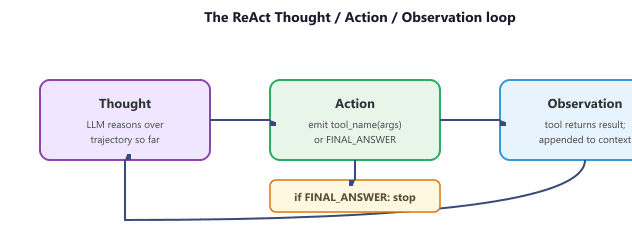
Formally, the agent maintains a trajectory $\tau_t = (h_1, a_1, o_1, \ldots, h_{t-1}, a_{t-1}, o_{t-1})$ of thoughts $h$, actions $a$, and observations $o$. At step $t$ the LLM $M$ jointly samples the next thought and action conditioned on the system prompt $\pi$, the user task $T$, and the trajectory:
$$ (h_t, a_t) \sim p_M(\cdot \mid \pi, T, \tau_t) $$
The environment then returns an observation $o_t = \mathrm{exec}(a_t)$, and the trajectory grows to $\tau_{t+1} = \tau_t \cup (h_t, a_t, o_t)$. The loop terminates either when $a_t = \texttt{FINAL\_ANSWER}(y)$ (returning $y$) or when $t$ reaches the step budget $S$. The "Re" in ReAct is exactly the conditioning of $a_t$ on $h_t$: pure Act baselines drop $h_t$ and sample $a_t \sim p_M(\cdot \mid \pi, T, \tau_t)$ directly, which empirically gives lower accuracy on multi-hop tool tasks because the model cannot externalise the intermediate reasoning that grounds the next call.
This pseudocode formalizes the ReAct agent loop: given a user task T, tool set, and LLM M, the agent iterates through Thought, Action, and Observation steps up to max_steps S. The loop terminates when the LLM emits a final_answer action or the step budget is exhausted, returning the accumulated trajectory.
Input: user task T, tool set {tool_1, ..., tool_n}, LLM M, max steps S
Output: final answer or action result

1. Initialize context = [system_prompt, T]
2. for step = 1 to S:
  a. Thought: response = M(context)
  The LLM reasons about current state, what is known, what is needed
  b. if response contains FINAL_ANSWER:
  return extracted answer
  c. Action: parse tool_name and arguments from response
  d. Observation: result = execute(tool_name, arguments)
  e. Append (Thought, Action, Observation) to context
3. return "Max steps reached without resolution"
The key insight is that the explicit reasoning in step 2a (the "Thought") dramatically improves decision quality compared to acting without thinking or thinking without acting. Each thought provides a chain-of-reasoning that is also valuable for debugging when the agent makes mistakes.
Why ReAct works better than pure chain-of-thought for agents. Pure chain-of-thought (CoT) reasons in a closed loop: the model thinks step by step but never checks its reasoning against reality. ReAct adds grounding by interleaving reasoning with real-world observations from tool calls. When the model hypothesizes "the bug is in the authentication module," CoT continues reasoning from that hypothesis whether or not it is correct. ReAct instead calls a search tool, observes actual code, and corrects course if the hypothesis was wrong. This grounding effect is why ReAct agents outperform CoT-only approaches on tasks requiring factual accuracy, external data, or multi-step verification. The trade-off is latency: each tool call adds seconds to the total execution time.
from typing import Callable
class ReActAgent:
    """Minimal ReAct agent: Thought -> Action -> Observation loop."""
    def __init__(self, client, tools: dict[str, Callable], model: str = "gpt-4o"):
        self.client = client
        self.tools = tools
        self.model = model
    def run(self, task: str, max_steps: int = 10) -> str:
        # Build tool descriptions for the system prompt
        tool_desc = "\n".join(
            f"- {name}: {func.__doc__}" for name, func in self.tools.items()
            )
        system_prompt = f"""You are a ReAct agent. For each step:
        1. Thought: Reason about the current state and what to do next
        2. Action: Call a tool using the format: ACTION: tool_name(args)
        3. Wait for Observation (tool result)
        When you have the final answer, respond: FINAL ANSWER: [your answer]
        Available tools:
        {tool_desc}"""
        messages = [
            {"role": "system", "content": system_prompt},
            {"role": "user", "content": task}
            ]
        for step in range(max_steps):
            response = self.client.chat.completions.create(
                model=self.model,
                messages=messages
                ).choices[0].message.content
            messages.append({"role": "assistant", "content": response})
            # Check for final answer
            if "FINAL ANSWER:" in response:
                return response.split("FINAL ANSWER:")[1].strip()
            # Parse and execute action
            if "ACTION:" in response:
                action_str = response.split("ACTION:")[1].strip()
                observation = self._execute_action(action_str)
                messages.append({
                        "role": "user",
                        "content": f"Observation: {observation}"
                        })
                return "Max steps reached without final answer."
    def _execute_action(self, action_str: str) -> str:
        # Parse "tool_name(args)" format and execute
        try:
            name = action_str.split("(")[0].strip()
            args_str = action_str.split("(", 1)[1].rsplit(")", 1)[0]
            if name in self.tools:
                return str(self.tools[name](args_str))
            return f"Error: Unknown tool '{name}'"
        except Exception as e:
return f"Error executing action: {e}"The ReAct implementation above uses text parsing for simplicity. In production, you would use the provider's native function calling API (covered in Section 26.6), which gives structured JSON outputs instead of requiring text parsing. The conceptual loop is the same: think, act, observe.
ReAct Trace Example
A typical ReAct trace shows the interleaved thought-action-observation pattern. Notice how the agent explicitly reasons before each action, and how observations feed back into the next reasoning step.
# Example trace for: "What is the population of the capital of France?"
Thought: I need to find the capital of France, then look up its population.
 The capital of France is Paris, but let me verify and get the
 current population figure.
Action: search("Paris population 2024")
Observation: Paris has a city population of approximately 2.1 million
 and a metropolitan area population of about 12.3 million.
Thought: I now have the information. The capital of France is Paris,
 with a city population of about 2.1 million. I should provide
 both the city and metro figures for completeness.
FINAL ANSWER: The capital of France is Paris, with a city population
of approximately 2.1 million and a metropolitan area population
of about 12.3 million.The ReAct pattern is the backbone of several widely deployed agents. LangChain's create_react_agent and LangGraph's prebuilt ReAct executor are the default starting point for tens of thousands of production deployments tracked on LangSmith. Anthropic's Claude Code CLI (the same coding agent that produced this book's pipeline) uses an explicit Thought-Action-Observation loop with a tool registry of Bash, Read, Edit, Grep, and Glob. The published Claude 4 system card describes the same loop driving Computer Use: think about the screenshot, click or type, observe the next screenshot, repeat. When you see "Thinking..." in Cursor, Devin, or Replit's Agent mode, that is a ReAct loop emitting its Thought turn.
26.1.4 Cognitive Architectures and State Machines
As agents grow more complex, the simple ReAct loop becomes insufficient. Cognitive architectures provide a richer framework for organizing agent behavior by introducing explicit state management, memory systems, and structured decision-making processes. A cognitive architecture defines how an agent thinks, not just what it thinks about.
langgraph from LangChain models the agent as an explicit StateGraph: nodes are functions, edges are transitions, and the typed state object is the shared blackboard. The built-in create_react_agent wires up a ReAct loop in three lines, while custom graphs let you add reflection, human-in-the-loop checkpoints, and persistent checkpointing via Postgres or SQLite. It is the runtime under most production agents shipped in 2025-2026.
Show code
pip install langgraph langchain
from langgraph.prebuilt import create_react_agent
from langchain_openai import ChatOpenAI
def search(query: str) -> str:
    "Search the web for the query."
    return f"results for {query}"
agent = create_react_agent(ChatOpenAI(model="gpt-4o"), tools=[search])
result = agent.invoke({"messages": [("user", "Who won the 2024 Turing Award?")]})Agent State Machines
Many production agents are best modeled as state machines, where the agent transitions between well-defined states based on its observations and decisions. This provides predictability and debuggability while still allowing the LLM to make autonomous decisions within each state. Figure 26.1.6a shows the agent state machine with its transitions.
# Define AgentState, AgentContext, StatefulAgent; implement __init__, run, _handle_planning
from enum import Enum
from dataclasses import dataclass, field
class AgentState(Enum):
    PLANNING = "planning"
    EXECUTING = "executing"
    REFLECTING = "reflecting"
    WAITING_FOR_HUMAN = "waiting_for_human"
    COMPLETE = "complete"
    ERROR = "error"
@dataclass
class AgentContext:
    """Tracks the full state of an agent's execution."""
    task: str
    state: AgentState = AgentState.PLANNING
    plan: list[str] = field(default_factory=list)
    completed_steps: list[str] = field(default_factory=list)
    observations: list[dict] = field(default_factory=list)
    current_step_index: int = 0
    error_count: int = 0
    max_errors: int = 3
class StatefulAgent:
    """Agent that operates as a state machine with explicit transitions."""
    def __init__(self, client, tools):
        self.client = client
        self.tools = tools
        self.transitions = {
            AgentState.PLANNING: self._handle_planning,
            AgentState.EXECUTING: self._handle_executing,
            AgentState.REFLECTING: self._handle_reflecting,
            AgentState.ERROR: self._handle_error,
            }
        def run(self, task: str) -> str:
            ctx = AgentContext(task=task)
            while ctx.state not in (AgentState.COMPLETE, AgentState.WAITING_FOR_HUMAN):
                handler = self.transitions.get(ctx.state)
                if handler:
                    ctx = handler(ctx)
                else:
                    break
                    return self._format_result(ctx)
            def _handle_planning(self, ctx: AgentContext) -> AgentContext:
                # LLM creates a step-by-step plan
                plan = self._call_llm(
                    f"Break this task into concrete steps:\n{ctx.task}"
                    )
                ctx.plan = self._parse_plan(plan)
                ctx.state = AgentState.EXECUTING
                return ctx
    def _handle_executing(self, ctx: AgentContext) -> AgentContext:
        if ctx.current_step_index >= len(ctx.plan):
            ctx.state = AgentState.REFLECTING
            return ctx
            step = ctx.plan[ctx.current_step_index]
            try:
                result = self._execute_step(step, ctx)
                ctx.observations.append({"step": step, "result": result})
                ctx.completed_steps.append(step)
                ctx.current_step_index += 1
            except Exception as e:
                ctx.error_count += 1
                ctx.state = AgentState.ERROR if ctx.error_count >= ctx.max_errors \
            else AgentState.EXECUTING
            return ctx
            def _handle_reflecting(self, ctx: AgentContext) -> AgentContext:
                # LLM reviews results and decides: complete or replan
                assessment = self._call_llm(
                    f"Task: {ctx.task}\nCompleted: {ctx.completed_steps}\n"
                    f"Results: {ctx.observations}\n\n"
                    f"Is the task fully complete? If not, what remains?"
                    )
                if "complete" in assessment.lower():
                    ctx.state = AgentState.COMPLETE
                else:
                    ctx.state = AgentState.PLANNING # Replan with new context
                    return ctx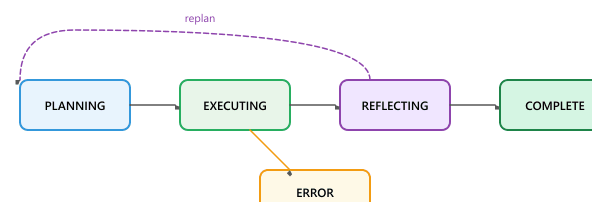
26.1.5 Agent Memory Systems
Agents need memory beyond the single context window. We sketch the categories briefly here; Section 26.6 covers the full taxonomy, storage strategies, retrieval policies, and production patterns. The four-way split below maps directly to the human-memory taxonomy in cognitive psychology (Tulving 1972, "Episodic and Semantic Memory"), which is not an accident: the names were borrowed in the 2023-2024 MemGPT, Voyager, and Generative Agents papers, and the analogy has stuck in production agent architectures since.
- Working memory: the live context window during a turn (system prompt, user message, tool results, reasoning traces). Bounded by the model's context limit; the engineering question is what to keep and what to evict. A GPT-4o-with-128k-context turn typically devotes 5-10k tokens to the system prompt and tool schemas, 20-40k to retrieved evidence, and the rest to scratch reasoning; above 60k working-memory occupancy, all frontier models in 2024-2026 show measurable quality degradation per the RULER long-context benchmark (Hsieh et al., 2024).
- Episodic memory: records of past interactions stored outside the context window so the agent can recall what happened in earlier sessions. Typically a vector database keyed by user/session/topic. Park et al.'s 2023 "Generative Agents" paper (Stanford, arXiv:2304.03442) stored every observation as an episodic record in a Chroma vector DB and ran a memory-stream retrieval on every action; without this layer, the simulated agents lost coherence within a single in-game day.
- Semantic memory: extracted facts, preferences, and learned heuristics that persist across sessions. Distilled from episodic memory or populated by the agent's own reflection step. MemGPT (Packer et al., 2023, arXiv:2310.08560) implements this as a hierarchical promotion: an episodic record is promoted to a "main context" semantic entry when the agent's reflection loop scores it as high-value, mirroring the systems-consolidation theory in human declarative memory.
- Procedural memory: skill libraries, tool descriptions, and learned routines the agent invokes by name. Often stored as structured templates or callable code rather than embeddings. The canonical 2024 reference is Voyager (Wang et al., NeurIPS 2024), which played Minecraft by incrementally extending a JavaScript skill library; by the end of a 30-day run the library contained over 100 reusable skills (craft_iron_pickaxe, build_furnace, etc.), each invocable by name without re-reasoning.
The hard problems (when to write, when to retrieve, how to compress, how to forget, how to prevent contamination across users) are the topic of Section 26.6.
26.1.6 Token Budget Management
Token management is one of the most practical challenges in building agents. Unlike a single-turn completion where you control the input size, agents accumulate context over many iterations. Without careful budgeting, agents hit context limits, lose important early context, or incur excessive costs.
Strategies for Managing Token Budgets
- Summarize tool outputs: Instead of including raw API responses, extract only the relevant fields. A search result page might be 10,000 tokens raw but only 200 tokens of useful information.
- Sliding window with summarization: Periodically summarize older conversation turns and replace them with a compact summary, keeping recent turns intact.
- Tiered context priority: Assign priorities to different message types. System prompts and the current task have highest priority; old tool results have lowest priority and are evicted first.
- Lazy loading: Instead of loading all context upfront, fetch information only when the agent needs it. Store tool descriptions in a separate index and inject only the ones the agent requests.
- Step limits: Set hard limits on the number of agent iterations. If the agent cannot solve a task in N steps, it should report what it found and ask for guidance.
| Strategy | Token Savings | Implementation | Risk |
|---|---|---|---|
| Summarize tool outputs | 50-90% | LLM-based or rule-based extraction | May lose relevant details |
| Sliding window | Variable | Drop oldest N messages | Loses early context |
| Tiered priority eviction | 30-60% | Score and rank all messages | Complex priority logic |
| Lazy tool loading | 20-40% | Tool registry with on-demand injection | Extra LLM call to select tools |
| Hard step limits | Bounded | Counter in agent loop | May not complete complex tasks |
The best agents are frugal with their context. Every token in the context window should earn its place. Production agents typically combine multiple strategies: summarizing tool outputs immediately, using a sliding window for conversation history, and imposing step limits as a safety net. The goal is to maintain the information density of the context while staying well within token limits.
26.1.7 Designing for Failure
Agents fail in ways that are qualitatively different from non-agentic systems. A simple chain either succeeds or produces an error. An agent can get stuck in loops, waste tokens on unproductive actions, misinterpret tool outputs, or take increasingly erratic actions as its context window degrades. Robust agent design requires anticipating and handling these failure modes. Chapter 42 covers how to observe and measure these failures in production.
Common Agent Failure Modes
- Infinite loops: The agent repeats the same action because it does not recognize that the result is unchanged. Always implement a maximum step counter.
- Tool misuse: The agent calls a tool with invalid arguments or misinterprets the output. Clear tool descriptions and structured error messages help.
- Goal drift: Over many steps, the agent gradually shifts away from the original task. Periodically re-injecting the original task description helps maintain focus.
- Context window overflow: The agent accumulates so much history that it cannot generate useful output. Token management strategies (above) are essential.
- Cascading errors: An early mistake propagates through subsequent steps, leading the agent further astray. Reflection checkpoints catch and correct errors early.
When building your first agent, start with one well-tested tool (for example, web search or code execution). Get the tool-calling loop working reliably before adding more tools. Agents with many poorly-tested tools fail in unpredictable ways.
Who: An IT operations manager and a junior ML engineer at a 2,000-employee enterprise
Situation: The IT helpdesk received 300+ tickets daily. Tier-1 agents spent 40% of their time on routine issues (password resets, VPN troubleshooting, software installation requests) that followed well-documented runbooks.
Problem: A simple chatbot with static decision trees handled only 25% of tickets because users described problems in unpredictable ways ("my computer is being weird" vs. "Outlook keeps crashing after the latest Windows update").
Dilemma: A fully autonomous agent with access to Active Directory and device management tools could resolve tickets end-to-end but posed security risks (what if it disabled the wrong account?). A classification-only agent was safe but still required human execution of every resolution.
Decision: They built a ReAct-style agent with tiered autonomy: the agent could autonomously execute low-risk actions (check account status, look up device info, send KB articles), but required human approval for medium-risk actions (password resets, group membership changes) and could not perform high-risk actions (account deletion, admin privilege grants) at all.
How: Each tool was tagged with a risk level. The agent's system prompt enforced the approval workflow. A supervisor dashboard showed pending approvals with the agent's reasoning chain, allowing Tier-1 agents to approve with one click.
Result: The agent autonomously resolved 35% of tickets and pre-triaged another 40% (reducing Tier-1 handling time from 12 minutes to 3 minutes per ticket). Zero security incidents occurred in the first 6 months.
Lesson: Tiered autonomy (auto-execute low risk, human-approve medium risk, block high risk) lets you deploy agents safely while still capturing significant efficiency gains from automation.
Agentic Reasoning and Self-Improvement (2024-2026): Recent work explores agents that learn from their own execution traces, adapting their strategies without retraining the underlying model. Reflexion (Shinn et al., 2023) demonstrated verbal reinforcement learning where agents store failure reflections in episodic memory. Voyager (Wang et al., 2023) showed that agents can build a persistent skill library, composing new abilities from previously learned ones.
Open questions remain about how to balance exploration with exploitation in agentic settings and how to evaluate agents on long-horizon tasks where success depends on dozens of sequential decisions. The intersection of reasoning models (covered in Section 26.4) with self-improving agents is a particularly active area.
- An AI agent is an LLM operating in a perception-reasoning-action loop, where the model determines the control flow rather than the developer.
- Prefer the simplest orchestration pattern that works: chains before workflows, workflows before agents.
- The four agentic design patterns (Reflection, Tool Use, Planning, Multi-Agent) are composable building blocks for all agent architectures.
- ReAct interleaves explicit reasoning with actions and observations, providing a structured and debuggable agent loop.
- Agent state machines combine the predictability of workflows with the flexibility of agents by defining explicit states and transitions.
- Three-tier memory (working, episodic, semantic) addresses different timescales of agent information needs.
- Token budget management is a critical production concern; combine output summarization, sliding windows, and step limits.
- Design for failure by implementing step limits, re-injecting task descriptions, adding reflection checkpoints, and handling cascading errors.
Show Answer
Show Answer
Show Answer
Show Answer
Show Answer
Exercises
Explain the difference between a chain, a router, and a full agent. For each, describe a concrete use case where it would be the most appropriate choice.
Answer Sketch
A chain follows a fixed sequence of steps (e.g., summarize then translate). A router selects one path from several based on input (e.g., classify intent then route to the right handler). A full agent decides which actions to take and in what order in a loop, continuing until the task is done (e.g., a research assistant that searches, reads, and synthesizes). Chains suit deterministic workflows; routers suit classification-driven dispatch; agents suit open-ended tasks with unknown step counts.
Andrew Ng identified four agentic design patterns: Reflection, Tool Use, Planning, and Multi-Agent Collaboration. For each pattern, describe one real-world scenario where it provides clear value over a simpler approach.
Answer Sketch
Reflection: a code-writing agent that reviews its own output for bugs before submitting. Tool Use: a customer support agent that queries a CRM database. Planning: a travel agent that decomposes a multi-city itinerary into bookable steps. Multi-Agent Collaboration: a content pipeline where one agent drafts, another fact-checks, and a third edits for style.
A ReAct agent keeps searching for information and never produces a final answer. Write a Python function run_react_loop() that implements a maximum-step limit and a "repeated action" detector that stops the loop if the agent calls the same tool with the same arguments twice in a row.
Answer Sketch
Maintain a list of (tool_name, arguments) tuples. After each action, compare with the previous entry. If they match, inject a prompt like 'You have repeated the same action. Synthesize what you know and provide a final answer.' Also enforce max_steps (e.g., 10) and return whatever partial answer the agent has produced when the limit is reached.
Implement a minimal three-state agent (PLANNING, EXECUTING, REFLECTING) using a Python dictionary to track state transitions. The agent should plan how to answer a user question, execute the plan step by step, and reflect on whether the result is satisfactory.
Answer Sketch
Use a while loop with a current_state variable. In PLANNING, call the LLM to produce a numbered list of steps. In EXECUTING, iterate through steps and call tools. In REFLECTING, ask the LLM whether the collected results answer the original question. Transition back to PLANNING if reflection says 'no' (with a max-retry limit).
Classify each of the following as episodic, semantic, or procedural memory: (a) "The user prefers Python over JavaScript." (b) "Last Tuesday the deployment failed because of a missing environment variable." (c) "To deploy to staging, first run migrations, then restart the service."
Answer Sketch
(a) Semantic memory: a distilled fact about the user. (b) Episodic memory: a timestamped record of a specific event. (c) Procedural memory: a learned action sequence that can be replayed.
What Comes Next
In the next section, Section 26.2: Planning & Agentic Reasoning, we explore tool use and function calling, the capability that allows agents to interact with external systems and APIs.