LangChain wraps six API calls in eighteen abstractions. LlamaIndex wraps them in twelve. Haystack wraps them in nine. The honest tutorial wraps them in six. Pick the layer of abstraction you can debug at 3 AM.
RAG, Abstraction-Counting AI Agent
RAG frameworks transform weeks of plumbing into hours of configuration. Building a production RAG system from raw API calls requires wiring together embedding models, vector stores, retrievers, rerankers, prompt templates, and LLM calls. Frameworks like LangChain, LlamaIndex, and Haystack provide pre-built abstractions for these components, letting you swap implementations without rewriting your pipeline. Understanding each framework's philosophy, strengths, and trade-offs is essential for choosing the right tool (or deciding to go without one entirely). The production patterns from Section 11.3 apply equally when building RAG pipelines with these frameworks.
Prerequisites
This section surveys practical RAG frameworks, so familiarity with the RAG architecture from Section 32.1 and the advanced retrieval strategies in Section 35.1 is essential. Experience with Python and basic API usage from Section 11.1 will help you follow the code examples. The framework comparison here prepares you for building production applications discussed in Section 27.1.
35.6.1 Why Use a RAG Framework?
A minimal RAG pipeline requires at least five distinct operations: loading documents, splitting them into chunks, computing embeddings, storing vectors in a database, and orchestrating retrieval with LLM generation. Each of these steps has multiple implementation choices (sentence splitters vs. recursive splitters, OpenAI embeddings vs. Cohere embeddings, Pinecone vs. Chroma vs. pgvector). Without a framework, every component switch requires rewriting integration code. The hybrid ML and LLM pipeline principles from Chapter 11 apply here as well, since RAG systems combine traditional retrieval with LLM generation.
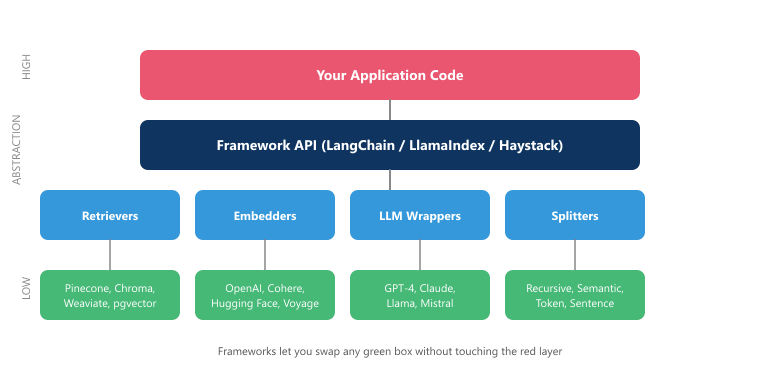
RAG frameworks solve this by providing a common interface layer. A retriever is a retriever regardless of whether it queries Pinecone or Weaviate underneath. A text splitter is a text splitter whether it uses token counts or recursive character boundaries. This abstraction brings three concrete benefits: faster prototyping, easier component swapping during evaluation, and a shared vocabulary that simplifies team communication.
However, frameworks also introduce complexity. They add layers of abstraction that can obscure what is actually happening, they impose opinions about pipeline structure that may not match your needs, and they evolve rapidly, sometimes introducing breaking changes. The decision to adopt a framework should weigh these trade-offs against the complexity of your specific use case.
LangChain's GitHub repository accumulated over 400 open issues about breaking changes in its first year alone. The framework moved so fast that tutorials written in January were often obsolete by March. This is both a testament to the pace of innovation and a cautionary tale about coupling your production code to a rapidly evolving abstraction layer.
Figure 35.6.1 shows the framework abstraction stack.
35.6.2 LangChain
LangChain is the most widely adopted framework for LLM application development. Originally built
around the concept of "chains" (sequential pipelines of operations), it has evolved into a
comprehensive ecosystem with separate packages for core abstractions (langchain-core),
community integrations (langchain-community), and the orchestration runtime
(langgraph). For RAG specifically, LangChain provides document loaders, text splitters,
embedding models, vector stores, retrievers, and output parsers as composable building blocks.
35.6.2.1 Core Concepts
LangChain's architecture revolves around several key abstractions. Document loaders ingest
data from PDFs, web pages, databases, and dozens of other sources into a uniform Document
object. Text splitters break documents into chunks with configurable size and overlap.
Retrievers provide a standard interface for fetching relevant documents, whether from
a vector store, a BM25 index, or a custom API. Chains wire these components together
into executable pipelines.
35.6.2.2 LCEL (LangChain Expression Language)
LCEL's pipe operator is not just syntactic sugar. Because every component implements the Runnable interface, you get streaming, batching, and async execution for free, without modifying any of the component code. This means you can prototype a pipeline with synchronous calls and deploy it with streaming by changing a single method call from invoke to stream.
LCEL is LangChain's declarative composition syntax, introduced to replace imperative chain construction.
Using the pipe operator (|), LCEL lets you compose components into readable pipelines
that support streaming, batching, and async execution out of the box. Each component in an LCEL
pipeline implements the Runnable interface, meaning it has invoke,
stream, batch, and ainvoke methods automatically.
Example 1: RAG Pipeline with LangChain LCEL
This snippet builds a retrieval-augmented generation pipeline using LangChain Expression Language (LCEL).
# End-to-end RAG pipeline assembled with LangChain Expression Language (LCEL):
# Chroma retriever -> prompt -> ChatOpenAI -> string parser, composed with the | operator.
from langchain_openai import ChatOpenAI, OpenAIEmbeddings
from langchain_community.vectorstores import Chroma
from langchain_core.prompts import ChatPromptTemplate
from langchain_core.output_parsers import StrOutputParser
from langchain_core.runnables import RunnablePassthrough
# Initialize components
embeddings = OpenAIEmbeddings(model="text-embedding-3-small")
vectorstore = Chroma(
    collection_name="docs",
    embedding_function=embeddings,
    persist_directory="./chroma_db"
    )
retriever = vectorstore.as_retriever(
    search_type="similarity",
    search_kwargs={"k": 5}
    )
llm = ChatOpenAI(model="gpt-4o", temperature=0)
# Define the prompt template
template = """Answer the question based only on the following context:
{context}
Question: {question}
Provide a detailed answer. If the context does not contain
enough information, say so explicitly."""
prompt = ChatPromptTemplate.from_template(template)
# Helper to format retrieved documents
def format_docs(docs):
    return "\n\n".join(doc.page_content for doc in docs)
# LCEL pipeline: pipe operator composes Runnables
rag_chain = (
    {
        "context": retriever | format_docs,
        "question": RunnablePassthrough()
        }
    | prompt
    | llm
    | StrOutputParser()
    )
# Invoke the pipeline
answer = rag_chain.invoke("What are the key benefits of RAG?")
print(answer)
# Streaming is automatic with LCEL
for chunk in rag_chain.stream("Explain hybrid search approaches"):
print(chunk, end="", flush=True)The multi-query expansion pattern from Section 35.2.1.6 ships as a ready-to-use retriever in LangChain. MultiQueryRetriever.from_llm wraps any base retriever, calls the LLM to generate n paraphrases of the input query, runs the base retriever once per paraphrase, and deduplicates by document id. Combine it with the RRF helper from langchain.retrievers.ensemble to get the full RAG-Fusion stack in a few lines:
from langchain.retrievers.multi_query import MultiQueryRetriever

multi_retriever = MultiQueryRetriever.from_llm(
    retriever=vectorstore.as_retriever(search_kwargs={"k": 5}),
    llm=llm,
)
docs = multi_retriever.invoke("How does the KV cache work?")Steps
A team has an imperative LangChain RAG function that retrieves, formats, calls the model, and parses the result in four sequential blocks of Python (about 40 lines). Porting it to LCEL collapses the entire pipeline to a single readable expression:
chain = (
    {"context": retriever | format_docs, "question": RunnablePassthrough()}
    | prompt
    | llm
    | StrOutputParser()
)
answer = chain.invoke("How does the KV cache work?")            # blocking
async for token in chain.astream("..."):                         # streaming
    print(token, end="", flush=True)
batched = chain.batch(["question 1", "question 2", "question 3"])  # parallel
Three concrete wins land immediately: (1) the same chain object supports invoke, stream, astream, and batch with no code changes, (2) every component participates in LangSmith tracing automatically, and (3) swapping the retriever or the LLM is a one-line edit. The cost is learning the Runnable protocol, which is about a 30-minute investment for someone already familiar with LangChain.
35.6.2.3 Memory and Conversation
For conversational RAG, LangChain provides memory chapters that persist chat history across turns.
The simplest is ConversationBufferMemory, which stores all messages. For long conversations,
ConversationSummaryMemory uses an LLM to compress earlier turns into a summary, keeping
the context window manageable. In the newer LangGraph paradigm, state management replaces these
memory classes with explicit graph state that flows between nodes, providing more control over
how conversation context evolves.
LangChain has undergone significant architectural changes since its early days. The original monolithic langchain package has been split into langchain-core (stable interfaces), langchain-community (third-party integrations), and vendor-specific packages like langchain-openai. For complex agent workflows, langgraph is now the recommended approach over legacy chain classes. When reading tutorials or documentation, check the version carefully, as patterns from six months ago may already be deprecated.
35.6.3 LlamaIndex
LlamaIndex (formerly GPT Index) takes a data-centric approach to RAG. While LangChain provides general-purpose LLM application primitives, LlamaIndex focuses specifically on connecting LLMs with external data. Its core philosophy is that different data structures and query patterns require different index types, and the framework should help you choose and combine them.
35.6.3.1 Index Types
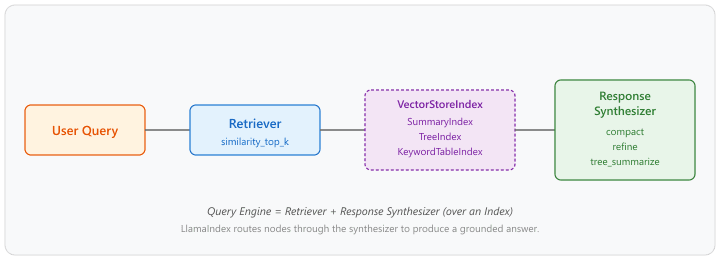
LlamaIndex offers several index types, each optimized for different query patterns. VectorStoreIndex is the most common, storing embeddings for semantic similarity search. SummaryIndex (formerly ListIndex) stores all nodes and iterates through them sequentially, useful when you need to process every document. TreeIndex builds a hierarchical tree of summaries, enabling top-down traversal for broad questions. KeywordTableIndex extracts keywords from each node and uses keyword matching for retrieval.
35.6.3.2 Query Engines and Response Synthesizers
A query engine in LlamaIndex combines a retriever with a response synthesizer. The retriever fetches relevant nodes (chunks), and the response synthesizer determines how to construct the final answer from those nodes. LlamaIndex provides several synthesis strategies: compact (stuff all context into one prompt), refine (iteratively refine the answer by processing one chunk at a time), and tree_summarize (recursively summarize groups of chunks in a tree structure). The choice of synthesizer affects both answer quality and token consumption.
The synthesizers differ in how many LLM calls they spend on $k$ retrieved nodes. If $k$ is the number of retrieved nodes and $C$ the per-call cost, then:
so total cost scales as $C$, $kC$, and roughly $(2k-1)C$ respectively, while context per call shrinks from "all $k$ chunks at once" (compact) to "one chunk plus running answer" (refine) to "pairs of summaries" (tree_summarize). Reader picks the synthesizer that fits the prompt budget and the answer quality requirement.
Example 2: RAG Pipeline with LlamaIndex
This snippet builds a RAG pipeline using LlamaIndex with a vector store index and query engine.
# Implementation example
from llama_index.core import (
    VectorStoreIndex,
    SimpleDirectoryReader,
    Settings,
    StorageContext
    )
from llama_index.core.node_parser import SentenceSplitter
from llama_index.llms.openai import OpenAI
from llama_index.embeddings.openai import OpenAIEmbedding
# Configure global settings
Settings.llm = OpenAI(model="gpt-4o", temperature=0)
Settings.embed_model = OpenAIEmbedding(model_name="text-embedding-3-small")
Settings.node_parser = SentenceSplitter(
    chunk_size=1024,
    chunk_overlap=200
    )
# Load documents from a directory
documents = SimpleDirectoryReader("./data").load_data()
print(f"Loaded {len(documents)} documents")
# Build the vector index (embeds and stores automatically)
index = VectorStoreIndex.from_documents(documents)
# Create a query engine with custom parameters
query_engine = index.as_query_engine(
    similarity_top_k=5,
    response_mode="compact", # or "refine", "tree_summarize"
    streaming=True
    )
# Query with streaming response
response = query_engine.query(
    "What are the key benefits of RAG?"
    )
# Stream the response
response.print_response_stream()
# Access source nodes for citations
for node in response.source_nodes:
    print(f"\nSource: {node.metadata.get('file_name', 'unknown')}")
    print(f"Score: {node.score:.4f}")
print(f"Text: {node.text[:200]}...")A documentation Q&A team runs the same query "What changed in the v3 API?" through the three response synthesizers on a corpus of 800 release-notes chunks with similarity_top_k = 8:
- compact: Concatenates the 8 chunks into a single prompt (about 4,800 tokens). One LLM call, latency 1.6 s, cost roughly 1.5 cents on GPT-4o. The answer is fluent but occasionally drops a minor breaking change.
- refine: Calls the LLM 8 times in sequence, each time updating the running answer with the next chunk. Latency 9 s, cost 4 cents. The answer captures every change but is more verbose.
- tree_summarize: Recursively summarizes the 8 chunks in pairs, then pairs of summaries, until one root answer remains. 4 + 2 + 1 = 7 LLM calls, latency 4 s, cost 2.5 cents. The answer is concise and covers all changes, the best quality-vs-cost tradeoff for this workload.
The team ships tree_summarize for the "summarize all release notes" panel and keeps compact for snappy single-question lookups, demonstrating that the choice of synthesizer is a per-query-pattern decision, not a single global setting.
35.6.3.3 Routers and Multi-Index Queries
One of LlamaIndex's distinctive features is its routing system. A RouterQueryEngine selects which sub-query engine to use based on the question. For example, you might route factual questions to a vector index, summary questions to a tree index, and comparison questions to a SQL query engine. This enables a single application to handle diverse query types by dispatching each question to the most appropriate retrieval strategy.
35.6.4 Haystack by deepset
Haystack takes a pipeline-first approach to NLP and RAG applications. Developed by deepset, it models every workflow as a directed graph of components. Each component has typed inputs and outputs, and pipelines are validated at construction time to ensure that component connections are compatible. This design philosophy emphasizes explicit data flow, type safety, and reproducibility.
35.6.4.1 Pipeline-Based Architecture
In Haystack, a pipeline is a directed acyclic graph (DAG) where each node is a component that performs a specific operation. Components declare their input and output types using Python dataclasses, and the pipeline validates that connected components have compatible types. This strict typing catches configuration errors at build time rather than at runtime, which is valuable for complex production pipelines with many components.
Example 3: RAG Pipeline with Haystack
This snippet builds a RAG pipeline using Haystack's component-based pipeline API.
# Implementation example
from haystack import Pipeline
from haystack.components.converters import TextFileToDocument
from haystack.components.preprocessors import DocumentSplitter
from haystack.components.embedders import (
    SentenceTransformersDocumentEmbedder,
    SentenceTransformersTextEmbedder
)
from haystack.components.writers import DocumentWriter
from haystack.components.builders import PromptBuilder
from haystack.components.generators import OpenAIGenerator
from haystack_integrations.document_stores.chroma import (
    ChromaDocumentStore
)
from haystack_integrations.components.retrievers.chroma import (
    ChromaEmbeddingRetriever
)
# ---- Indexing Pipeline ----
document_store = ChromaDocumentStore()
indexing_pipeline = Pipeline()
indexing_pipeline.add_component("converter", TextFileToDocument())
indexing_pipeline.add_component("splitter", DocumentSplitter(
    split_by="sentence", split_length=3, split_overlap=1
))
indexing_pipeline.add_component("embedder",
    SentenceTransformersDocumentEmbedder()
)
indexing_pipeline.add_component("writer",
    DocumentWriter(document_store=document_store)
)
# Connect components explicitly
indexing_pipeline.connect("converter", "splitter")
indexing_pipeline.connect("splitter", "embedder")
indexing_pipeline.connect("embedder", "writer")
# Run indexing
indexing_pipeline.run({
    "converter": {"sources": ["./data/doc1.txt", "./data/doc2.txt"]}
})
# ---- Query Pipeline ----
template = """Given the following context, answer the question.
Context:
{% for doc in documents %}
 {{ doc.content }}
{% endfor %}
Question: {{ question }}
Answer:"""
query_pipeline = Pipeline()
query_pipeline.add_component("text_embedder",
    SentenceTransformersTextEmbedder()
)
query_pipeline.add_component("retriever",
    ChromaEmbeddingRetriever(document_store=document_store)
)
query_pipeline.add_component("prompt_builder",
    PromptBuilder(template=template)
)
query_pipeline.add_component("llm", OpenAIGenerator(model="gpt-4o"))
query_pipeline.connect("text_embedder.embedding", "retriever.query_embedding")
query_pipeline.connect("retriever.documents", "prompt_builder.documents")
query_pipeline.connect("prompt_builder", "llm")
# Run the query pipeline
result = query_pipeline.run({
    "text_embedder": {"text": "What are the key benefits of RAG?"},
    "prompt_builder": {"question": "What are the key benefits of RAG?"}
})
print(result["llm"]["replies"][0])Haystack's explicit component wiring may feel verbose compared to LangChain's LCEL pipes, but it provides a major advantage for production systems: the pipeline graph can be serialized to YAML, versioned in Git, and reconstructed identically across environments. This makes Haystack pipelines highly reproducible and easy to audit, which matters in regulated industries where you must document exactly how your system processes data.
35.6.5 Framework Comparison
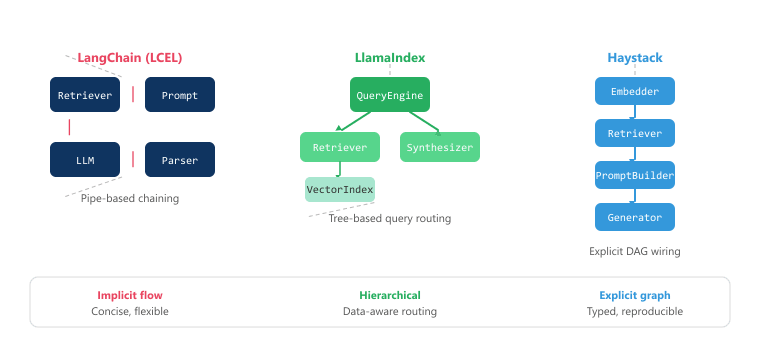
Each framework reflects a different philosophy about how RAG applications should be built. LangChain prioritizes breadth of integrations and developer velocity, LlamaIndex focuses on data-aware retrieval strategies, and Haystack emphasizes pipeline clarity and production robustness. The following table summarizes the key differences. Figure 35.6.3b compares the composition models used by each framework.
| Dimension | LangChain | LlamaIndex | Haystack |
|---|---|---|---|
| Philosophy | General-purpose LLM toolkit | Data-centric RAG framework | Pipeline-first NLP framework |
| Primary strength | Breadth of integrations (700+) | Index types and query routing | Type-safe pipeline composition |
| Composition model | LCEL pipes, LangGraph | Query engines, routers | DAG pipelines with typed I/O |
| Learning curve | Moderate (many concepts) | Lower for RAG tasks | Lower (explicit data flow) |
| Agent support | LangGraph (strong) | AgentRunner (growing) | Agent components (newer) |
| Production tooling | LangSmith tracing, LangServe | Observability callbacks | Hayhooks, pipeline YAML |
| Community size | Largest (90k+ GitHub stars) | Large (35k+ GitHub stars) | Growing (17k+ GitHub stars) |
| API stability | Frequent changes (improving) | More stable core API | Stable since Haystack 2.0 |
| Best for | Prototyping, diverse use cases | Complex data retrieval | Production NLP pipelines |
35.6.6 When to Use a Framework vs. Building from Scratch
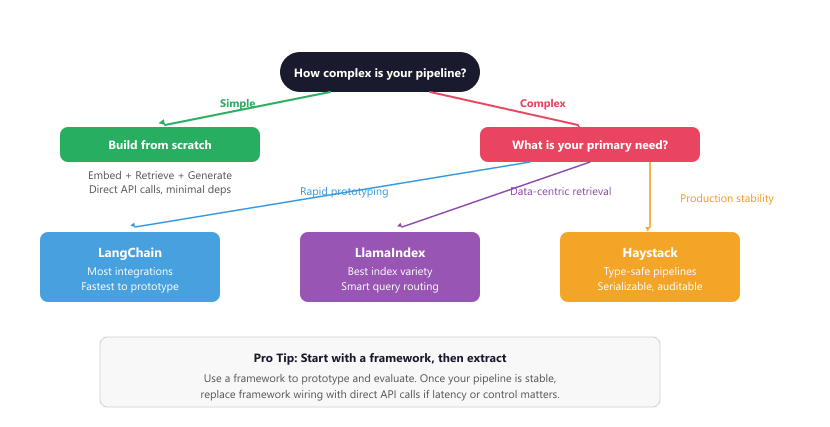
Frameworks are not always the right choice. For simple RAG pipelines (embed, retrieve, generate), the overhead of learning and maintaining a framework may exceed the effort of writing the integration code yourself. The decision depends on several factors: pipeline complexity, team size, iteration speed requirements, and the need for component swapping.
35.6.6.1 Choose a Framework When
- You need rapid prototyping: Frameworks let you test different vector stores, embedding models, and retrieval strategies in hours instead of days.
- Your pipeline has many components: Once you need rerankers, query routers, hybrid search, or multi-step retrieval, the wiring code grows exponentially. Frameworks manage this complexity.
- Your team is growing: Frameworks provide a shared vocabulary and structure that makes onboarding easier and code reviews more productive.
- You want observability tooling: LangSmith, LlamaTrace, and Haystack's pipeline visualization provide tracing and debugging that would take weeks to build from scratch.
35.6.6.2 Build from Scratch When
- Your pipeline is simple and stable: If you know you are using OpenAI embeddings, Pinecone, and GPT-4o, and this will not change, direct API calls are simpler and faster.
- Performance is critical: Frameworks add latency overhead (typically 5 to 50ms per component call). For latency-sensitive applications, direct API calls eliminate this overhead.
- You need deep customization: If your retrieval logic requires custom scoring functions, specialized chunk merging, or non-standard pipeline patterns, fighting a framework's abstractions can be harder than building your own.
- You want minimal dependencies: Frameworks pull in dozens of transitive dependencies. For lightweight deployments (Lambda functions, edge computing), a minimal implementation is often preferable.
Example 4: Minimal RAG Without a Framework
This snippet implements a minimal RAG pipeline using only the OpenAI SDK and a simple in-memory vector store.
# Minimal framework-free RAG: three tiny functions (embed, retrieve, generate)
# show the entire pipeline in under 50 lines without LangChain or LlamaIndex.
import openai
import chromadb
# Direct API calls: no framework needed
client = openai.OpenAI()
chroma = chromadb.PersistentClient(path="./chroma_db")
collection = chroma.get_or_create_collection(
    name="docs",
    metadata={"hnsw:space": "cosine"}
)
def embed(text: str) -> list[float]:
    """Get embedding from OpenAI."""
    response = client.embeddings.create(
        model="text-embedding-3-small",
        input=text
    )
    return response.data[0].embedding
def retrieve(query: str, k: int = 5) -> list[str]:
    """Retrieve top-k relevant documents."""
    results = collection.query(
        query_embeddings=[embed(query)],
        n_results=k
    )
    return results["documents"][0]
def generate(query: str, context_docs: list[str]) -> str:
    """Generate answer using retrieved context."""
    context = "\n\n".join(context_docs)
    response = client.chat.completions.create(
        model="gpt-4o",
        messages=[
        {"role": "system", "content": (
        "Answer based on the provided context. "
        "If the context is insufficient, say so."
        )},
        {"role": "user", "content": (
        f"Context:\n{context}\n\nQuestion: {query}"
        )}
        ],
        temperature=0
    )
    return response.choices[0].message.content
# The entire RAG pipeline in three function calls
query = "What are the key benefits of RAG?"
docs = retrieve(query)
answer = generate(query, docs)
print(answer)Be cautious about deep framework coupling. If you use LangChain's custom prompt classes, LlamaIndex's specialized node postprocessors, and framework-specific serialization formats throughout your codebase, migrating to a different framework (or to raw API calls) becomes expensive. As a safeguard, keep your core business logic in plain Python functions that accept and return standard types (strings, lists, dictionaries). Use the framework for orchestration and wiring, not for your domain logic. This layered approach lets you swap the orchestration layer without rewriting your retrieval and generation logic. Figure 35.6.2b provides a decision tree for choosing the right approach.
What's Next?
In the next part of this section, Section 35.7: RAG Production: DSPy, Hardening & Security, we move from framework selection to running a RAG system in production: the hardening checklist, the compound-AI shift represented by DSPy (optimize the pipeline, not the prompt), and the retrieval-layer security threats (RAG poisoning, indirect prompt injection) that no framework will solve for you.