"The best training framework is the one that lets you stop configuring YAML and start looking at loss curves."
LoRA, YAML-Weary AI Agent
The fine-tuning tool landscape is evolving rapidly. While you can always write a training loop from scratch using Section 0.3 and the PEFT library, specialized platforms can dramatically reduce setup time, optimize GPU utilization, and provide production-tested configurations out of the box. This section surveys the five most important tools in the ecosystem: Unsloth for raw speed, Axolotl for configuration-driven workflows, LLaMA-Factory for a visual interface, torchtune for PyTorch-native composability, and TRL for alignment training. The SFT workflow from Section 16.3 and the LoRA/QLoRA techniques from Section 17.1 are the foundations these tools build upon.
Prerequisites
This section builds on the LoRA and QLoRA techniques from Section 17.1 and the advanced PEFT methods covered in Section 17.2. You should be comfortable with the supervised fine-tuning workflow from Section 16.3, as these tools wrap that workflow with convenience layers and optimizations.
When the QLoRA paper landed in mid-2023, the most surprising claim was not the accuracy preservation but the hardware floor: a 65B-parameter model fine-tuned on a single 48 GB GPU. Within weeks, Reddit users were reporting successful 7B QLoRA runs on consumer 24 GB cards, then 13B on 16 GB, then 7B on 8 GB. The downward pressure on fine-tuning hardware requirements turned out to be one of the most consequential single papers of the open-source LLM era.
17.3.1 Unsloth: 2x Faster Fine-Tuning
Unsloth is an open-source library that achieves roughly 2x training speedup and 50% memory reduction compared to standard Hugging Face training, with zero accuracy loss. It accomplishes this through hand-written Triton kernels for attention, RoPE, cross-entropy loss, and other operations, bypassing the overhead of PyTorch's autograd in performance-critical paths.
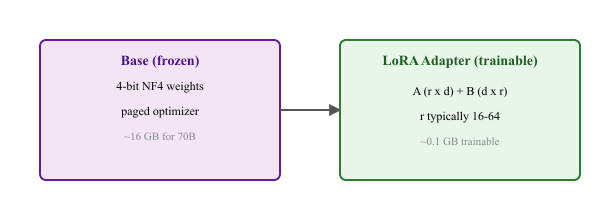
"QLoRA quantizes the LoRA adapters" is a common misreading: load_in_4bit=True sits next to the LoRA setup, so it looks like they describe the same matrices. They do not. QLoRA quantizes the frozen base model to NF4 (the part you do not train), then attaches BF16 LoRA adapters (the part you do train). The adapters stay full precision because training a 4-bit matrix would be unstable. The memory win is from compressing the 70 GB of frozen base weights into 18 GB while paying full precision on the 50 MB of trainable adapters.
Unsloth integrates seamlessly with the Hugging Face ecosystem: you load models through Unsloth's optimized loader, and then use standard SFTTrainer or DPOTrainer for the actual training. The output is a standard PEFT adapter that can be loaded by any tool.
Think of training platforms as auto-tuning workshops for cars. Unsloth is the speed shop that optimizes your engine (training kernels) to run twice as fast on the same hardware. Axolotl is the all-in-one garage with pre-built configurations for common jobs. Hugging Face TRL is the standard toolkit that every mechanic knows, with parts (trainers, callbacks) that work across any model.
# Load a model with Unsloth for 2x faster LoRA fine-tuning
from unsloth import FastLanguageModel
from trl import SFTTrainer
from transformers import TrainingArguments

# 1. Load model with Unsloth (handles quantization + LoRA setup)
model, tokenizer = FastLanguageModel.from_pretrained(
    model_name="unsloth/Meta-Llama-3.1-8B",
    max_seq_length=2048,
    dtype=None,
    load_in_4bit=True,
)

# 2. Add LoRA adapters (Unsloth optimized)
model = FastLanguageModel.get_peft_model(
    model, r=16, lora_alpha=16, lora_dropout=0,
    target_modules=["q_proj", "k_proj", "v_proj", "o_proj",
                    "gate_proj", "up_proj", "down_proj"],
    use_gradient_checkpointing="unsloth",
)

# 3. Export to GGUF directly (Unsloth-specific shortcut)
# model.save_pretrained_gguf("gguf_model", tokenizer, quantization_method="q4_k_m")Unsloth's save_pretrained_gguf method directly exports to GGUF format, eliminating the separate llama.cpp conversion step. This makes the workflow from training to local deployment (via Ollama or llama.cpp) a single pipeline. For production vLLM deployments, use save_pretrained_merged instead.
Who: Solo developer building a legal document summarization product.
Problem: The standard Hugging Face training pipeline took 8 hours on a single RTX 4090 and required a separate GGUF conversion step for local Ollama deployment at a privacy-sensitive law firm.
Decision: They adopted Unsloth with 4-bit quantization and trained with Unsloth's fused kernels. save_pretrained_gguf exported directly to Q4_K_M.
Result: Training time dropped from 8 hours to 2.5 hours (a 3.2x speedup). The entire train-to-deploy pipeline (including GGUF export and Ollama import) completed in under 3 hours, enabling weekly update cycles.
Lesson: When your deployment target is local inference (Ollama, llama.cpp), Unsloth's integrated GGUF export eliminates a fragile conversion step and dramatically accelerates iteration.
17.3.2 Axolotl: Configuration-Driven Training
Axolotl takes a different approach: instead of writing Python code, you define your entire training run in a YAML configuration file. This makes experiments reproducible, shareable, and easy to iterate on. Axolotl supports all major model architectures, PEFT methods, dataset formats, and training features (DeepSpeed, FSDP, multi-GPU) through configuration alone.
# axolotl_config.yml
base_model: meta-llama/Meta-Llama-3.1-8B-Instruct
model_type: LlamaForCausalLM
tokenizer_type: AutoTokenizer

# Dataset configuration
datasets:
  - path: tatsu-lab/alpaca
    type: alpaca

# QLoRA configuration
load_in_4bit: true
adapter: qlora
lora_r: 32
lora_alpha: 64
lora_dropout: 0.05
lora_target_linear: true

# Training parameters
sequence_len: 4096
sample_packing: true
micro_batch_size: 2
gradient_accumulation_steps: 4
num_epochs: 3
learning_rate: 0.0002
lr_scheduler: cosine
warmup_ratio: 0.05
optimizer: paged_adamw_8bit
bf16: auto
gradient_checkpointing: true
flash_attention: true

# Launch with: accelerate launch -m axolotl.cli.train axolotl_config.ymlAxolotl's sample_packing feature concatenates multiple short training examples into a single sequence, significantly improving GPU utilization when your dataset contains many short examples. This can speed up training by 2-5x for datasets with average sequence lengths well below the maximum. Axolotl handles the attention masking automatically so that packed samples do not attend to each other.
17.3.3 LLaMA-Factory: Web UI for Fine-Tuning
LLaMA-Factory provides a graphical web interface (LLaMA Board) for configuring and launching fine-tuning runs. It is particularly valuable for teams where not everyone is comfortable writing YAML or Python configurations. The web UI lets you select models, datasets, PEFT methods, and hyperparameters through dropdown menus and sliders, then generates and executes the corresponding training code.
# Install LLaMA-Factory: pip install llamafactory
# Launch the web UI: llamafactory-cli webui
# Or use CLI for scriptable workflows
import json
config = {
    "model_name_or_path": "meta-llama/Meta-Llama-3.1-8B-Instruct",
    "stage": "sft",
    "finetuning_type": "lora",
    "lora_rank": 16,
    "lora_alpha": 32,
    "lora_target": "all",
    "dataset": "alpaca_en",
    "template": "llama3",
    "quantization_bit": 4,
    "per_device_train_batch_size": 4,
    "gradient_accumulation_steps": 4,
    "num_train_epochs": 3.0,
    "learning_rate": 2e-4,
    "output_dir": "./llama_factory_output",
}
with open("train_config.json", "w") as f:
    json.dump(config, f, indent=2)
# llamafactory-cli train train_config.json17.3.4 torchtune: PyTorch-Native Fine-Tuning
torchtune is PyTorch's official library for fine-tuning LLMs. Its philosophy is transparency and composability: rather than hiding complexity behind abstractions, it provides well-documented, hackable recipes that you can read, understand, and modify. Each recipe is a self-contained Python script, not a framework that manages your training loop. torchtune is the best choice when you need full control over the training process, want to implement custom training logic, or are integrating fine-tuning into an existing PyTorch codebase.
import torch
# Install: pip install torchtune
# Download a model:
#   tune download meta-llama/Meta-Llama-3.1-8B-Instruct --output-dir ./models/llama3-8b
# Run a built-in recipe (LoRA single GPU):
#   tune run lora_finetune_single_device --config llama3_1/8B_lora_single_device
# Programmatic use:
from torchtune.models.llama3_1 import lora_llama3_1_8b
from torchtune.modules.peft import get_adapter_params
model = lora_llama3_1_8b(
    lora_attn_modules=["q_proj", "v_proj"],
    apply_lora_to_mlp=True,
    lora_rank=16,
    lora_alpha=32,
)
adapter_params = get_adapter_params(model)
optimizer = torch.optim.AdamW(adapter_params, lr=2e-4)17.3.5 TRL: Transformer Reinforcement Learning
TRL (Transformer Reinforcement Learning) from Hugging Face is the standard library for alignment training, including SFT, RLHF, DPO, and other preference optimization methods. While its scope extends beyond PEFT, TRL integrates deeply with the PEFT library, making it the natural choice when your fine-tuning involves alignment stages.
from trl import SFTTrainer, SFTConfig, DPOTrainer, DPOConfig
from peft import LoraConfig

# SFT with LoRA (most common PEFT + TRL pattern)
sft_config = SFTConfig(
    output_dir="./sft_output", max_seq_length=2048,
    per_device_train_batch_size=4, num_train_epochs=3,
    learning_rate=2e-4, packing=True,
)
peft_config = LoraConfig(r=16, lora_alpha=32,
                         target_modules="all-linear", task_type="CAUSAL_LM")
trainer = SFTTrainer(
    model="meta-llama/Meta-Llama-3.1-8B",
    args=sft_config,
    train_dataset=dataset,
    peft_config=peft_config,
)
trainer.train()

# DPO with LoRA (preference optimization after SFT)
dpo_config = DPOConfig(output_dir="./dpo_output",
                       per_device_train_batch_size=2,
                       num_train_epochs=1, learning_rate=5e-5, beta=0.1)
dpo_trainer = DPOTrainer(model=sft_model, args=dpo_config,
                         train_dataset=preference_dataset,
                         peft_config=peft_config)
dpo_trainer.train()Why this matters: The choice of training platform has more practical impact than the choice of PEFT method. A misconfigured training run wastes hours and GPU dollars, while a well-integrated platform handles mixed-precision training, gradient checkpointing, and dataset preprocessing automatically. For most practitioners, the recommendation is clear: use Unsloth for single-GPU experiments (fastest iteration), Axolotl for reproducible multi-GPU training (best configuration management), and TRL when you need RLHF or DPO integration.
- Unsloth delivers 2x speed and 50% memory savings through custom Triton kernels, making it the best choice for single-GPU fine-tuning when the model is supported.
- Axolotl provides reproducible, configuration-driven training via YAML files, with sample packing and multi-GPU support built in.
- LLaMA-Factory offers a web UI that makes fine-tuning accessible to teams without deep Python expertise.
- torchtune is PyTorch-native and transparent, ideal when you need full control over the training pipeline or are doing custom research.
- TRL is essential for alignment training (SFT, DPO, RLHF) and integrates seamlessly with PEFT for parameter-efficient alignment.
Show Answer
Show Answer
Show Answer
Exercises
What does Unsloth do to achieve 2x training speedup and 50% memory reduction compared to standard Hugging Face training? Name two key techniques.
Answer Sketch
Unsloth uses: (1) hand-written Triton kernels for attention, RoPE, cross-entropy loss, and other operations that bypass PyTorch autograd overhead, and (2) intelligent memory management that avoids materializing large intermediate tensors. These custom kernels fuse operations that Hugging Face runs as separate steps, reducing GPU memory traffic and computation.
Compare Unsloth, Axolotl, and LLaMA-Factory on three dimensions: ease of use, flexibility, and performance. When would you choose each?
Answer Sketch
Unsloth: best performance (2x speedup), code-first API, limited to single-GPU. Choose for fast iteration on a single GPU. Axolotl: config-driven (YAML), supports multi-GPU and complex training recipes (DPO, RLHF). Choose for production training pipelines that need reproducibility. LLaMA-Factory: web UI for non-programmers, supports many model families, good for experimentation.
What's Next?
This section continues in Section 17.3a: Training Tool Comparison, Cloud Compute & Recommended Workflows, which puts the five tools side by side, walks through the cloud GPU landscape (Colab, Lambda Labs, RunPod, Modal, Vast.ai), and stitches the pieces into beginner, intermediate-production, and advanced multi-stage alignment workflows.