"An LLM inference server in a container is a small chess engine inside a small chess engine. Memory, latency, and GPU access all have to line up."
Deploy, GPU-Container-Tuner AI Agent
LLM inference servers like vLLM, Text Generation Inference (TGI), and Ollama are designed to run inside containers. Each provides official Docker images that handle GPU configuration, model loading, and API serving. This section covers practical patterns for deploying these servers in containers, including model weight management, GPU resource allocation, quantized model serving, and exposing OpenAI-compatible endpoints.
Prerequisites
This section assumes the Docker fundamentals from Section 65.1, the LLM inference servers (vLLM, TGI, TensorRT-LLM) from Section 10.6, and the NVIDIA Container Toolkit basics introduced in Section 65.2.
65.4.1 vLLM in Docker
vLLM started in early 2023 as a UC Berkeley class project by Woosuk Kwon and colleagues. The PagedAttention technique they introduced (which underpins the vllm/vllm-openai image) was inspired by virtual memory paging from operating systems, a 1960s concept that turned out to be exactly what KV cache management needed. The original course this was built for ended up giving the team an A+ and a $7M seed round.

vLLM publishes official Docker images on Docker Hub under the vllm/vllm-openai repository.
These images include the vLLM engine, its OpenAI-compatible API server, and all necessary CUDA
dependencies. Running a vLLM container requires GPU access and a model specification.
The following command launches vLLM with Llama-3.1 8B, exposes the API on port 8000, and mounts a persistent cache for downloaded model weights.
# Run vLLM with Llama 3.1 8B Instruct
docker run -d \
    --name vllm-server \
    --gpus '"device=0"' \
    -v hf-cache:/root/.cache/huggingface \
    -p 8000:8000 \
    -e HF_TOKEN=${HF_TOKEN} \
    vllm/vllm-openai:latest \
    --model meta-llama/Llama-3.1-8B-Instruct \
    --max-model-len 4096 \
    --gpu-memory-utilization 0.90 \
    --dtype auto

# Verify the server is running (may take 1-2 minutes to load)
curl http://localhost:8000/v1/models
Once the server is ready, it accepts requests that follow the OpenAI API format. Any application
built against the OpenAI SDK can point to this container by changing the base_url to
http://localhost:8000/v1.
Model weight management is the biggest operational challenge for containerized LLMs. A 7B parameter model in float16 requires approximately 14 GB of storage. Without a persistent volume for the Hugging Face cache, Docker downloads the full model every time you recreate the container. Always mount a named volume at /root/.cache/huggingface.
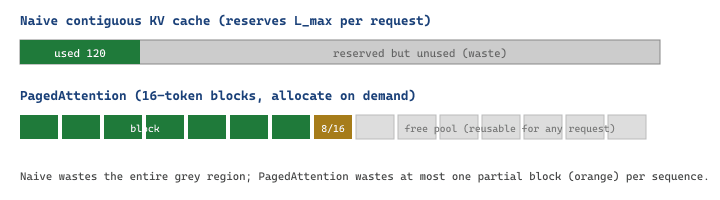
The headline feature that lets vLLM out-throughput a naive HuggingFace generate loop is PagedAttention, a non-contiguous allocator for the KV cache. A classical KV cache reserves $L_{\max}$ slots up front for every request, which on a server with $R$ concurrent users wastes a fraction equal to the average unused tail:
$$ \text{waste}_{\text{naive}} = 1 - \frac{\bar{L}_{\text{actual}}}{L_{\max}}, \qquad \text{waste}_{\text{paged}} \le \frac{B - 1}{B}\,\text{(at most one half-empty block per sequence)}, $$
where $\bar{L}_{\text{actual}}$ is the mean realised sequence length and $B$ is the block size (vLLM defaults to 16 tokens per block). For a workload with $\bar{L}=200$ but $L_{\max}=4096$, the naive scheme wastes more than 95% of the KV cache, while PagedAttention wastes at most $15/200 = 7.5\%$. The freed memory directly translates into higher concurrent batch size and therefore higher throughput.
# client_vllm.py: hit the OpenAI-compatible vLLM endpoint started above.
from openai import OpenAI

client = OpenAI(base_url="http://localhost:8000/v1", api_key="sk-anything")

resp = client.chat.completions.create(
    model="meta-llama/Llama-3.1-8B-Instruct",
    messages=[{"role": "user", "content": "Summarize PagedAttention in one sentence."}],
    max_tokens=64,
    temperature=0.2,
)
print(resp.choices[0].message.content)
Code Fragment 65.4.2a: A vLLM container exposes the same chat completion schema as OpenAI, so any client written against the OpenAI SDK can be retargeted by changing base_url.
Consider Llama-3.1-8B with 32 layers, 8 KV heads, head dimension 128, BF16 (2 bytes). Each KV-cache token costs $2 \times 32 \times 8 \times 128 \times 2 = 131{,}072$ bytes $\approx 128$ KB. An A100-80GB with 70 GB free for KV cache (after model weights) holds about $70 \cdot 1024^3 / 131072 \approx 573{,}440$ tokens. With $L_{\max} = 4096$ and a workload averaging only 256 tokens per reply, naive reservation pre-allocates $4096$ slots per request and admits only $573440 / 4096 \approx 140$ concurrent sequences. PagedAttention allocates 16-token blocks lazily, so it admits roughly $573440 / 256 \approx 2240$ concurrent sequences. The 16x increase in concurrent batch directly compounds into higher tokens-per-second, which is the throughput multiplier the vLLM paper reports on real workloads.
65.4.2 Text Generation Inference (TGI) in Docker
Hugging Face's TGI provides its own Docker image optimized for transformer model serving. TGI uses Rust for the HTTP server and includes FlashAttention, continuous batching, and token streaming out of the box. The image is available on GitHub Container Registry.
# Run TGI with Mistral 7B Instruct
docker run -d \
    --name tgi-server \
    --gpus all \
    -v tgi-cache:/data \
    -p 8080:80 \
    -e HF_TOKEN=${HF_TOKEN} \
    ghcr.io/huggingface/text-generation-inference:2.4 \
    --model-id mistralai/Mistral-7B-Instruct-v0.3 \
    --max-input-tokens 2048 \
    --max-total-tokens 4096 \
    --max-batch-prefill-tokens 4096

# Test with a generation request
curl http://localhost:8080/generate \
    -H 'Content-Type: application/json' \
    -d '{"inputs": "What is Docker?", "parameters": {"max_new_tokens": 100}}'
TGI stores downloaded models in the /data directory inside the container. Mounting a
persistent volume at this path prevents re-downloading. TGI also supports an OpenAI-compatible endpoint
at /v1/chat/completions when launched with the --messages-api-enabled flag
(enabled by default in recent versions).
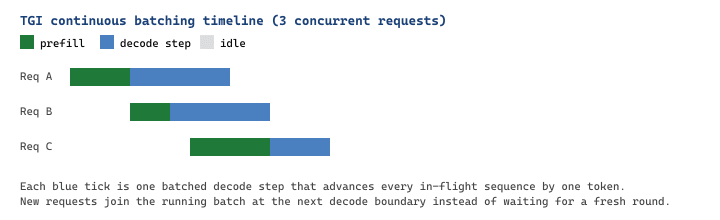
Internally, TGI overlaps two stages on the GPU: prefill (one forward pass over all $L_{\text{in}}$ input tokens) and decode (one forward pass per output token, batched across in-flight sequences via continuous batching). If $T_p$ is the per-token prefill time and $T_d$ the per-token decode time, the wall-clock latency for a single request is approximately:
$$ T_{\text{total}} \approx L_{\text{in}}\,T_p + L_{\text{out}}\,T_d. $$
Continuous batching makes $T_d$ effectively shared across the whole in-flight batch, so the per-request decode time stays roughly constant as concurrency grows, up until the GPU hits its compute or KV-cache ceiling. This is why TGI's published throughput numbers look bandwidth-bound rather than latency-bound.
# client_tgi.py: stream tokens from a TGI container as they are generated.
import requests, json

with requests.post(
    "http://localhost:8080/generate_stream",
    headers={"Content-Type": "application/json"},
    data=json.dumps({
        "inputs": "Explain continuous batching in two sentences.",
        "parameters": {"max_new_tokens": 80, "temperature": 0.2},
    }),
    stream=True,
) as r:
    for line in r.iter_lines():
        if line.startswith(b"data:"):
            event = json.loads(line[5:])
            print(event["token"]["text"], end="", flush=True)
Code Fragment 65.4.2c: Python client for TGI's streaming endpoint. Each server-sent event contains one decoded token, which makes the per-request decode rhythm in Figure 65.4.3 directly observable.
Mistral-7B in BF16 needs about 14 GB for weights. On a 24 GB L4 GPU that leaves 10 GB for the KV cache. With 32 layers, 8 KV heads, head dimension 128, and BF16, each token costs $2 \cdot 32 \cdot 8 \cdot 128 \cdot 2 = 131{,}072$ bytes $\approx 128$ KB. So 10 GB supports about $10 \cdot 1024^3 / 131072 \approx 81{,}920$ KV-cache tokens, which is comfortable for $20$ concurrent users averaging 4K tokens each. The container in Code Fragment 65.4.2 sets --max-total-tokens 4096 and --max-batch-prefill-tokens 4096; raising the second to $8192$ lets two requests share a prefill batch and roughly doubles prefill throughput on the same GPU.
65.4.3 Ollama in Docker
Ollama provides the simplest Docker experience for running LLMs locally. It manages model downloads, quantization, and serving through a single binary. Ollama is especially useful for development environments where you need a quick, self-contained LLM without manual model management.
# Run Ollama server
docker run -d \
    --name ollama \
    --gpus all \
    -v ollama-data:/root/.ollama \
    -p 11434:11434 \
    ollama/ollama:latest

# Pull a model (runs inside the container)
docker exec ollama ollama pull llama3.1:8b

# Test generation
curl http://localhost:11434/api/generate \
    -d '{"model": "llama3.1:8b", "prompt": "Explain containers in one sentence."}'

# Ollama also supports the OpenAI-compatible API
curl http://localhost:11434/v1/chat/completions \
    -H "Content-Type: application/json" \
    -d '{
        "model": "llama3.1:8b",
        "messages": [{"role": "user", "content": "What is Docker?"}]
}'Ollama automatically serves quantized models (GGUF format) and selects the appropriate quantization level based on available GPU memory. For a 7B model, Ollama typically uses Q4_K_M quantization, which requires only about 4.5 GB of VRAM. This makes Ollama ideal for development on consumer GPUs with 8 GB of memory.
65.4.4 Comparing Inference Server Containers
Each inference server has different strengths. The following table compares key characteristics to help you choose the right one for your use case.
| Feature | vLLM | TGI | Ollama |
|---|---|---|---|
| Primary use case | High-throughput production serving | Production serving with HF ecosystem | Local development and testing |
| OpenAI-compatible API | Yes (native) | Yes (built-in) | Yes (built-in) |
| Continuous batching | Yes (PagedAttention) | Yes (FlashAttention) | Limited |
| Tensor parallelism | Yes (multi-GPU) | Yes (multi-GPU) | No |
| Quantization support | GPTQ, AWQ, SqueezeLLM | GPTQ, AWQ, EETQ | GGUF (automatic) |
| Model management | Manual (HF Hub) | Manual (HF Hub) | Built-in (ollama pull) |
| Minimum GPU memory | ~16 GB (7B FP16) | ~16 GB (7B FP16) | ~5 GB (7B Q4) |
| Image size | ~8 GB | ~10 GB | ~2 GB |
65.4.5 Model Weight Mounting Strategies
For production deployments, downloading model weights at container startup is unreliable (network failures, rate limits) and slow (minutes to hours for large models). Three strategies avoid this problem.
The first strategy is to pre-download weights to a host directory and bind-mount them. This works well for single-machine deployments.
# Pre-download model weights to the host
docker run --rm \
-v /opt/models:/models \
-e HF_TOKEN=${HF_TOKEN} \
python:3.11-slim \
pip install huggingface_hub && \
python -c "
from huggingface_hub import snapshot_download
snapshot_download(
    'meta-llama/Llama-3.1-8B-Instruct',
    local_dir='/models/llama-3.1-8b',
    local_dir_use_symlinks=False
    )
"
# Mount the pre-downloaded weights
docker run -d --gpus all \
-v /opt/models/llama-3.1-8b:/models/llama-3.1-8b:ro \
-p 8000:8000 \
vllm/vllm-openai:latest \
--model /models/llama-3.1-8bThe second strategy bakes the model weights directly into the Docker image. This creates a large (20+ GB) but entirely self-contained image that can be deployed to any machine without network access to Hugging Face.
# Dockerfile that bakes model weights into the image
FROM vllm/vllm-openai:latest
# Download model weights during build
RUN pip install huggingface_hub
ARG HF_TOKEN
RUN python -c "
from huggingface_hub import snapshot_download
snapshot_download(
    'meta-llama/Llama-3.1-8B-Instruct',
    local_dir='/models/llama-3.1-8b',
    local_dir_use_symlinks=False,
    token='${HF_TOKEN}'
    )
"
CMD ["--model", "/models/llama-3.1-8b", "--max-model-len", "4096"]When baking model weights into an image, pass the Hugging Face token as a build argument (--build-arg HF_TOKEN=...), not as an ENV instruction. Build arguments are not persisted in the final image layers. However, if you use multi-stage builds, ensure the token is only used in the build stage and not copied to the runtime stage.
65.4.6 Running Quantized Models in Containers
Quantization reduces model memory requirements by representing weights in lower precision (4-bit or 8-bit instead of 16-bit). This enables running larger models on smaller GPUs. Each inference server supports different quantization formats.
# vLLM with a GPTQ-quantized 70B model on a single GPU
docker run -d --gpus '"device=0"' \
    -v hf-cache:/root/.cache/huggingface \
    -p 8000:8000 \
    vllm/vllm-openai:latest \
    --model TheBloke/Llama-2-70B-Chat-GPTQ \
    --quantization gptq \
    --max-model-len 2048 \
    --gpu-memory-utilization 0.95

# TGI with an AWQ-quantized model
docker run -d --gpus all \
    -v tgi-cache:/data \
    -p 8080:80 \
    ghcr.io/huggingface/text-generation-inference:2.4 \
    --model-id TheBloke/Mistral-7B-Instruct-v0.2-AWQ \
    --quantize awq

# Ollama with a Q4 quantized model (automatic)
docker exec ollama ollama pull llama3.1:8b-instruct-q4_K_MA 70B parameter model in float16 requires approximately 140 GB of VRAM, which means at least two A100-80GB GPUs. With GPTQ 4-bit quantization, the same model fits on a single A100 (approximately 35 GB). In a Docker container with vLLM, pass --quantization gptq and --tensor-parallel-size 1. The throughput penalty for 4-bit quantization is typically 10 to 20% compared to float16.
65.4.7 Multi-GPU Inference in Containers
For models that exceed single-GPU memory (even with quantization), both vLLM and TGI support tensor parallelism across multiple GPUs within a single container. The container needs access to all target GPUs.
# vLLM with tensor parallelism across 4 GPUs
docker run -d \
    --gpus '"device=0,1,2,3"' \
    --shm-size=16g \
    -v hf-cache:/root/.cache/huggingface \
    -p 8000:8000 \
    vllm/vllm-openai:latest \
    --model meta-llama/Llama-3.1-70B-Instruct \
    --tensor-parallel-size 4 \
    --max-model-len 4096 \
    --gpu-memory-utilization 0.90

# TGI with tensor parallelism across 2 GPUs
docker run -d \
    --gpus '"device=0,1"' \
    --shm-size=8g \
    -v tgi-cache:/data \
    -p 8080:80 \
    ghcr.io/huggingface/text-generation-inference:2.4 \
    --model-id meta-llama/Llama-3.1-70B-Instruct \
    --num-shard 2
The --shm-size flag is critical for multi-GPU containers. Tensor parallelism uses shared
memory for inter-GPU communication via NCCL. Docker's default shared memory size (64 MB) is far too
small. Set it to at least 1 GB per GPU, and 4 to 16 GB total for reliable operation.
65.4.8 Optimizing Container Image Size
LLM server images are inherently large due to CUDA libraries and PyTorch. However, several practices can reduce the overhead beyond the irreducible minimum.
# Optimized Dockerfile for a custom vLLM wrapper
FROM vllm/vllm-openai:latest
# Remove unnecessary packages from the base image
RUN pip uninstall -y \
jupyterlab notebook scipy matplotlib \
&& rm -rf /root/.cache/pip
# Install only the additional packages you need
COPY requirements-extra.txt .
RUN pip install --no-cache-dir -r requirements-extra.txt
# Copy only the application code
COPY src/ /app/src/
# Set a non-root user for security
RUN useradd -m appuser
USER appuser
CMD ["python", "-m", "src.custom_server"]Use docker image history <image> to see the size of each layer and identify what is consuming the most space. Often, development packages like Jupyter, matplotlib, and testing libraries are included in base images but not needed in production. Removing them can save 500 MB to 1 GB.
Summary
Containerizing LLM inference servers is straightforward thanks to official Docker images from vLLM, TGI, and Ollama. The primary operational challenge is managing multi-gigabyte model weights; persistent volumes, pre-downloaded bind mounts, and baked-in-image approaches each have their place depending on deployment context. Quantized models enable serving larger models on smaller GPUs, and tensor parallelism distributes models across multiple GPUs within a single container. In the final section, we move beyond single-machine Docker to explore container orchestration with Docker Swarm and Kubernetes for production ML deployments.
What's Next?
In the next section, Section 65.5: Kubernetes-Native LLM Operations: Scheduling, Serving, and GPU Management, we build on the material covered here.