Scaling is easy. Scaling reliably while keeping every response safe is the part they do not mention in the demo.
Deploy, Scale-Scarred AI Agent
Production LLM systems must handle unpredictable traffic while ensuring every response is safe. Scaling involves more than adding replicas; it requires latency optimization at every layer (caching, batching, model quantization), backpressure mechanisms to prevent cascading failures, and guardrails that inspect both inputs and outputs in real time. The prompt injection defenses from Section 12.4 form one essential guardrail layer. Building on the quantization techniques from Section 9.1 and the KV cache optimizations from Section 9.3, this section covers the performance engineering and safety infrastructure needed to run LLM applications at scale.
Prerequisites
Before starting, make sure you are familiar with the LLM API and deployment vocabulary from Section 11.1. Application-architecture and deployment patterns are revisited in detail later in the book.
62.1.1 Latency Optimization Strategies
Users do not perceive latency as a single number. They notice two distinct things: how long until the first word appears (time-to-first-token, or TTFT) and how smoothly the rest of the text streams in (inter-token latency, or ITL). A system with fast TTFT but stuttering ITL feels broken, even if the total generation time is identical to a competitor's. Different optimization strategies target each component, as the layered stack in Figure 62.1.1 shows.
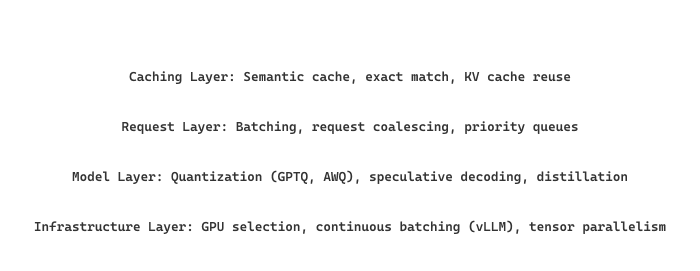
Latency optimization works like diagnosing low water pressure in a building. The problem could be at the municipal supply (infrastructure layer), the building's main pipe (model layer), the floor's distribution system (request layer), or a clogged faucet aerator (caching layer). You diagnose from the top down, fix the tightest bottleneck first, and measure again. Adding a bigger pipe at the building level does nothing if the faucet is clogged. Unlike plumbing, however, LLM latency has two distinct "flows" (TTFT and ITL) that require separate diagnosis.
Rate Limiting with Token Buckets
Input: capacity C, refill rate R (tokens/sec), request cost cost
Output: allow or reject

1. Initialize tokens = C, last_time = now()
2. on each request:
  a. elapsed = now() − last_time
  b. tokens = min(C, tokens + elapsed × R) // refill
  c. last_time = now()
  d. if tokens ≥ cost:
  tokens = tokens − cost
  return ALLOW
  e. else:
  return REJECT // or enqueue with backpressure
import time
from dataclasses import dataclass, field
@dataclass
class TokenBucket:
    """Token bucket rate limiter for LLM API requests."""
    capacity: float # max tokens in bucket
    refill_rate: float # tokens added per second
    tokens: float = field(init=False)
    last_refill: float = field(init=False)
    def __post_init__(self):
        self.tokens = self.capacity
        self.last_refill = time.monotonic()
    def consume(self, cost: float = 1.0) -> bool:
        now = time.monotonic()
        elapsed = now - self.last_refill
        self.tokens = min(self.capacity, self.tokens + elapsed * self.refill_rate)
        self.last_refill = now
        if self.tokens >= cost:
            self.tokens -= cost
            return True
            return False
            # Allow 10 requests/sec, burst up to 50
            limiter = TokenBucket(capacity=50, refill_rate=10)
            for i in range(5):
                allowed = limiter.consume()
                print(f"Request {i}: {'allowed' if allowed else 'rate-limited'}")
Configure a bucket with capacity C = 50 tokens and refill rate R = 10 tokens/sec. A burst of 50 requests arrives instantly, each costing 1 token. The first 50 requests all succeed (draining the bucket to 0). The 51st request, arriving 0.1 seconds later, finds only 10 × 0.1 = 1 token refilled, so it succeeds. The 52nd request at 0.1 seconds has 0 tokens remaining and is rejected. After a 5-second quiet period, the bucket refills to min(50, 0 + 10 × 5) = 50 tokens, ready for the next burst. This pattern allows occasional traffic spikes while enforcing a sustained rate of 10 requests per second.
For high-throughput self-hosted model serving, vLLM provides continuous batching and PagedAttention that maximize GPU utilization with minimal configuration.
Serve any Hugging Face model as an OpenAI-compatible API with vLLM (pip install vllm) in 3 lines:
Show code
from vllm import LLM, SamplingParams
llm = LLM(model="meta-llama/Llama-3.1-8B-Instruct", tensor_parallel_size=1)
outputs = llm.generate(["Explain rate limiting in one paragraph."],
    SamplingParams(temperature=0.7, max_tokens=256))
print(outputs[0].outputs[0].text)vLLM.For production deployment, run vllm serve meta-llama/Llama-3.1-8B-Instruct from the command line to get an OpenAI-compatible HTTP endpoint with continuous batching enabled by default.
Prompt injection attacks, where users trick an LLM into ignoring its system prompt, were discovered almost immediately after ChatGPT launched. The first widely shared attack was simply asking the model to "ignore all previous instructions." Despite years of research, no model is fully immune to sophisticated prompt injection, making defense-in-depth the only reliable strategy.
LLM latency is dominated by generation, not computation. A typical web API responds in 10 to 50 milliseconds. An LLM generating 500 tokens at 50 tokens per second takes 10 seconds. This 100x to 1000x latency difference changes everything about system architecture. You cannot hide this latency behind load balancers; you must manage it with streaming (showing tokens as they arrive), caching (avoiding redundant generation), and smart routing (sending simple queries to small, fast models). The inference optimization techniques from Chapter 9 operate at the model layer; this section addresses the system layer that surrounds the model.
62.1.2 Backpressure and Queue Management
Backpressure is a mechanism where an overloaded system signals upstream callers to slow down or shed load, preventing cascading failures. In LLM serving, GPU inference has hard capacity limits; without backpressure, unbounded request queues can cause out-of-memory errors and extreme latency.
# Define BackpressureQueue; implement __init__, utilization, health_status
import asyncio
from collections import deque

class BackpressureQueue:
    """Bounded async queue with backpressure signaling."""
    def __init__(self, max_size: int = 100, warn_threshold: float = 0.8):
        self.queue = asyncio.Queue(maxsize=max_size)
        self.max_size = max_size
        self.warn_threshold = warn_threshold
        self.rejected = 0

    @property
    def utilization(self) -> float:
        return self.queue.qsize() / self.max_size

    async def enqueue(self, item, timeout: float = 5.0):
        try:
            await asyncio.wait_for(
                self.queue.put(item), timeout=timeout
            )
            return {"status": "queued", "position": self.queue.qsize()}
        except asyncio.TimeoutError:
            self.rejected += 1
            return {"status": "rejected", "reason": "queue_full"}

    def health_status(self):
        util = self.utilization
        if util > self.warn_threshold:
            return "degraded"
        return "healthy"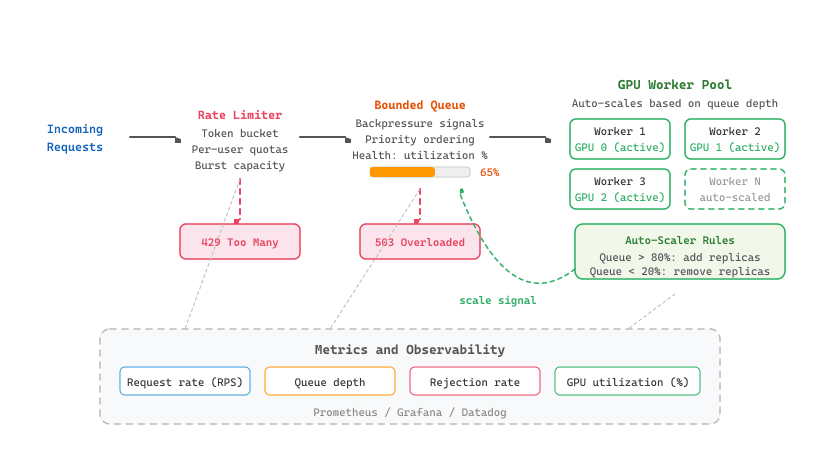
Expose LLM serving metrics (request latency, token counts) for Prometheus scraping.
Show code
# pip install prometheus-client
from prometheus_client import Histogram, Counter, start_http_server
llm_latency = Histogram(
    "llm_request_seconds", "LLM request latency",
    buckets=[0.5, 1, 2, 5, 10, 30],
    )
llm_tokens = Histogram(
    "llm_tokens_total", "Tokens per request",
    labelnames=["direction"], # "prompt" or "completion"
    buckets=[100, 500, 1000, 2000, 4000],
    )
llm_errors = Counter("llm_errors_total", "LLM call errors", ["error_type"])
# Start metrics endpoint on port 9090
start_http_server(9090)
# Instrument your LLM calls
with llm_latency.time():
    # response = call_llm(prompt)
    pass
    llm_tokens.labels(direction="prompt").observe(580)
    llm_tokens.labels(direction="completion").observe(120)
62.1.3 Production Guardrails
| Guardrail System | Type | Checks | Latency |
|---|---|---|---|
| NeMo Guardrails | Programmable rails | Input/output, topic control, fact-checking | 50-200ms |
| Guardrails AI | Validator framework | Schema validation, PII, toxicity, hallucination | 20-100ms |
| Lakera Guard | API service | Prompt injection, PII, toxicity, relevance | 10-50ms |
| Llama Guard 3/4 | Safety classifier | Unsafe content categories (S1-S14) | 100-300ms |
| Prompt Guard | Injection detector | Direct/indirect prompt injection | 5-20ms |
| ShieldGemma | Safety classifier | Dangerous content, harassment, sexual content | 50-150ms |
Layer your guardrails by latency budget. Put the fastest check first: Prompt Guard (5 to 20 ms) catches injection attempts before slower validators even run. If a request fails the fast check, you skip the expensive ones entirely. This "fail fast" pattern keeps median guardrail overhead under 30 ms for most traffic while still running comprehensive checks on inputs that pass the initial screen.
NeMo Guardrails Configuration
# config.yml for NeMo Guardrails
models:
- type: main
engine: openai
model: gpt-4o-mini
rails:
input:
flows:
- self check input # Block harmful prompts
- check jailbreak # Detect jailbreak attempts
output:
flows:
- self check output # Filter harmful outputs
- check hallucination # Verify factual claims
# Colang rails definition
define user ask about competitors
"What do you think about [competitor]?"
"Compare yourself to [competitor]"
define flow
user ask about competitors
bot refuse to discuss competitors
"I'm not able to provide comparisons with other products."Use Guardrails AI validators to enforce output structure and content policies on LLM responses.
Show code
# pip install guardrails-ai
from guardrails import Guard
from guardrails.hub import ToxicLanguage, DetectPII
guard = Guard().use_many(
    ToxicLanguage(on_fail="fix"),
    DetectPII(pii_entities=["EMAIL_ADDRESS", "PHONE_NUMBER"], on_fail="fix"),
)
raw_output = "Contact john@example.com or call 555-0123 for help."
result = guard.validate(raw_output)
print(f"Validated: {result.validated_output}")
print(f"Passed: {result.validation_passed}")Llama Guard for Content Safety
This snippet uses Llama Guard to classify user inputs and model outputs for content safety violations.
# implement check_safety
from transformers import AutoModelForCausalLM, AutoTokenizer
import torch
def check_safety(conversation: list[dict], model_name="meta-llama/Llama-Guard-3-8B"):
    """Classify conversation safety using Llama Guard 3."""
    tokenizer = AutoTokenizer.from_pretrained(model_name)
    model = AutoModelForCausalLM.from_pretrained(
        model_name, torch_dtype=torch.bfloat16, device_map="auto"
        )
    chat = tokenizer.apply_chat_template(conversation, tokenize=False)
    inputs = tokenizer(chat, return_tensors="pt").to(model.device)
    with torch.no_grad():
        output = model.generate(**inputs, max_new_tokens=100, pad_token_id=0)
        result = tokenizer.decode(output[0][inputs["input_ids"].shape[1]:])
        is_safe = "safe" in result.lower()
        return {"safe": is_safe, "raw_output": result.strip()}

# Example usage
convo = [
    {"role": "user", "content": "How do I make a simple pasta recipe?"}
    ]
print(check_safety(convo))The diagram below shows the complete guardrail pipeline, with input rails filtering requests before they reach the LLM and output rails validating responses before they reach the user.
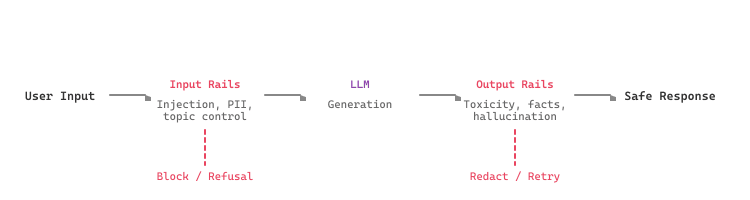
Guardrails add latency to every request. Profile your guardrail stack and set a latency budget. Lightweight checks (regex, blocklist, Prompt Guard at 5-20ms) should run first; expensive classifiers (Llama Guard at 100-300ms) should run only when cheaper checks pass. Parallelize independent checks where possible.
Llama Guard 3 classifies content across 14 safety categories (S1 through S14), including violent crimes, self-harm, sexual content, and privacy violations. Llama Guard 4 extends this with multimodal support for image inputs. Both models can be fine-tuned on custom safety taxonomies for domain-specific needs.
The most effective guardrail strategy combines multiple layers: fast, cheap filters for obvious violations, followed by ML classifiers for nuanced content, and finally output validators for factual accuracy. No single guardrail system catches everything, and defense in depth is the only reliable approach.
62.1.4 Production Memory Patterns
Conversational applications that persist memory across sessions face engineering challenges that go well beyond the memory architectures discussed in Section 37.3. In production, memory is not just a design pattern; it is infrastructure that must be provisioned, monitored, garbage-collected, and budgeted like any other stateful resource.
62.1.4.1 Memory Persistence Strategies
The choice of persistence backend depends on access patterns and latency requirements. Redis or Memcached stores provide sub-millisecond reads for session-level memory (recent turns, active preferences) but offer limited durability without careful configuration. Relational databases (PostgreSQL, MySQL) store structured user profiles and key-value facts with ACID guarantees, making them the right choice for preference data that must survive restarts. Vector databases (Pinecone, Weaviate, Qdrant) handle semantic memory, storing embedded conversation snippets for similarity retrieval as described in Section 31.1. Most production systems use all three tiers together: Redis for hot session state, a relational store for structured facts, and a vector store for long-term semantic retrieval.
62.1.4.2 Memory Scopes
Production memory systems must distinguish between three scopes. Session memory holds the current conversation and is discarded (or archived) when the session ends. User memory persists across sessions for a single user, storing preferences, past decisions, and interaction history. Global memory captures knowledge shared across all users, such as product catalog updates, policy changes, or frequently asked questions. Each scope has different retention policies, access controls, and storage costs. A common mistake is treating all memory as session-scoped, which forces users to repeat themselves every time they start a new conversation.
62.1.4.3 Garbage Collection and TTL Policies
Memory stores grow without bound unless actively managed. Time-to-live (TTL) policies automatically expire stale entries: session memory might have a TTL of 24 hours, while user preferences persist for 90 days since last access. Beyond simple TTL, production systems implement importance-weighted garbage collection that scores each memory entry by recency, access frequency, and explicit user signals (pinned memories are never evicted). The consolidation pipeline from Section 37.3 provides the algorithmic foundation; production deployment adds monitoring, alerting on memory store size, and scheduled batch jobs that run during off-peak hours.
62.1.4.4 Memory Compression for Long-Running Conversations
Long-running conversations (customer support threads spanning days, ongoing project discussions) accumulate thousands of turns that cannot fit in any context window. The production solution is hierarchical compression: recent turns are stored verbatim, turns from the last few hours are summarized into paragraph-level digests, and older content is compressed into key-fact bullet points. The decision of when to summarize versus store verbatim is fundamentally a cost optimization problem. Verbatim storage preserves nuance but consumes tokens at retrieval time; summarization is lossy but cheaper to inject into the context window. A practical heuristic: summarize when the verbatim text exceeds 500 tokens and the information density (measured by the ratio of unique entities or decisions to total tokens) drops below a threshold.
62.1.4.5 Cost Management
Memory-related costs appear in three places: storage costs for persisting conversation data and embeddings, compute costs for generating summaries and embeddings, and inference costs for injecting retrieved memory into the LLM context window (every token of memory context is a token you pay for). Teams that store every conversation turn verbatim and retrieve generously often discover that memory context accounts for 30 to 50 percent of their total token spend. Cost-conscious architectures use a small, cheap model (GPT-4o-mini, Haiku) for summarization and embedding, reserving the expensive model for the final response generation. They also cap the number of retrieved memory entries per request and monitor the memory-to-response token ratio as a key cost metric.
The memory patterns described here apply to any stateful LLM application, not just chatbots. RAG pipelines with user-specific context (Chapter 32), agent systems with episodic memory (Section 26.1), and multi-session workflows all benefit from the same persistence, scoping, and garbage collection strategies.
Who: An ML engineering team at a digital health company
Situation: The team launched a patient-facing symptom checker powered by GPT-4o, receiving 15,000 queries per day.
Problem: Within the first week, the chatbot provided a response that could be interpreted as a specific diagnosis, violating medical device regulations. The team needed guardrails without sacrificing the sub-2-second response time users expected.
Dilemma: Running Llama Guard on every request added 200ms of latency and required a dedicated GPU. Skipping it risked another harmful output reaching patients.
Decision: They implemented a tiered guardrail pipeline: fast regex checks first (5ms), then Prompt Guard for injection detection (15ms), and Llama Guard only when cheaper checks passed (200ms). Checks ran in parallel where possible.
How: The regex layer caught obvious medical advice patterns ("you should take," "your diagnosis is"). Prompt Guard blocked injection attempts. Llama Guard classified the remaining 70% of requests for safety categories S1 through S14.
Result: Total guardrail latency averaged 85ms (down from 220ms with sequential processing). Zero harmful medical advice incidents occurred in the following six months.
Lesson: Order guardrails from cheapest to most expensive, parallelize independent checks, and accept that safety latency is a non-negotiable cost of production deployment.
If your RAG system indexes documents that rarely change, pre-compute and cache their embeddings. Re-embedding the same documents on every deployment wastes compute and can introduce subtle inconsistencies if the embedding model is updated.
Open Questions:
- How should production guardrails balance safety with user experience? Overly aggressive content filtering creates false positives that frustrate legitimate users, while permissive filters risk harmful outputs.
- Can model routing (dynamically selecting the cheapest model that can handle each request) reduce costs without degrading quality? The research on input complexity estimation for routing is still early.
Recent Developments (2024-2025):
- Semantic caching for LLM applications (2024-2025) showed that embedding-based similarity detection can serve cached responses for semantically equivalent queries, reducing costs by 20-40% in some deployments.
- Guardrails frameworks like Guardrails AI, NeMo Guardrails, and Lakera Guard (2024-2025) provided configurable safety layers that can be inserted between the user and the model without modifying the application.
Explore Further: Implement semantic caching (using embeddings to detect similar queries) for an LLM application. Measure cache hit rates and evaluate whether cached responses maintain acceptable quality across 200 queries.
Objective
Build a FastAPI service that fronts two upstream LLM endpoints (real or mocked), enforces per-request timeouts, retries idempotent calls with bounded attempts, opens a circuit breaker after repeated failures, and propagates a request-id header end-to-end through every log line. By the end, you should be able to chaos-test the router by killing one upstream and watch traffic shed cleanly to the survivor.
Setup
You need Python 3.11+ and FastAPI. Use httpx for async upstreams and tenacity for retry primitives. The two upstreams can be real (OpenAI + Anthropic) or local FastAPI stubs that occasionally fail; the stubs are easier for a controlled chaos test.
pip install fastapi httpx tenacity uvicorn structlog purgatorySteps
- Stand up two mock upstreams: Write a tiny FastAPI app that returns a fake completion with configurable error rate and latency. Run two instances on ports 8001 and 8002 with different error profiles.
- Build the router with timeout and retry: Write
/v1/chatthat calls the primary upstream viahttpx.AsyncClient(timeout=10.0), wrapped intenacity.retry(stop_after_attempt(3), wait_exponential_jitter(initial=0.5, max=4)). - Add the circuit breaker: Use the
purgatorylibrary (or write your own three-state state machine). After 5 consecutive failures on the primary, the breaker opens and traffic routes to the secondary for 30 seconds, then a half-open probe runs. - Propagate request-id: Add a FastAPI middleware that reads
X-Request-ID(or generates a UUID if missing) and binds it tostructlog.contextvars. Every log line in the request, including upstream client logs, must include it. - Chaos-test: Use
hey -z 60s -c 50 http://localhost:8000/v1/chatto drive 50 concurrent users for 60 seconds. Mid-test, kill one upstream. Confirm that latency p99 stays under 2x baseline and zero requests fail with 5xx.
Expected Output
Logs trace each request through the router with a single shared request-id. When the primary dies, you should see "breaker opened" warning, traffic shift to secondary, and a successful half-open probe ~30 seconds later. Error rate stays below 1% throughout.
Extension
Add weighted round-robin between healthy upstreams (90/10 canary split) and verify the split is honored across 10k requests.
- Optimize LLM latency at four layers: caching, request batching, model quantization, and infrastructure (GPU selection, continuous batching).
- Implement rate limiting with token buckets and backpressure with bounded queues to protect GPU resources from overload.
- Deploy guardrails as a pipeline: fast input filters first, then ML classifiers, then output validators.
- NeMo Guardrails provides programmable conversation control; Llama Guard and ShieldGemma provide ML-based content safety classification.
- No single guardrail catches everything; defense in depth with multiple complementary systems is essential for production safety.
- Profile guardrail latency and set a budget; parallelize independent checks and order them from cheapest to most expensive.
Guardrails protect individual requests; the next challenge is improving the system over time. Section 45.4 covers the LLMOps practices (prompt versioning, A/B testing, data flywheels) that drive continuous improvement.
1. What are the two components of LLM latency, and which one is more important for user experience?
Show Answer
2. How does a token bucket rate limiter handle burst traffic?
Show Answer
3. What is the difference between NeMo Guardrails and Llama Guard?
Show Answer
4. Why should input guardrails run before expensive LLM generation?
Show Answer
5. What is backpressure, and why is it important for LLM serving?
Show Answer
Exercises
Distinguish between time-to-first-token (TTFT) and inter-token latency (ITL). Which matters more for user experience and why? Name one optimization technique that targets each.
Answer Sketch
TTFT is the delay before the first token appears; ITL is the delay between subsequent tokens. TTFT affects perceived responsiveness (users may think the system is broken if nothing appears for 3 seconds). ITL affects reading experience (stuttering output feels broken). For TTFT: use streaming to show tokens immediately. For ITL: use KV cache to avoid recomputing attention for previous tokens. Both matter, but TTFT has a higher impact on user satisfaction because first impressions determine whether users wait for the full response.
Design a two-tier caching strategy for an LLM application: exact match cache (same prompt returns cached response) and semantic cache (similar prompts return cached responses). Explain the tradeoffs and write the lookup logic.
Answer Sketch
Tier 1 (exact match): hash the full prompt and check a key-value store (Redis). If hit, return immediately. Tier 2 (semantic): embed the prompt and search a vector store for similar cached prompts. If cosine similarity exceeds a threshold (e.g., 0.95), return the cached response. Tradeoffs: exact match has zero false positives but low hit rate. Semantic cache has higher hit rate but risks returning responses to subtly different questions. Use a high similarity threshold to minimize incorrect matches. Invalidate caches when the model or system prompt changes.
Describe four types of input guardrails for a production LLM application: content moderation, PII detection, prompt injection detection, and token limit enforcement. For each, explain the implementation approach and what happens when a guardrail triggers.
Answer Sketch
(1) Content moderation: classify input for harmful content using a lightweight model (or OpenAI's moderation endpoint). Block and return a safe message. (2) PII detection: use regex patterns or NER to detect names, emails, phone numbers. Mask PII before forwarding to the LLM. (3) Prompt injection detection: use a classifier trained on injection examples to score the input. Block inputs above the threshold. (4) Token limit: count tokens using the tokenizer and reject inputs that exceed the context window minus the reserved output length. Each guardrail runs before the LLM call to save cost and prevent misuse.
An LLM customer support bot occasionally generates responses that promise unauthorized discounts. Design an output guardrail pipeline that catches and corrects this behavior. Include both rule-based and model-based approaches.
Answer Sketch
Layer 1 (rule-based): regex patterns that detect discount-related phrases ("% off," "discount code," "free upgrade"). Flag responses containing these patterns. Layer 2 (model-based): a lightweight classifier that scores whether the response makes unauthorized commitments. Trained on examples of compliant and non-compliant responses. Layer 3 (correction): if flagged, either (a) regenerate with a stronger instruction or (b) route to a human agent. Log all flagged responses for review. Set the guardrail to block rather than log-only for high-risk actions like financial commitments.
Design a load test for an LLM API endpoint that measures TTFT, ITL, total latency, throughput, and error rate under increasing concurrency (10, 50, 100, 200 concurrent users). What tool would you use and what would the success criteria be?
Answer Sketch
Use Locust or k6 with custom timing for TTFT (time until first SSE event) and ITL (time between events). Ramp concurrency in stages. Success criteria: TTFT p95 under 2 seconds, ITL p95 under 100ms, error rate under 1%, throughput scales linearly up to the target concurrency. If TTFT degrades sharply at a certain concurrency level, that indicates the need for more replicas or request queuing. Log all metrics per request for analysis.
What Comes Next
In the next section, Section 62.2: LLMOps & Continuous Improvement, we examine LLMOps and continuous improvement, the operational practices for maintaining and evolving deployed models.
For the inference-side throughput and latency techniques (paged KV cache, speculative decoding, quantization) that production guardrails depend on, see Section 9.1: Inference Optimization. For the distributed training systems and capacity planning that govern training-side production guardrails, see Section 57.1: LLM Compute Planning and Infrastructure. For the SLO-and-registry side of production reliability, see Section 66.1: Reliability, SLOs, and the Model Registry.